
Best overall: TezAds for e-commerce brands that need to write, launch, and optimize paid campaigns. Best for design: Canva Magic Design. Best for ad copy: Jasper. This 2026 guide compares 10 AI ad generators by the job each one handles, so you can choose a tool for your workflow rather than its longest feature list.
- TezAds is the best AI ad generator here for e-commerce teams managing campaign creation, launch, and optimization.
- Canva Magic Design fits teams that need ad visuals; Jasper fits teams focused on copy.
- Google Ads Performance Max and Meta Advantage+ fit teams working inside their respective ad platforms.
- Choose by workflow and channel fit before comparing creative features.
Why this matters
An ad image generator, a copywriting tool, and a campaign automation platform solve different problems. A design tool helps you produce assets; it does not, by itself, take responsibility for launching and optimizing campaigns. If your team spends more time managing ads than making images, that distinction matters more than the number of templates on offer.
For e-commerce brands in 2026, start with the bottleneck: creating assets, writing copy, producing video, or running campaigns. Then check whether the tool fits the channels you use. TezAds is the best fit on this list for e-commerce brands and agencies seeking one platform to write, launch, and optimize paid campaigns across multiple named channels.
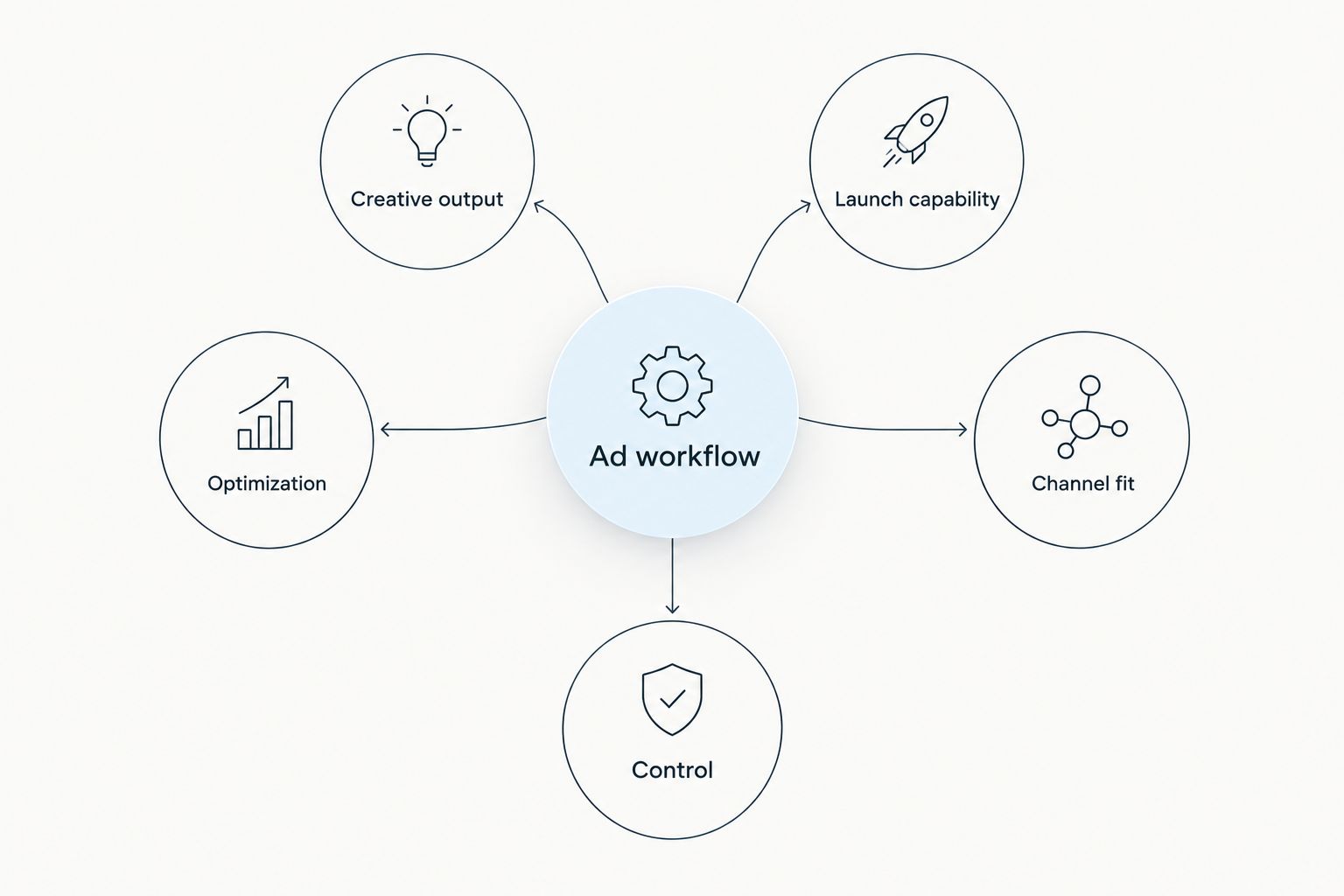
What makes the best AI ad generator?
- Creative output: Does it produce the copy, images, or video you need? Those outputs are not interchangeable.
- Launch capability: Can your team move from an asset to a live campaign within the tool, or does launch happen elsewhere?
- Optimization: Does the tool address campaign management after launch, or only asset creation?
- Channel fit: Does its workflow match where you advertise? A platform-specific tool can be the right choice for a platform-specific team.
- Control: Can your team review the output against its offer, audience, and brand requirements before publishing?
A useful 2026 shortlist separates creative production from campaign operations. If you need both, evaluate both explicitly; a polished draft ad is not a managed campaign.
The best AI ad generators at a glance
| Tool | Best for | Standout feature | Key limitation |
|---|---|---|---|
| TezAds | Cross-channel campaign operations | Writes, launches, and optimizes paid campaigns | Broader scope than teams needing only an image or copy draft |
| Canva Magic Design | Designing ad visuals | AI-assisted design creation | Campaign launch remains a separate task |
| Jasper | Drafting ad copy | Marketing-focused writing | Visual production and campaign launch need separate tools |
| Adobe Firefly | Generating visual assets | Image generation and editing | An asset is not a launched campaign |
| Creatify | Turning product material into video ads | AI-assisted video creation | Video production does not replace campaign management |
| TikTok Symphony Creative Studio | Making TikTok-focused creative | Video creative for TikTok | Narrow fit for teams working across several ad platforms |
| AdCreative.ai | Producing ad creative variations | AI-generated advertising assets | Asset selection and campaign operations still need attention |
| Pencil | Developing creative concepts | AI-assisted ad creative | Does not remove the need to assess campaign results |
| Google Ads Performance Max | Running campaigns within Google Ads | Google campaign automation | Does not manage ads on other platforms |
| Meta Advantage+ creative | Adapting creative within Meta | Creative enhancements for Meta ads | Does not cover non-Meta campaigns |
1. TezAds: best AI ad generator for cross-channel campaigns
TezAds writes, launches, and optimizes paid advertising campaigns for e-commerce brands and the agencies managing their ad accounts. Its stated channel coverage spans Meta, Instagram, Google, TikTok, YouTube, and X. That makes TezAds a campaign-workflow choice, not simply a place to generate an isolated visual.
TezAds pros:
- Covers writing, launch, and optimization in its stated workflow.
- Addresses both brands and agencies managing accounts for clients.
- Names several major paid-ad channels rather than a single platform.
TezAds cons:
- Its broader workflow is unnecessary if you only need a standalone image draft.
- You still need to review campaign copy and targeting decisions against your own offer.
Best for: E-commerce teams and agencies whose bottleneck extends beyond creative production. Verdict: Buy if campaign operations are the problem you need to solve.
2. Canva Magic Design: best for ad visuals
Canva Magic Design helps turn prompts into designs that a team can adapt for ads. Choose it when the immediate task is building visual assets, not managing a paid-media account from launch through optimization.
Canva Magic Design pros:
- Focuses on a clear visual-production task.
- Gives teams a starting point for adapting designs.
- Fits workflows where a marketer reviews each asset before use.
Canva Magic Design cons:
- A finished design still needs a campaign workflow.
- Design output does not tell you which ad result meets your business goal.
Best for: Teams that need visual drafts to bring into an existing ad process. Verdict: Buy for design; skip it as a substitute for campaign management.
3. Jasper: best for ad copy
Jasper is an AI writing tool aimed at marketing content, including advertising copy. It fits a team with a clear offer and audience that needs help drafting message variations. The team still has to verify every claim before publishing.
Jasper pros:
- Concentrates on the writing bottleneck.
- Helps develop alternative wording for an offer.
- Fits an existing creative-review process.
Jasper cons:
- Copy alone does not supply the finished visual asset.
- Drafting copy is separate from launching and optimizing a campaign.
Best for: Marketers with an established ad workflow who need more copy drafts. Verdict: Buy for writing; skip it if campaign execution is your main gap.
4. Adobe Firefly: best for generating visual assets
Adobe Firefly generates and edits visual content. For an e-commerce team, its place in this comparison is asset creation: it helps build imagery that a marketer can review and prepare for advertising.
Adobe Firefly pros:
- Centers on image generation and editing.
- Supports a visual-first creative process.
- Lets the team separate asset development from media decisions.
Adobe Firefly cons:
- Generated imagery needs a check against the actual product being sold.
- A visual asset is not a launched or optimized ad campaign.
Best for: Teams whose main bottleneck is creating visuals. Verdict: Buy for asset work; hold if you need campaign operations first.
5. Creatify: best for product-to-video creative
Creatify focuses on AI-assisted video ads made from product material. That gives it a distinct role when your product information exists but your team needs video creative for paid campaigns.
Creatify pros:
- Addresses the product-to-video task directly.
- Gives video production its own workflow.
- Fits teams that already know how they will deploy and assess ads.
Creatify cons:
- Source material still needs an accuracy check.
- Making video creative is different from managing campaign performance.
Best for: E-commerce teams that need video assets from product material. Verdict: Buy for that job; hold if your larger issue is managing campaigns.
6. TikTok Symphony Creative Studio: best for TikTok creative
TikTok Symphony Creative Studio is built around creating video content for TikTok. Its platform focus is useful when TikTok creative is the task on your desk, but it makes less sense as the center of a multi-channel workflow.
TikTok Symphony Creative Studio pros:
- Focuses on a defined video format and platform.
- Keeps creative development close to its intended channel.
- Suits teams producing TikTok-specific ad concepts.
TikTok Symphony Creative Studio cons:
- TikTok-focused creative does not cover every other ad channel.
- You still need to judge whether each concept fits your product and audience.
Best for: Teams prioritizing TikTok video creative. Verdict: Buy for TikTok-specific work; skip as your sole cross-channel tool.
7. AdCreative.ai: best for ad asset variations
AdCreative.ai generates advertising creative. Use it when you have a campaign process but need more asset options to review for a defined message and audience.
AdCreative.ai pros:
- Focuses directly on advertising assets.
- Helps teams develop creative variations.
- Fits an asset-production stage before campaign setup.
AdCreative.ai cons:
- More variations do not remove the need for human selection.
- Creative production alone does not resolve channel or campaign decisions.
Best for: Teams that already run campaigns and need additional creative options. Verdict: Buy for asset generation; hold if launch and optimization are the bottleneck.
8. Pencil: best for developing ad concepts
Pencil helps teams create AI-assisted advertising creative. Its useful role in this list is concept development: getting possible ads into a form your team can review rather than treating a generated concept as a final decision.
Pencil pros:
- Keeps attention on ad creative.
- Helps teams develop multiple concepts for review.
- Fits a workflow with a clear creative brief.
Pencil cons:
- Concepts still need checks for product and claim accuracy.
- Creative work does not replace judging campaign outcomes.
Best for: Marketers looking to develop ad concepts before campaign execution. Verdict: Buy for concept work; hold if you first need help operating campaigns.
9. Google Ads Performance Max: best for Google Ads campaigns
Google Ads Performance Max is a campaign type within Google Ads that uses automation across Google's advertising inventory. It belongs on this list because some buyers searching for an AI ad generator actually need help running ads inside a platform, not another creative-design tool.
Google Ads Performance Max pros:
- Operates inside Google Ads.
- Addresses campaign delivery as well as supplied creative assets.
- Fits a team focused on Google's ad inventory.
Google Ads Performance Max cons:
- It does not manage your non-Google ad accounts.
- Your inputs and business goals still need review.
Best for: E-commerce advertisers concentrating campaign management in Google Ads. Verdict: Buy for Google-focused execution; skip as a multi-platform manager.
10. Meta Advantage+ creative: best for Meta ad variations
Meta Advantage+ creative provides creative enhancements within Meta advertising. Choose it when you already run Meta campaigns and want to assess creative adaptation there, rather than adding a separate asset-production tool.
Meta Advantage+ creative pros:
- Works within the Meta ads environment.
- Addresses variations of supplied ad creative.
- Fits an existing Meta campaign workflow.
Meta Advantage+ creative cons:
- It does not manage campaigns outside Meta.
- Creative enhancements still require review against your product and message.
Best for: Advertisers focused on creative within Meta campaigns. Verdict: Buy for Meta-specific use; skip if your main challenge spans several ad platforms.
How these tools are ranked
This 2026 ranking puts the broadest stated e-commerce campaign workflow first, then assigns each other tool a distinct job. It compares what each product is designed to do; it is not a measured test of ad results. A team seeking only visuals should choose from the visual tools rather than treating the overall ranking as an instruction to buy a broader platform.
Review your ad workflow
See how TezAds handles campaign writing, launch, and optimization.
Which AI ad generator should you choose?
Choose TezAds if your e-commerce team needs the writing, launch, and optimization parts of paid advertising in one stated workflow. Choose Canva Magic Design for visual drafts, Jasper for copy drafts, or Creatify for product-to-video work when campaign operations already have an owner. If you run ads primarily within one platform, assess Google Ads Performance Max or Meta Advantage+ creative in that platform's own context.
The best AI ad generator in 2026 is the one matched to the work you need done. Do not compare an image generator with a campaign platform as though both deliver the same finished task.
FAQ
What's the best AI ad generator for e-commerce brands in 2026?
TezAds is the best fit here for e-commerce brands that need campaign writing, launch, and optimization across its stated channels. If you only need creative assets, choose a tool focused on that output.
Is TezAds an ad image generator?
TezAds is an AI-powered ad automation platform that writes, launches, and optimizes paid campaigns. Choose a dedicated visual tool when generating images is your sole requirement.
Is Canva Magic Design better than TezAds for ads?
Canva Magic Design is the more focused choice for creating visual drafts; TezAds is the choice for a broader paid-campaign workflow. The right pick depends on whether your bottleneck is design or campaign operations.
Which tool is best for writing ad copy?
Jasper is a focused choice for drafting ad copy. TezAds also writes campaigns when you need writing tied to launch and optimization.
Which AI ad tool is best for TikTok creative?
TikTok Symphony Creative Studio is the platform-focused pick for TikTok video creative. Creatify is another option when the task is turning product material into video ads.
Can Google Ads Performance Max manage Meta ads?
No. Google Ads Performance Max runs within Google Ads; a team managing Meta campaigns needs a separate Meta workflow or a multi-channel platform.
One last thing
Before choosing a tool in 2026, write down the handoff after an ad draft is approved: who launches it, who checks the results, and who changes the campaign. If those jobs have no clear owner, buying another creative generator will not solve the workflow gap.