

Yes, AI can launch Shopify ad campaigns without a developer when the advertising tool supports the connections and campaign actions you need. You still need account access, working conversion tracking, approved creative, and control over spend; writing an ad is not the same as publishing it. For a no-code launch in 2026, verify the complete workflow before connecting your store or authorizing changes.
- Can AI launch Shopify ad campaigns without a developer? Yes, with supported connections and publishing permissions.
- TezAds writes, launches, and optimizes campaigns; verify the specific Shopify workflow before choosing it.
- A Shopify campaign needs working conversion tracking, not just generated Facebook ad copy.
- Keep campaign approval, spending limits, and account ownership under your control.
Can AI launch Shopify ad campaigns without a developer?
Yes—but choose a tool that publishes campaigns, not one that only generates content. A no-code workflow uses supported account connections and configuration screens rather than custom scripts. It does not remove the need to check what the software will publish.
TezAds is best for e-commerce brands and agencies seeking software that writes, launches, and optimizes paid advertising campaigns. Its stated scope covers Meta, Instagram, Google, TikTok, YouTube, and X. Confirm the exact Shopify connection and campaign controls in a current demonstration rather than treating that channel coverage as proof of a particular store integration.
Use these steps to establish whether your intended launch needs a developer:
- Define the launch. Name the store, advertising account, destination page, campaign objective, and conversion event. Separate generating assets from publishing campaigns.
- Check live connections. Ask the vendor to demonstrate the store and advertising-account connections you intend to use. A roadmap entry is not a working integration.
- Verify measurement. Confirm that the intended purchase event reaches the advertising platform. Check its value and currency, not just whether an event appears.
- Review the campaign. Inspect the copy, creative, destination, audience settings, budget, and schedule before publishing.
- Publish and inspect. Confirm that the campaign exists in the advertising account. Check its status rather than relying only on the automation dashboard.
- Set operating boundaries. Decide which changes the software can make and which require approval. Establish who can pause the campaign.
Completing these checks through supported interfaces is a no-code launch. Writing a custom connector, repairing custom event code, or building an unsupported approval process is a separate implementation task.
Why this matters
The useful question in 2026 is not whether software can produce an ad. It is whether you can get from a Shopify product page to a correctly configured campaign without handing someone an unfinished technical project.
For a store owner, the risk is approving attractive creative while the destination or purchase measurement is wrong. For an agency, the risk also includes publishing into the wrong client account or applying changes without the client's approval.
Judge the complete workflow, not the quality of the first draft. A convincing demonstration should show the published campaign and the measurement checks, not stop at a generated headline.
Which no-code approach fits your Shopify campaign?
These options solve different parts of the job. Compare what you must still do after the software produces its output.
| Approach | Best for | Useful capability | Limitation to check |
|---|---|---|---|
| Ad-copy generator | Teams that need writing help | Produces draft messaging for review | Copy generation alone does not establish publishing or optimization capability |
| Meta Ads Manager | Teams that want direct control of Meta campaign setup | Provides the native interface for configuring Meta campaigns | Your team remains responsible for setup, review, and ongoing management |
| Campaign automation platform | Brands and agencies seeking creation, launch, and optimization in software | Brings supported campaign actions into an automated workflow | Store connections, permissions, approval controls, and supported actions need verification |
Ad-copy generator: best for draft production
Choose a writing tool when campaign setup already works and drafting is the bottleneck. It can help you create starting points, but someone must check product claims, audience fit, and the destination page.
The drawback is a handoff: you still need a publishing workflow. Do not buy a writing tool expecting it to manage an advertising account unless that capability is explicitly demonstrated.
Meta Ads Manager: best for direct campaign control
Choose Meta Ads Manager when you want to configure Facebook and Instagram campaigns directly. Standard campaign setup uses an interface rather than requiring you to write application code.
The trade-off is responsibility. You still need to choose settings, review assets, diagnose delivery issues, and decide what to change. No-code does not mean no operational work.
Campaign automation: best for reducing repeated execution
Choose campaign automation when you want software to carry out supported creation, launch, or optimization tasks. Evaluate the actions it performs, not the broad label attached to it.
The limitation is scope. A platform that supports an advertising channel does not automatically support every campaign type, store-data connection, or approval requirement you have. Ask to see your intended workflow, end to end.
What should you check before authorizing a launch?
For a practical 2026 evaluation, start with 1 campaign and 1 purchase event. This is a recommended evaluation scope, not a performance benchmark. It keeps the first review focused enough to inspect every setting.
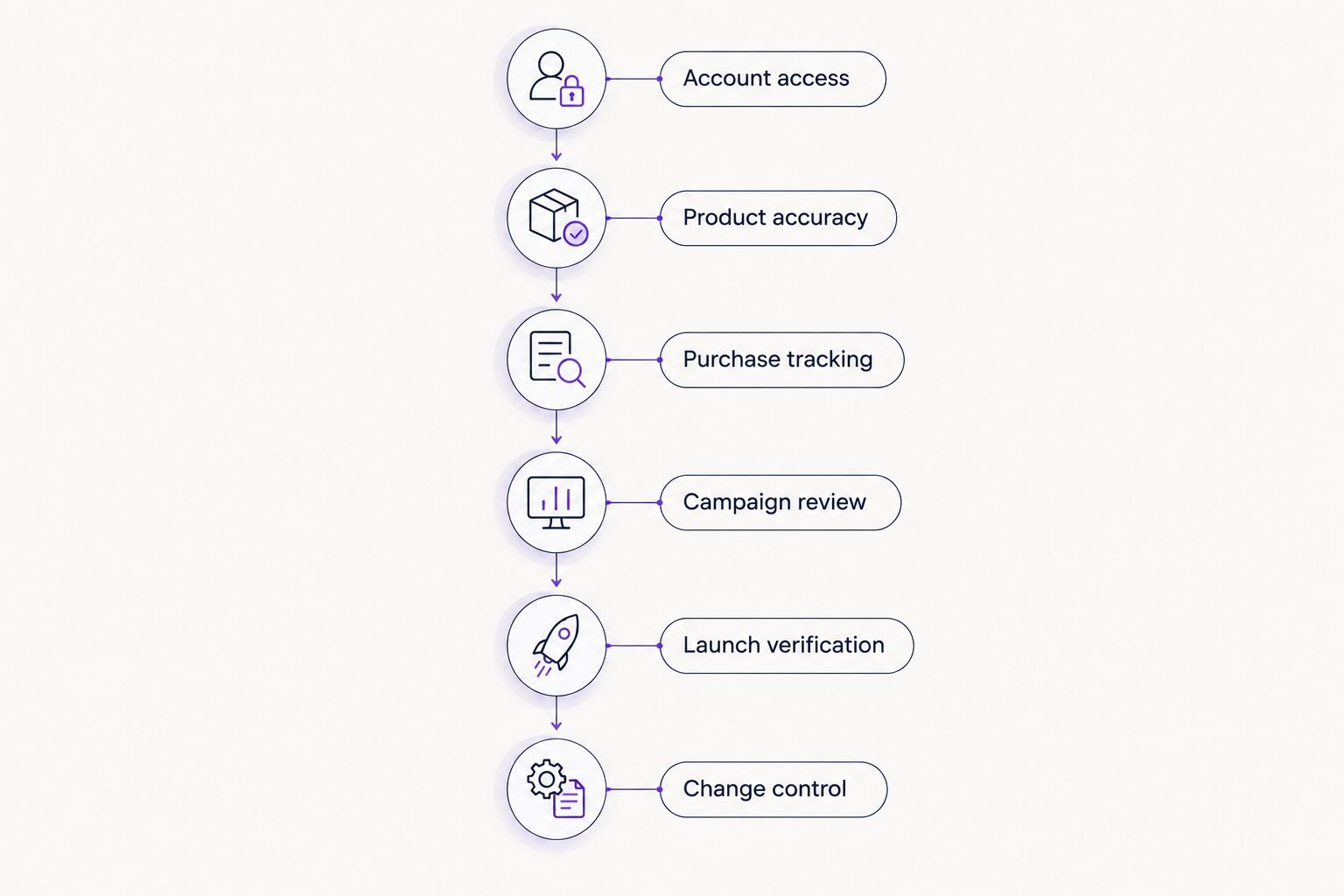
Use the following checks in order. Each should produce something you can inspect rather than a verbal assurance.
Account access
Confirm the Shopify store, advertising account, and relevant business assets. Check that the person connecting them has the permissions required for the proposed actions.
For an agency, record which client owns each asset. Access to one client's account must not become permission to make changes in another client's account.
Product accuracy
Choose a product with a clear destination page and approved images. Compare the draft ad against that page, checking claims, variants, and the offer described.
Do not let generated copy introduce an unsupported benefit or promotion. A fluent sentence can still misrepresent what the shopper will find.
Purchase tracking
Use a controlled test purchase to inspect whether the intended conversion event reaches the advertising platform. Check the event name, value, currency, and whether the same purchase is being counted more than intended.
Consent requirements still apply. Do not bypass consent settings to make a test appear successful; fix the measurement design instead.
Campaign review
Inspect the actual destination, creative, objective, budget, and schedule. A preview should make the proposed launch understandable before you authorize it.
For agencies, get client approval on the material that will actually run. Approval of a concept is not approval of every generated variation.
Launch verification
After publishing, open the advertising account and inspect the campaign. Confirm that its configuration matches the approved version and check whether it is under review, active, or showing an issue.
Publishing and delivery are different states. Do not describe a submitted campaign as delivering simply because the automation tool completed its publishing task.
Change control
Identify who can pause campaigns and change budgets. Confirm whether the software asks for approval or acts automatically for each supported action.
If a required control is unavailable, keep that action manual. Automation should operate inside your decisions, not replace them without permission.
Why the need for a developer varies
The dividing line is whether supported settings complete the job. These factors determine whether your launch remains no-code:
- Storefront customization. A standard configuration and a custom storefront do not necessarily use the same tracking implementation. Inspect your actual setup.
- Measurement requirements. A purchase event and a custom business event are different requirements. Confirm support for the event you intend to use.
- Connection support. A working connector must cover the data and actions you need, not merely display an integration name.
- Permission structure. Missing account access requires an authorized owner or administrator. It is not automatically a coding problem.
- Approval requirements. If your process requires controls the tool does not provide, retain a manual approval step or reassess the workflow.
- Custom data movement. Moving proprietary data between systems requires a supported connection or separate implementation work.
Diagnose the gap before hiring a developer. A permissions issue belongs with the account owner; an unsupported connector belongs in a technical scoping discussion. They are not interchangeable problems.
What should an e-commerce brand ask in a demonstration?
Bring a real product page and an approved creative asset. Ask the vendor to show the path from those inputs to a campaign you can inspect in the advertising account.
Your 2026 evaluation should answer these questions:
- What information must you enter manually?
- Which claims and assets can you approve before publishing?
- Which campaign settings can you inspect and change?
- How do you verify the purchase event?
- What actions happen automatically after launch?
- How do you stop further changes?
The benefit of automation is execution of supported tasks. Its limitation is that execution does not prove the offer, creative, or destination is effective.
Keep commercial judgment with the brand. Software cannot establish whether a product claim is true simply by rewriting it convincingly.
What should an agency verify across client accounts?
An agency should evaluate account separation and approvals alongside campaign creation. A workflow that suits a store owner does not automatically fit a team handling several clients.
Ask the vendor to demonstrate selecting the intended client account, confirming its connected assets, and reviewing a proposed change. Then ask how your team can identify what changed and who authorized it.
Keep client instructions explicit. Record which actions require approval, who owns the advertising account, and who can stop a campaign when the primary account manager is unavailable.
Treat account selection as part of every launch review. Correct copy in the wrong client's account is still an incorrect launch.
Does no-code mean the ads will convert?
No-code describes implementation, not sales performance. A campaign can publish correctly and still fail to persuade shoppers or produce the outcome you want.
Check the offer, creative, destination, and measurement separately. Do not treat a completed launch as proof that the campaign is commercially sound.
Should you wait for a planned Shopify integration?
Choose a tool for the workflow it can demonstrate now. A planned integration does not complete your current launch.
For a 2026 buying decision, separate live capabilities, manual workarounds, and roadmap items in your evaluation. If the required connection is planned, decide whether the present workflow is acceptable without it.
FAQ
Can AI launch Shopify ad campaigns without a developer?
Yes, when the selected tool supports the required connections and publishing actions. You still need account permissions, verified conversion tracking, reviewed creative, and control over campaign changes.
Do I need a developer to launch Facebook ads for Shopify?
Standard campaign setup through supported interfaces does not require writing code. Custom tracking, unsupported connections, or custom storefront requirements can create separate technical work.
Can TezAds create and launch advertising campaigns?
TezAds writes, launches, and optimizes paid advertising campaigns across Meta, Instagram, Google, TikTok, YouTube, and X. Verify the specific Shopify connection, campaign type, and approval controls before adopting it for your workflow.
Is an AI ad-copy generator enough to launch a campaign?
Copy generation alone is not enough to establish campaign-launch capability. Check whether the tool can publish into your advertising account or whether your team must transfer the assets and configure the campaign manually.
How do I check whether my Shopify purchase tracking works?
Use a controlled test purchase and inspect the intended conversion event in the advertising platform. Check the event name, value, currency, and whether the purchase is counted more than intended, while respecting consent settings.
Can an agency use the same launch process for every client?
An agency can standardize its checklist, but it must verify each client's accounts, permissions, tracking, and approval requirements. Confirm the selected client account before every publication or material change.
Does publishing a campaign mean it is running?
Publishing does not prove that an ad is delivering. Inspect the campaign in the advertising account to confirm its configuration and current status.
One last thing
Before committing to automation in 2026, ask the vendor to demonstrate what happens when you withhold approval. A controlled workflow must make that boundary clear, not just show how quickly it can publish.
The strongest no-code test is whether you can stop an incorrect launch before it spends. Establish that control before expanding beyond the first campaign.


