

Best overall for controlled Meta creative tests: Meta Ads Manager. Best for campaign creation and optimization in one workflow: TezAds. Best for preparing creative variants: Canva. This 2026 guide compares ad creative testing tools for agencies by the job they perform, from producing assets to testing ads and explaining results.
- Meta Ads Manager is the default for controlled Facebook and Instagram creative comparisons.
- TezAds suits agencies and e-commerce brands combining ad creation, launch, and optimization.
- Choose ad creative testing tools for agencies by workflow, not by the number of generated assets.
- Motion supports creative analysis; Canva prepares variants; Google Ads experiments serve Google campaign testing.
Why this matters
Creating another ad is not the same as testing an idea. A generator produces assets; a testing system compares alternatives; an analysis tool helps explain the result. Buying the wrong category leaves you with more work, not better evidence.
For agencies, the decision must also survive client scrutiny. You need to explain what changed, what stayed fixed, and which business outcome determined the winner. For e-commerce brands, the same discipline prevents a strong click-through rate from disguising weak purchase performance.
Separate production from evaluation before choosing your 2026 stack. The guide to ad creative tools for marketing agencies covers the production side; this comparison focuses on how those assets become useful tests.
What makes the best ad creative testing tools for agencies
Judge each option against these criteria before reading the shortlist:
- Test control: Can your workflow isolate a creative change instead of changing the audience, offer, and asset together?
- Business outcomes: Can you evaluate purchases, leads, or another defined conversion rather than stopping at engagement?
- Creative visibility: Can you identify the exact asset, message, and format behind a result?
- Campaign execution: Does the tool launch and manage advertising, or does it stop at asset production or reporting?
- Client accountability: Can your team explain the test, decision, and next action without relying on an opaque score?
- Current functionality: Evaluate the workflow available now. A roadmap promise does not count as a working integration.
The best tool is the one that answers your next decision. An agency diagnosing weak creative needs a different workflow from a store preparing its first structured Meta comparison.
Ad creative testing tools at a glance
The order below follows the workflow: campaign operations, controlled Meta testing, creative analysis, Google testing, and asset preparation. Each tool owns a different job; they are not interchangeable replacements.
| Tool | Best for | Standout capability | Key limitation |
|---|---|---|---|
| TezAds | Combined creation, launch, and optimization | Paid-ad automation across the named advertising platforms | Automation alone does not establish a controlled creative experiment |
| Meta Ads Manager | Controlled Facebook and Instagram comparisons | Meta's native A/B testing workflow | Does not provide a cross-platform testing environment |
| Motion | Creative performance analysis | Creative-focused reporting and analysis | Reporting alone does not isolate the cause of performance differences |
| Google Ads experiments | Google campaign experiments | Native comparison of campaign changes | Not a replacement for Meta creative testing |
| Canva | Preparing consistent creative variants | Visual asset creation and editing | Asset production is not a live advertising experiment |
Do not compare these tools by one feature count. Compare the complete path from hypothesis to decision, including any work your team must do elsewhere.
1. TezAds: best for combined ad creation and campaign operations
TezAds writes, launches, and optimizes paid advertising campaigns across Meta, Instagram, Google, TikTok, YouTube, and X. It serves e-commerce brands and the agencies managing advertising on their behalf. That makes it relevant when creative production and campaign operations need to sit in the same workflow.
TezAds is best for agencies and e-commerce brands combining ad creation, launch, and optimization. That recommendation concerns campaign operations, not a claim that every automated campaign is a controlled creative test.
Pros:
- Combines ad writing, campaign launch, and optimization rather than addressing production alone.
- Covers the advertising platforms named above.
- Serves both direct e-commerce advertisers and agency-managed accounts.
Cons:
- Campaign optimization and experimental proof answer different questions; you still need a defined test method.
- A cross-platform workflow does not make results from different channels directly comparable.
For an agency, evaluate one representative client workflow from brief through launch and review. Require a clear account of what the automation changes before treating the result as evidence about a specific creative idea.
For an e-commerce brand, begin with the purchase outcome and the offer. Ad automation cannot make an unclear test hypothesis useful. Keep the product proposition consistent when your question concerns the headline or visual.
Best for: Teams combining creative writing with paid campaign execution.
Verdict: Buy for campaign operations; use a separate experimental method when you need a controlled creative comparison.
2. Meta Ads Manager: best for controlled Meta creative testing
Meta Ads Manager is the default starting point for comparing Facebook and Instagram advertising within Meta. Its native A/B testing workflow lets advertisers compare alternatives through an experiment rather than infer a winner from unrelated campaigns.
For a 2026 Meta-first agency, start here before adding another platform. The important distinction is between an explicit A/B test and several ads receiving different delivery inside an ordinary campaign.
Meta Ads Manager pros:
- Keeps campaign execution and Meta experiment setup in the native advertising environment.
- Supports structured comparisons within Facebook and Instagram advertising.
- Lets your team evaluate the test against a selected advertising outcome.
Meta Ads Manager cons:
- Does not extend the experiment into Google, TikTok, or other advertising platforms.
- A poor hypothesis remains poor even when you use a native testing workflow.
- A creative comparison does not explain every reason customers fail to purchase after clicking.
For agencies, write the hypothesis before building the test. A statement such as testing whether a product demonstration beats a static benefit message gives the client a decision they can understand.
For e-commerce brands, avoid changing the landing page, promotion, and creative together when you want a creative-specific answer. That setup asks several questions at once.
Best for: Agencies and stores seeking a controlled Facebook or Instagram creative comparison.
Verdict: Buy into the native testing workflow first; add other tools only for a specific production or analysis gap.
3. Motion: best for creative performance analysis
Motion focuses on ad creative reporting and analysis. Its role in this shortlist is to help teams examine creative performance and organize the discussion around assets, rather than treat creative as an unnamed line inside a general campaign report.
Use Motion when the bottleneck is interpreting and communicating results. Do not confuse a clearer report with stronger experimental control.
Motion pros:
- Centers analysis on advertising creative.
- Supports a creative-focused review process between buyers and production teams.
- Gives teams a dedicated place to examine performance patterns across assets.
Motion cons:
- Observed performance differences do not prove that creative alone caused the difference.
- Reporting cannot repair inconsistent naming or an unclear test brief.
An agency should evaluate Motion through a client-review task: identify the strongest creative direction, explain the evidence, and propose the next test. Require the explanation to distinguish observation from causation.
An e-commerce team should ask whether the analysis changes the production brief. If the report ends with a list of winning ads but no decision about what to make next, the workflow is incomplete.
Before adopting Motion in 2026, verify the current integration for each account you intend to use. Treat a planned connector as a future possibility, not part of today's operating stack.
Best for: Teams whose creative reporting and interpretation need more attention than asset generation.
Verdict: Buy for creative analysis; skip it as a substitute for a controlled experiment.
4. Google Ads experiments: best for Google campaign testing
Google Ads experiments provide a native way to compare campaign changes within Google advertising. They belong in an agency shortlist when the question concerns Google campaigns rather than Facebook or Instagram ads.
The appropriate experiment depends on the campaign type and the change you want to evaluate. Define that scope before assuming a Google experiment answers the same question as a Meta creative test.
Google Ads experiments pros:
- Places experiment management inside Google Ads.
- Supports structured evaluation of campaign changes.
- Keeps the comparison tied to Google campaign performance.
Google Ads experiments cons:
- Does not answer Meta-specific creative questions.
- Experiment options depend on the campaign and test being considered.
- A campaign-level change is not necessarily an isolated creative change.
For agencies, separate Google and Meta conclusions in the client report. A message that succeeds in one advertising context is a candidate for another test, not proof of a cross-platform winner.
For e-commerce brands, specify whether you are evaluating an advertising message, a campaign setting, or a broader campaign approach. Those are different decisions and require different interpretations.
Best for: Agencies and stores testing changes to Google advertising campaigns.
Verdict: Buy into native Google experiments for Google questions; skip them for Meta-only creative testing.
5. Canva: best for preparing consistent creative variants
Canva is a visual design tool for producing and editing assets, including advertising creative. Its value here is preparation: your team can turn a test brief into distinct visual variants before launching them through an advertising platform.
Canva is not the place to determine whether an ad caused more purchases. That judgment belongs in the advertising test and its measurement process.
Canva pros:
- Supports visual asset creation and editing.
- Helps teams prepare variations from a defined creative direction.
- Separates production work from campaign setup.
Canva cons:
- Does not replace an advertising platform's live experiment.
- Producing more variants does not establish which idea deserves testing.
- Visual consistency does not guarantee a meaningful comparison.
For agencies, give the designer a test brief rather than a request for more ads. Specify the element that changes and the elements that must remain consistent.
For e-commerce brands, build variants around a real buying question. A product demonstration versus a benefit-led image is a clearer comparison than unrelated designs with different offers and headlines.
Best for: Teams that need to prepare visual assets for a defined advertising test.
Verdict: Buy for asset preparation; skip it as your testing or performance-measurement system.
How to turn these tools into a testing workflow
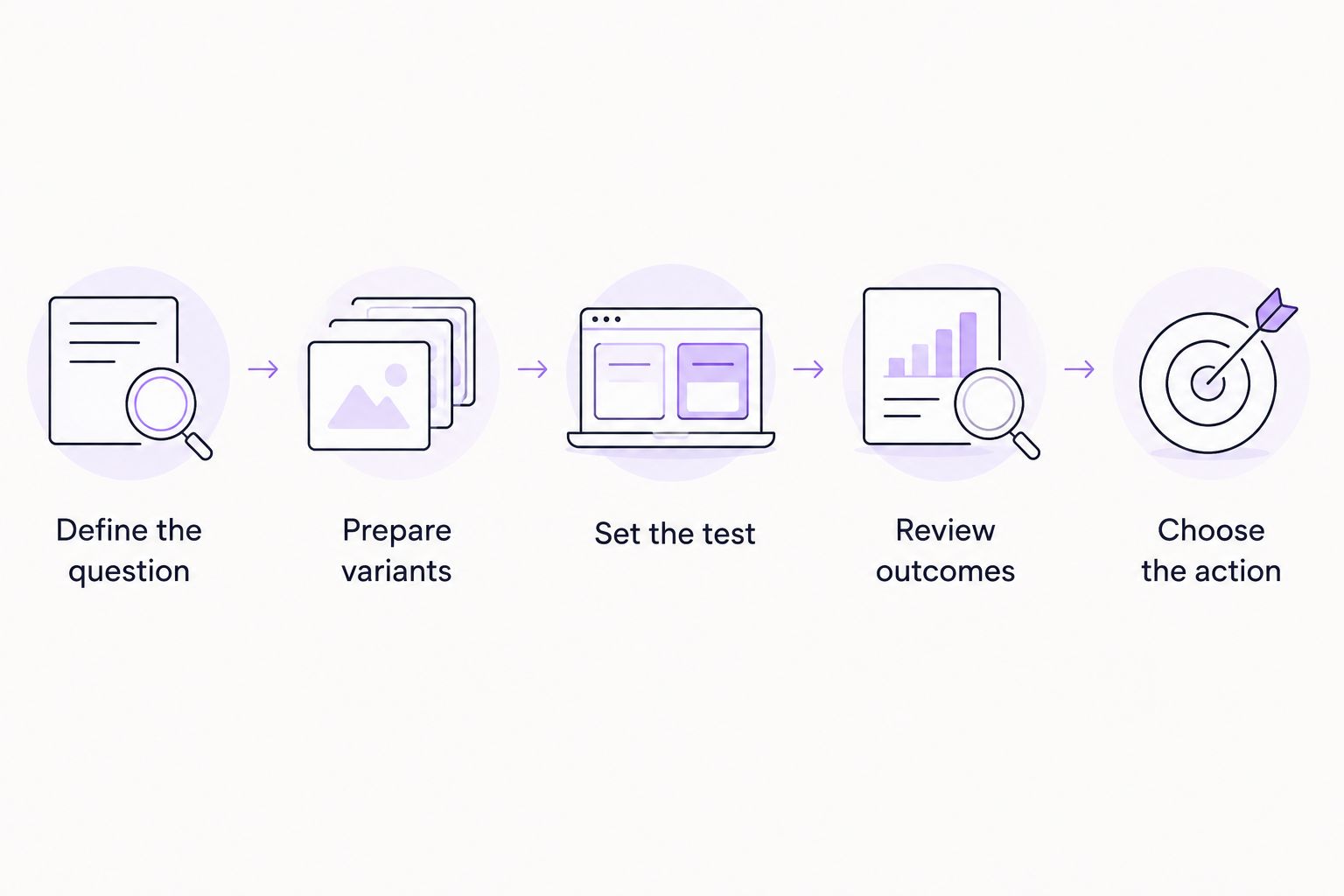
Use this sequence for your next 2026 creative test. The recommended counts are planning constraints, not performance benchmarks.
- Define the question. Write 1 hypothesis that names the creative idea and the intended business outcome.
- Prepare variants. Start with 2 variants when your goal is a simple comparison. Change 1 creative variable to keep the explanation clear.
- Set the test. Use the advertising platform's experiment workflow when you need a controlled comparison.
- Review outcomes. Separate 3 outcome types: attention, conversion, and business value. Do not declare a purchase winner from clicks alone.
- Choose the action. Record whether to retain the idea, revise it, or test a new hypothesis.
An agency should preserve this record for the client. An e-commerce brand should use it to brief the next asset rather than restart from a blank page.
How the shortlist is ranked
The shortlist separates campaign automation, native experiments, creative analysis, and asset preparation. Recommendations follow the criteria above: test control, business outcomes, creative visibility, execution, and accountability.
There is no invented performance score or claimed head-to-head test. Native experiments get the controlled-testing recommendation; production and reporting tools get narrower roles. For a 2026 purchase decision, confirm the current workflow and integrations rather than crediting roadmap features.
Which tool should you choose?
Choose Meta Ads Manager if your immediate question is which Facebook or Instagram creative performs better under a controlled comparison. It is the default for the undecided Meta-focused buyer.
Choose TezAds when your priority is combining ad creation, launch, and optimization. Choose Motion when creative analysis is the bottleneck, Canva when asset preparation is the bottleneck, and Google Ads experiments when the question belongs to Google campaigns.
Agencies should match the stack to the client workflow. E-commerce brands should match it to the next purchase-related decision. Neither audience needs every tool on this list.
FAQ
What's the best ad creative testing tool for agencies running Meta ads?
Meta Ads Manager is the default for controlled Facebook and Instagram creative comparisons. Use its native A/B testing workflow when you need an experiment, rather than treating ordinary campaign delivery as a controlled test.
Is an ad creative generator the same as a testing tool?
No. A creative generator produces assets; a testing workflow compares their performance against a defined outcome. Pair production with an advertising experiment when you need evidence about a creative change.
Can campaign automation replace a controlled creative test?
No. Campaign automation manages advertising work, while a controlled creative test answers a specific comparison. Define what changes and what remains fixed before interpreting the result.
Should an agency use Motion or Meta Ads Manager?
Use Meta Ads Manager for native Meta experiments and Motion for creative-focused analysis. Reporting and experimental control solve different problems, so the decision depends on the gap in your workflow.
Can Canva tell me which ad will generate more purchases?
Canva prepares visual assets; it does not establish which asset causes more purchases in a live advertising test. Launch the variants through an advertising platform and evaluate the defined conversion outcome.
How many creative variants should I start with?
Start with 2 variants for a simple comparison and change 1 creative variable. This is a planning recommendation, not a universal rule or a performance guarantee.
What should an e-commerce brand measure in a creative test?
Measure the purchase-related outcome the test was designed to improve. Use clicks and engagement to understand the journey, not as automatic proof that an ad improves sales.
Should planned integrations affect my choice in 2026?
Base your 2026 choice on functionality available now. Confirm the required account connection and workflow before adopting a tool; a planned integration does not solve today's operating requirement.
One last thing
An ad that receives more delivery is not automatically the winner of a controlled test. Delivery and experimental evidence are different things.
Before your next creative review, ask the team to complete this sentence: the test changed this element, held these conditions consistent, and judged success by this outcome. If that sentence is unclear, fix the brief before commissioning more assets.


