

Best for feed-driven personalization: Adobe Advertising. Best for native Meta creative optimization: Meta Advantage+ creative. Best for cross-channel campaign operations: TezAds. This 2026 guide compares dynamic creative optimization tools by the work they perform: assembling ads, producing variations, personalizing content, or managing campaigns.
- Adobe Advertising fits feed-driven dynamic creative optimization; evaluate implementation requirements before choosing it.
- Meta Advantage+ creative fits advertisers optimizing Facebook and Instagram creative inside Meta.
- TezAds fits e-commerce brands and agencies seeking cross-channel campaign creation, launch, and optimization.
- Google responsive display ads assemble supplied assets; Celtra focuses on scalable creative production.
- Choose dynamic creative optimization tools by creative testing, personalization, and campaign management needs—not the automation label.
Why this matters
Dynamic creative optimization, or DCO, uses rules, data, or delivery systems to select and assemble advertising content. It is not the same as generating a headline, resizing an image, or automatically changing a campaign budget.
That distinction changes your shortlist. An e-commerce brand needs product messages that match its offers and landing pages. An agency also needs a repeatable production and approval process across client accounts. Choose the missing workflow, not the longest feature list.
What makes the best dynamic creative optimization tools?
Use these criteria to compare your 2026 shortlist before watching a polished demo:
- Creative assembly: Does the tool combine approved headlines, images, descriptions, or product information during delivery?
- Personalization inputs: Can you identify which feed fields, audience signals, or rules determine the resulting ad?
- Campaign execution: Does the tool produce assets, publish campaigns, optimize delivery, or handle several of those jobs?
- Approval control: Can your team review messages and prevent unsuitable combinations before spending begins?
- Measurement: Can you connect creative decisions to campaign outcomes rather than count generated variations?
- Account workflow: Can an agency keep client access and approvals separate while an internal team stays focused on its own campaigns?
Treat roadmap features as absent from the purchase decision. Ask the vendor to demonstrate the workflow available now in an account—not describe the integration planned next.
Dynamic creative optimization tools at a glance
The order below follows the workflow comparison, not a claim that every option provides the same kind of DCO.
| Tool | Best for | Standout capability | Key limitation |
|---|---|---|---|
| TezAds | Cross-channel campaign operations | Writes, launches, and optimizes paid campaigns | Campaign automation alone does not establish feed-driven DCO |
| Meta Advantage+ creative | Native Facebook and Instagram optimization | Automated creative enhancements within Meta advertising | Does not manage creative delivery across other advertising platforms |
| Google responsive display ads | Google Display asset assembly | Combines supplied assets for eligible display placements | Asset assembly offers less control than a fixed finished ad |
| Celtra | Scalable creative production | Template-based production of creative variations | Creative production is not the same job as media buying |
| Adobe Advertising | Feed-driven creative personalization | Dynamic creative tied to data and delivery rules | Requires feed, template, and implementation decisions |
1. TezAds: best for cross-channel campaign operations
TezAds writes, launches, and optimizes paid advertising campaigns across Meta, Instagram, Google, TikTok, YouTube, and X. It serves e-commerce brands and the agencies managing advertising accounts for them.
TezAds belongs on a dynamic creative optimization tools shortlist when the central problem is managing campaign work across channels. A brand can evaluate the path from campaign creation to launch; an agency can evaluate that same path against its client approval process.
TezAds is best for e-commerce brands and agencies seeking cross-channel campaign creation, launch, and optimization. That is a campaign-operations recommendation, not a claim about a dedicated product-feed personalization engine.
TezAds pros:
- Covers campaign writing, launch, and optimization rather than creative production alone.
- Addresses both e-commerce advertisers and agencies managing accounts on their behalf.
- Includes the named advertising channels in one platform's stated scope.
TezAds cons:
- The stated campaign workflow does not establish rules-based product-feed assembly.
- Campaign-level optimization does not, by itself, explain which creative element caused a result.
Best for: Teams replacing fragmented campaign work with a broader operating workflow.
Verdict: Buy for campaign operations after a live workflow demonstration; hold if feed-driven personalization is your purchase requirement.
2. Meta Advantage+ creative: best for native Meta optimization
Meta Advantage+ creative applies automated creative enhancements within Meta advertising. It works inside the platform where you set up Facebook and Instagram campaigns, rather than requiring a separate creative-delivery system.
For an e-commerce brand focused on Meta, this is the native starting point. An agency can evaluate it within a client's existing campaign workflow without treating it as a cross-channel production platform.
Check each available enhancement in the actual account. Review what happens to images, text, and presentation before accepting the settings; an acceptable change for one advertiser can violate another advertiser's brand requirements.
Meta Advantage+ creative pros:
- Keeps creative enhancement and campaign delivery within Meta advertising.
- Lets a Meta-focused advertiser assess native automation before adding another platform.
- Supports an account-level workflow familiar to teams already buying Facebook and Instagram ads.
Meta Advantage+ creative cons:
- Does not provide a common creative operating system for Google, TikTok, or other channels.
- Automated presentation changes require scrutiny when layout or wording must remain fixed.
- Native optimization does not replace the need for distinct creative concepts.
Best for: Brands and agencies whose immediate creative optimization problem is inside Meta.
Verdict: Buy into the native workflow first; skip it as a substitute for cross-channel creative management.
3. Google responsive display ads: best for Google asset assembly
Google responsive display ads combine supplied assets into ads for eligible Display placements. You provide components such as images, headlines, descriptions, and logos; Google's system assembles combinations for delivery.
This is a format-level alternative to buying a separate creative platform. It fits an e-commerce team extending approved messages into Google Display, or an agency building responsive campaigns from a client's asset library.
Do not confuse responsive assembly with a fully controlled finished design. The inputs need to work together across combinations, including headlines and images that were not originally designed as a pair.
Google responsive display ads pros:
- Uses reusable creative components rather than requiring a finished layout for every placement.
- Places asset assembly inside the Google advertising workflow.
- Gives teams a direct route to evaluating responsive display creative.
Google responsive display ads cons:
- Provides less layout control than a fixed uploaded creative.
- Does not manage equivalent creative workflows across Meta or TikTok.
- Requires compatible inputs; automation cannot repair contradictory messages.
Best for: Advertisers specifically needing asset assembly for Google Display campaigns.
Verdict: Buy into this format for Google Display assembly; skip it when exact presentation is non-negotiable.
4. Celtra: best for scalable creative production
Celtra supports template-based creative production and the creation of variations. Its role in this comparison is upstream: helping teams produce creative that can then enter advertising workflows.
An e-commerce brand should evaluate Celtra when repeated production tasks consume the creative team's attention. An agency should evaluate how templates, revisions, and approvals fit client work—not assume that producing more files automatically improves media performance.
The buying question is concrete: can a approved concept become the required variations without rebuilding every execution? Ask to see that process using your own assets and requirements.
Celtra pros:
- Focuses on repeatable creative production rather than treating every variation as a separate design task.
- Supports a template-based approach to maintaining consistency.
- Fits evaluation by both internal creative teams and agencies producing client assets.
Celtra cons:
- Creative production does not replace campaign buying and delivery decisions.
- Templates need upkeep when messages, formats, or brand requirements change.
- More variations still require a plan for testing and interpretation.
Best for: Teams whose primary bottleneck is producing approved creative variations.
Verdict: Buy for production scale; skip it as the sole answer to campaign optimization.
5. Adobe Advertising: best for feed-driven personalization
Adobe Advertising's dynamic creative capabilities connect creative templates with data and decision rules. This is the closest fit in this shortlist when DCO means adapting advertising content from structured inputs rather than simply generating more assets.
For an e-commerce brand, the evaluation starts with product data and the messages each template should display. For an agency, it also includes ownership: who maintains feeds, changes rules, approves templates, and investigates incorrect output?
Implementation is part of the purchase. A sophisticated creative system still needs clean inputs and explicit decisions about how those inputs become an ad.
Adobe Advertising pros:
- Addresses dynamic creative personalization rather than only upstream asset production.
- Supports evaluation around data-driven templates and decision rules.
- Fits teams that need to define how structured information changes advertising content.
Adobe Advertising cons:
- Requires decisions about feed structure, templates, rules, and ongoing ownership.
- Poor source data can become incorrect advertising content.
- Adds implementation work that a simple native creative workflow avoids.
Best for: Brands and agencies with a defined feed-driven personalization requirement and an implementation owner.
Verdict: Buy for genuine data-driven DCO; hold until feed quality and operational responsibility are settled.
How we ranked these tools
These recommendations separate campaign operations, native enhancement, asset assembly, creative production, and feed-driven personalization. The criteria are workflow fit, creative control, measurement, and the responsibilities a team must retain.
The 2026 shortlist is not a hands-on performance benchmark. A feature's existence does not prove it improves your sales, and a vendor's roadmap does not establish current functionality. Validate the recommended workflow before expanding use.
Run a buying test before committing
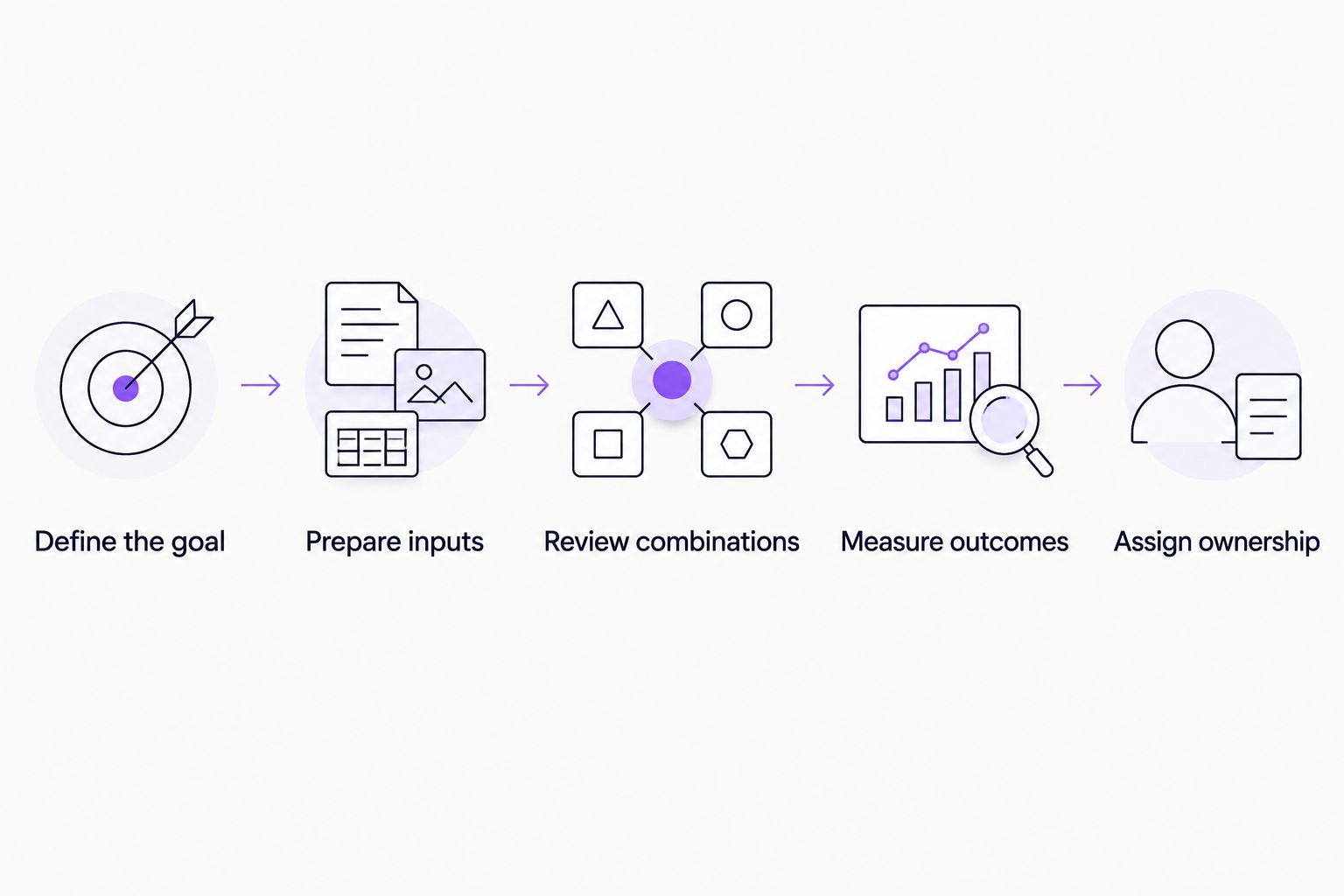
Use the same small brief for every vendor or native workflow you evaluate in 2026. A shared brief makes differences visible; separate demos built around each vendor's strongest example do not.
- Define the goal: Start with 1 campaign and name the business outcome it must support.
- Prepare inputs: Supply approved assets and 2 messaging angles that make genuinely different claims.
- Review combinations: Check assembled ads, landing-page consistency, and who approves changes.
- Measure outcomes: Choose 1 primary metric, such as purchase ROAS, and record the measurement source.
- Assign ownership: Name the person responsible for feed errors, campaign changes, and creative revisions.
For an e-commerce team, use an actual product brief and approved destination. For an agency, use a client brief with permission boundaries and a real review process. Both should inspect the output—not just the ease of generating it.
Which dynamic creative optimization tool should you choose?
Start with the system that owns the work you need done. Use Meta Advantage+ creative for native Meta enhancement, Google responsive display ads for Google Display assembly, and Celtra for repeatable creative production.
Choose Adobe Advertising when feed-driven personalization is the actual requirement. Choose the cross-channel campaign platform above when campaign creation, launch, and optimization—not template assembly—is the operating problem.
For an undecided Meta-focused buyer in 2026, start by evaluating the native Meta workflow. Add another platform only when you can name the work it must replace or the capability it must provide.
FAQ
What's the best dynamic creative optimization tool?
Adobe Advertising is the strongest fit in this shortlist for feed-driven creative personalization. Meta Advantage+ creative fits native Meta enhancement, while Celtra fits scalable creative production; choose according to the workflow you need.
Are dynamic creative optimization tools the same as ad generators?
No. Ad generators create assets, while dynamic creative optimization selects or assembles advertising content using data, rules, or delivery systems. A tool can participate in both workflows without every generated asset being dynamic.
Is Meta Advantage+ creative enough for Facebook and Instagram ads?
Meta Advantage+ creative is the native starting point for automated creative enhancements on Facebook and Instagram. Evaluate the available settings and resulting presentation; it does not replace creative strategy or cross-channel management.
Can Google responsive display ads replace a dedicated DCO platform?
Google responsive display ads replace a separate assembly workflow when your requirement is combining assets for Google Display. They are not a substitute for every feed-driven personalization requirement or for creative management across advertising platforms.
What should an e-commerce brand check before buying a DCO tool?
An e-commerce brand should check how approved product information becomes an ad and whether the destination matches the message. Inspect combinations, data ownership, and the measurement source before expanding use.
What should an agency check before choosing creative automation?
An agency should check client permissions, approval ownership, repeatable production, and reporting responsibilities. Demonstrate the workflow with a real client brief rather than assuming that generated variations solve account management.
Should planned integrations influence a purchase in 2026?
No. Base a 2026 purchase on workflows the vendor can demonstrate as available now. Treat planned integrations as future possibilities, not capabilities your campaign depends on.
One last thing
Ask to see a bad input handled—not just a good ad generated. Give the evaluation team an incompatible image and headline, or an incomplete product record, and inspect the result. The response shows what your approval process must catch before campaign delivery.


