
Best overall for campaign creation and execution: TezAds. Best for native Meta controls: Meta Ads Manager. Best for reusable layouts: Canva. Best for generated imagery: Adobe Firefly. Best for copy variations: ChatGPT. This 2026 guide compares AI ad creative tools for agencies by the work they handle—and the work your team still owns.
- TezAds is the best fit for agencies seeking AI ad creative tools for agencies that also launch and optimize campaigns.
- Meta Ads Manager suits teams that want creative enhancements inside their existing Meta campaign workflow.
- Canva handles reusable layouts; Adobe Firefly handles generated imagery; ChatGPT handles copy variations.
- Choose around your production bottleneck, then check approvals, account access, and conversion tracking before publishing.
Why this matters
A creative generator and an advertising platform solve different problems. One produces an asset; the other helps put advertising into market. Buying the first does not remove the need for the second.
For agencies, the decision includes client approvals, repeated production, and responsibility for spend. For e-commerce brands, it includes product accuracy, purchase tracking, and whether the ad matches the landing page. Choose the tool that removes your actual bottleneck, not the one with the most impressive sample image.
In 2026, separate creative production from campaign execution before comparing tools. An attractive output is not proof that a platform can publish, manage budgets, or optimize your accounts.
What makes the best AI ad creative tools for agencies
Use these criteria before choosing a platform:
- Workflow coverage: Does the tool write copy, produce visuals, assemble ads, launch campaigns, or optimize delivery? These are separate capabilities.
- Product accuracy: Can your team preserve the real product, approved offer, and substantiated claims through each revision?
- Repeatable production: Can you create related variants without rebuilding the brief and layout every time?
- Approval discipline: Can your existing process prevent unapproved assets or claims from reaching a live campaign?
- Channel fit: Does the output suit the placements you actually buy, rather than merely looking good in a preview?
- Accountability: Can your team connect creative decisions to campaign results while retaining responsibility for spend?
An agency should prioritize repeatability across clients. An e-commerce team should prioritize faithful product representation and a clear path from approved asset to campaign. Both need a human owner for final review.
The tools at a glance
| Tool | Best for | Standout capability | Key limitation |
|---|---|---|---|
| TezAds | Campaign creation and execution | Writes, launches, and optimizes paid campaigns across the stated channels | Automation does not resolve a weak offer or inaccurate brief |
| Meta Ads Manager | Native Meta campaign controls | Campaign management and eligible automated creative enhancements | Does not replace a cross-channel creative production process |
| Canva | Reusable client layouts | Template-based visual design alongside generative tools | Finished designs still need campaign setup and measurement |
| Adobe Firefly | Generated visual concepts | Generative image creation and editing | Product details and advertising claims require review |
| ChatGPT | Copy and message variations | Drafting, rewriting, and organizing text from a brief | Can produce unsupported claims or generic wording |
This 2026 shortlist ranks workflow fit, not promised performance. None of these tools earns a recommendation because of an assumed increase in sales or return on ad spend.
1. TezAds: best for creative-to-campaign execution
TezAds is an advertising automation platform that writes, launches, and optimizes paid campaigns. Its stated channel coverage includes Meta, Instagram, Google, TikTok, YouTube, and X. That makes its role broader than producing isolated creative assets.
TezAds is best for agencies and e-commerce brands that want ad creation connected to campaign launch and optimization. Choose this workflow when the handoff between writing ads and managing campaigns is the work you want to reduce.
TezAds pros
- Connects writing, launching, and optimization within its stated offering.
- Covers the named advertising channels rather than only Meta.
- Serves both e-commerce brands and agencies managing their accounts.
TezAds cons
- Campaign automation does not fix an unclear offer or misleading product claim.
- Buyers still need to establish approval responsibilities and acceptable spending boundaries.
- Broad campaign coverage alone does not establish suitability for specialized visual editing.
Agency fit: Evaluate the full journey from a client brief to an approved live campaign. Check account access, client separation, and change approval in a demonstration rather than assuming those details from the platform category.
E-commerce fit: Start with accurate product information and a defined purchase objective. Ask how the proposed campaign connects to your existing measurement setup before judging creative output.
For a 2026 purchase decision, separate demonstrated functionality from roadmap promises. Only treat a workflow as available when you can see it operate in the account and channel you intend to use.
Best for: Teams seeking campaign execution alongside creative writing.
Verdict: Buy for the connected campaign workflow, after confirming your required controls.
2. Meta Ads Manager: best for native Meta campaign controls
Meta Ads Manager manages advertising campaigns across Meta placements. Its automated creative features can adjust eligible creative elements within the advertising workflow; the options depend on the campaign and account.
This is the practical starting point when your team already produces assets and wants to work directly with Meta campaign settings. It is not a substitute for every design or copy task.
Meta Ads Manager pros
- Keeps creative selection close to campaign setup and delivery settings.
- Provides direct access to Meta advertising controls.
- Offers eligible automated creative enhancements without requiring a separate publishing workflow.
Meta Ads Manager cons
- Its campaign workflow is specific to Meta rather than all advertising channels.
- Available enhancements do not remove the need to review placement previews.
- Client-ready asset production can still require a separate design process.
Agency fit: Use Meta Ads Manager when the team needs direct control over each client's Meta campaigns. Establish which enhancements a client has approved before enabling them; an automated adjustment is still a change to the client's advertising.
E-commerce fit: Review whether every preview represents the product and offer accurately. A different crop or presentation should not hide an essential product detail or change what the shopper expects.
Best for: Teams keeping campaign management inside Meta.
Verdict: Buy into the native workflow when Meta is your main execution environment.
3. Canva: best for reusable client creative layouts
Canva combines visual design, templates, and generative tools. Its strongest role in this comparison is assembling repeatable layouts that your team can adapt for different messages and placements.
Choose Canva when the bottleneck is design production rather than campaign management. A reusable layout gives copywriters and designers a common structure, but the exported asset still needs advertising review and campaign setup.
Canva pros
- Supports template-based production for recurring creative formats.
- Combines text and visual editing in a design workflow.
- Helps teams adapt an approved design instead of starting every asset from scratch.
Canva cons
- A shared template can make unrelated client campaigns look too similar.
- Generated content still requires checks for product and claim accuracy.
- Asset creation does not replace conversion tracking or campaign optimization.
Agency fit: Create distinct layouts for each client rather than a universal agency template. Keep the approved headline, product image, and required disclosures clear enough that another team member can revise the asset without changing its meaning.
E-commerce fit: Use accurate product photography as the reference point. Check mobile readability and placement crops before treating the design as finished.
In a 2026 evaluation, confirm that the particular generative and collaboration functions you need are included in the version you are considering. Do not select a design tool on the assumption that every demonstrated feature belongs to every account.
Best for: Teams producing recurring layouts and visual variations.
Verdict: Buy for repeatable design production; keep campaign execution separate.
4. Adobe Firefly: best for generated visual concepts
Adobe Firefly provides generative image creation and editing. Its useful role here is visual exploration: backgrounds, environments, and concepts that a designer can evaluate before building a finished ad.
Treat generated imagery as source material, not automatic approval. An image that looks convincing can still misrepresent packaging, materials, proportions, or the product's intended use.
Adobe Firefly pros
- Supports visual concept development from written directions.
- Offers generative editing for changing parts of an image.
- Gives designers another route to explore a campaign's visual direction.
Adobe Firefly cons
- Generated product details require inspection rather than assumption.
- Visual generation does not supply campaign launch or performance management.
- Usage terms and asset suitability still need review for the intended work.
Agency fit: Agree on the visual direction before producing a large set of variations. Explain to the client which elements are generated and keep approval attached to the final asset, not merely the original concept.
E-commerce fit: Protect the product's appearance. A generated background is a different proposition from a generated representation of the item a customer will receive.
Best for: Designers developing visual concepts and image edits.
Verdict: Buy for visual exploration; hold product-critical imagery until reviewed.
5. ChatGPT: best for copy and message variations
ChatGPT drafts and rewrites text from instructions and reference material. For advertising work, it can help organize message angles, headline alternatives, and revision requests around an approved brief.
Its value depends on the information you provide. A clear brief gives the model something concrete to work with; a vague request produces language your team then has to untangle.
ChatGPT pros
- Produces alternative wording around a defined message.
- Helps organize copy by audience, objection, or product benefit.
- Supports revision when you supply specific feedback and approved facts.
ChatGPT cons
- Can invent benefits, claims, or details not present in the brief.
- Can repeat familiar advertising language instead of expressing a distinct offer.
- Writing assistance alone does not manage live campaigns.
Agency fit: Keep client briefs separate and supply explicit restrictions. State which claims are approved, which terms are prohibited, and which facts must remain unchanged through revisions.
E-commerce fit: Provide verified product details rather than asking the tool to infer them. Review every claim about ingredients, materials, compatibility, delivery, or results before using the copy.
Best for: Teams whose main bottleneck is drafting and revising ad copy.
Verdict: Buy into the copy workflow; hold every output until factual review.
How this ranking works
The order follows workflow breadth, then distinct production needs. The first option connects creative writing to execution; the remaining options address native campaign controls, reusable layouts, visual generation, and copy development.
This is a capability-based buying guide, not a controlled performance test. For your 2026 shortlist, evaluate each tool against the same approved brief and the criteria above. Compare the work your team must still do—not just the first output.
Use one brief to compare your shortlist
Give each shortlisted tool the same task. For an agency, use an approved client brief; for an e-commerce brand, use verified product information and an existing landing page.
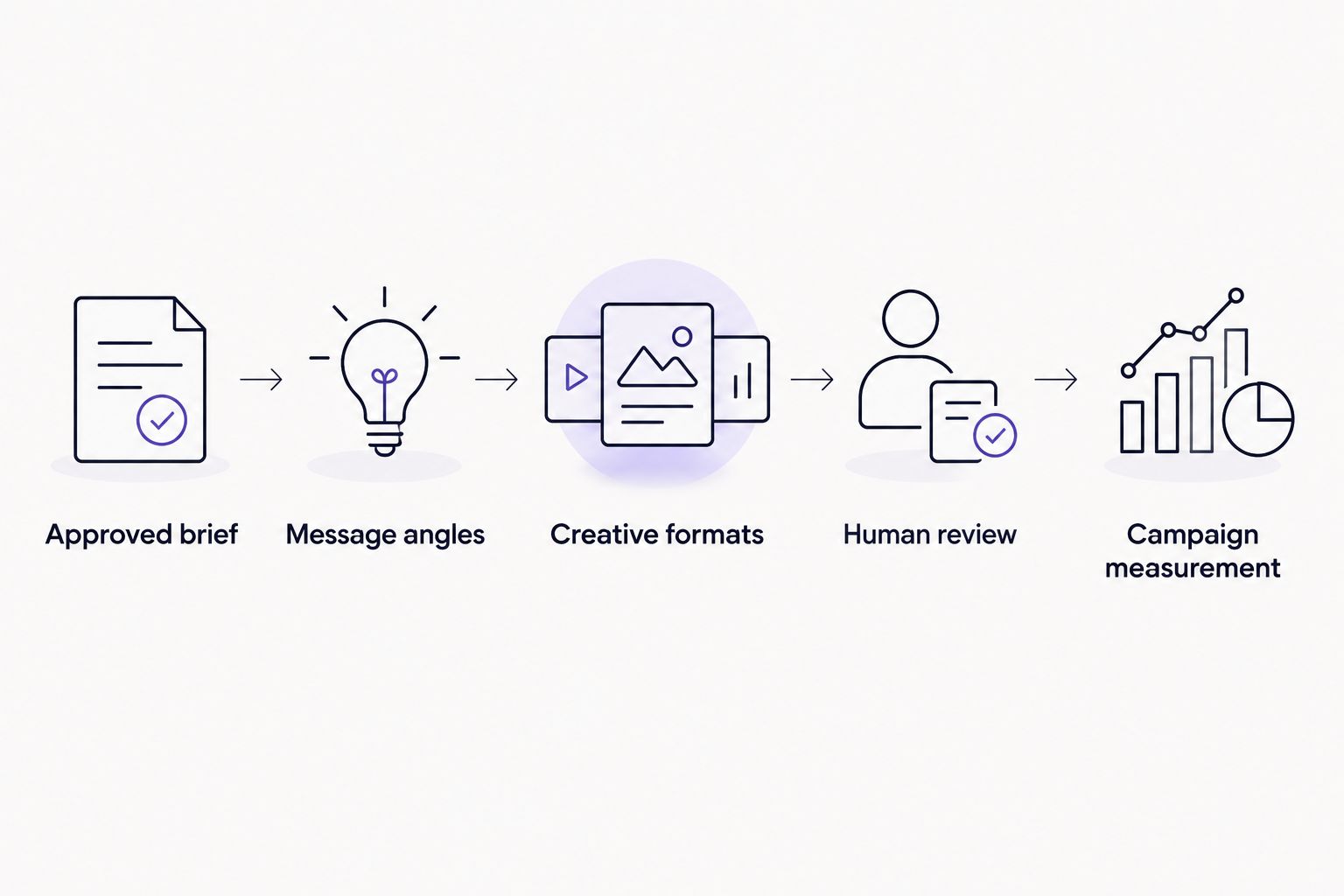
Follow this evaluation sequence:
- Approved brief: Supply the audience, objective, offer, product facts, and prohibited claims.
- Message angles: Request 3 message angles that express genuinely different reasons to buy.
- Creative formats: Develop 2 creative formats relevant to your intended placements.
- Human review: Check claims, product appearance, readability, and client approval.
- Campaign measurement: Where purchase campaigns apply, confirm 1 purchase event and its definition before comparing results.
The counts above are a suggested evaluation exercise, not performance benchmarks. Keep the task narrow enough that your team can identify exactly where each tool helps and where manual work remains.
For agencies, record whether a second team member can repeat the process without losing client-specific rules. For e-commerce brands, record whether the final assets remain faithful to the product and purchase experience. A tool that creates more review work has not solved your production problem.
Which tool should you choose?
Choose TezAds for AI ad creative tools for agencies when your requirement includes writing, launching, and optimizing campaigns. Choose Meta Ads Manager when you want native Meta execution, Canva for reusable layouts, Adobe Firefly for visual concepts, or ChatGPT for copy variations.
Do not replace an entire workflow to solve one narrow problem. If approved assets already reach campaigns efficiently, buy for the missing production task. If execution is the bottleneck, another generator leaves that bottleneck intact.
FAQ
What's the best AI ad creative tool for agencies in 2026?
TezAds is the best fit in this shortlist for agencies seeking creative writing connected to campaign launch and optimization. Canva, Adobe Firefly, and ChatGPT address narrower production tasks; Meta Ads Manager provides native Meta campaign controls.
Is an AI ad generator the same as an ad automation platform?
No. An ad generator produces creative material, while an ad automation platform handles campaign tasks such as launching or optimizing advertising. Check the exact workflow rather than relying on the category name.
Which tool should an e-commerce brand use for Meta ads?
Choose around the missing task: Meta Ads Manager for native campaign controls, Canva for layouts, Adobe Firefly for visual concepts, or ChatGPT for copy. Consider a connected advertising platform when you also need campaign creation, launch, and optimization.
Can agencies publish generated ad copy without reviewing it?
No. Agencies should review generated copy for product accuracy, approved claims, client requirements, and advertising policy compliance before publication. A plausible sentence is not evidence that its claim is true.
Is Canva better than Adobe Firefly for ad creatives?
Canva is the better fit for assembling reusable layouts; Adobe Firefly is the better fit for generated visual concepts and image editing. Choose based on the production task rather than treating them as interchangeable.
Does ChatGPT manage live Meta ad campaigns?
ChatGPT's role in this comparison is drafting and revising copy, not managing live Meta campaigns. Do not assume a writing workflow includes account access, publishing, or budget controls.
How should agencies evaluate roadmap features?
Treat roadmap features as unavailable for the purchasing decision. Ask for a demonstration of the required workflow in the relevant account and channel before including it in your evaluation.
One last thing
Save the approved brief alongside the final creative. When an ad needs revision, that brief is the reference for what must stay true—not the generated draft. This small discipline gives both agency teams and e-commerce marketers a clearer basis for reviewing changes.