Best for cross-channel campaign execution: TezAds. Best for auction-time bidding: Google Smart Bidding. Best for specialist PPC management: Optmyzr. This 2026 guide compares Google Ads automation software for e-commerce brands and agencies, including native rules and custom scripts for narrower jobs.
- TezAds is the Google Ads automation software pick for e-commerce brands and agencies managing campaigns across advertising channels.
- Google Smart Bidding handles auction-time bids; it does not replace creative development or campaign strategy.
- Optmyzr fits specialist PPC management. Google automated rules fit scheduled actions, while Google Ads scripts fit custom logic.
- Choose software by the work it removes, then check conversion tracking, approval controls, and account access.
Why this matters
Buying another dashboard does not solve an advertising workflow. You need to identify the work that actually needs automation: writing ads, launching campaigns, setting bids, enforcing rules, or reviewing accounts.
For an e-commerce brand, the decision starts with purchases and the workload around selling products. For an agency, the same decision also includes client separation, permissions, approvals, and explaining changes. The best tool is the one that handles your required task without removing the controls you need.
This 2026 shortlist separates those jobs. A bidding system, a cross-channel platform, and a scripting environment are not interchangeable, even when all three automate parts of advertising.
What makes the best Google Ads automation software?
Judge the options against these criteria before comparing their feature lists:
- Workflow coverage: Does the option write and launch campaigns, adjust bids, monitor accounts, or execute predefined actions? Name the exact task you expect it to replace.
- Conversion inputs: Check which conversion actions and values drive decisions. Automation cannot correct a purchase event that records the wrong business outcome.
- Control and accountability: Establish who approves changes, who can stop them, and where you can inspect what happened.
- Account structure: Brands need a workable setup for their advertising accounts. Agencies also need clear boundaries between clients and their decision-makers.
- Channel fit: Decide whether you need Google-only management or coordinated execution across Google, Meta, Instagram, and other channels.
- Maintenance burden: Include the work required to maintain rules, troubleshoot scripts, review recommendations, and keep integrations functioning.
Do not count a roadmap item as a working capability. During a 2026 evaluation, ask the vendor to demonstrate the exact workflow in its current product. A planned integration does not complete today's campaign launch.
Google Ads automation software at a glance
| Option | Best for | Standout capability | Key limitation |
|---|---|---|---|
| TezAds | Cross-channel campaign execution | Writes, launches, and optimizes campaigns across the advertising channels named in its platform description | Campaign automation still needs accurate measurement and a clear approval process |
| Google Smart Bidding | Auction-time bid optimization | Sets auction-time bids around supported conversion goals | Does not write your creative or manage an agency's client workflow |
| Optmyzr | Specialist PPC management | PPC recommendations and rule-based optimization workflows | Requires someone who can evaluate account recommendations and their consequences |
| Google automated rules | Scheduled account actions | Applies actions when your defined conditions are met | Scheduled conditions are not auction-time bidding or business judgment |
| Google Ads scripts | Custom account logic | Runs JavaScript-based advertising tasks | Requires technical ownership, testing, and maintenance |
The table is a workflow comparison, not a claim that each option replaces every other option. A campaign platform can coexist with native bidding. Scripts can supplement an account-management process rather than become the entire process.
1. TezAds: best for cross-channel campaign execution
TezAds writes, launches, and optimizes paid campaigns across Meta, Instagram, Google, TikTok, YouTube, and X. That makes it relevant when your problem extends beyond Google bids to the work of creating and operating campaigns across channels.
For an e-commerce brand, evaluate the path from a product brief to an advertising campaign. For an agency, evaluate the same path with client approvals and separate accounts included. TezAds is best for e-commerce brands and agencies that need campaign creation, launch, and optimization across advertising channels.
TezAds pros:
- Covers campaign writing, launch, and optimization rather than only one account task.
- Includes Google and Meta in the stated channel scope.
- Serves both e-commerce brands and agencies managing advertising accounts for them.
TezAds cons:
- Cross-channel execution does not eliminate the need to validate purchase tracking and conversion values.
- Generated campaign content still needs review for product accuracy, claims, and client requirements.
- Broad platform coverage is not proof of every specialized Google Ads workflow; validate the exact task you need.
If Meta ads are part of your buying decision, include them in the demonstration. Ask how a product brief becomes a Facebook or Instagram campaign, then inspect the equivalent Google workflow. Do not assume that a working action on one channel establishes identical controls on another.
Best for: Brands and agencies seeking campaign execution across channels, not just bid adjustments.
Verdict: Buy for demonstrated cross-channel workflows that match your operating requirements.
2. Google Smart Bidding: best for auction-time bid optimization
Google Smart Bidding uses auction-time bidding to optimize toward supported conversion objectives. Strategies include Target CPA, Target ROAS, Maximize Conversions, and Maximize Conversion Value.
For an e-commerce brand, the important question is whether the bidding objective matches the conversion outcome you record. For an agency, the question also includes whether each client's goals, conversion definitions, and reporting expectations align. Native bidding does not make those decisions for you.
Google Smart Bidding pros:
- Adjusts bids at auction time instead of relying only on scheduled changes.
- Supports conversion-focused and conversion-value-focused bidding strategies.
- Operates inside Google Ads, alongside your campaign settings and performance reporting.
Google Smart Bidding cons:
- Does not create a complete advertising operation across Google and Meta.
- Depends on the conversion actions and values supplied to the account.
- Does not replace ad review, landing-page work, or client approvals.
Start with measurement rather than a target copied from another account. A purchase event and a newsletter signup represent different outcomes; your bidding setup should reflect that difference. Agencies should document the agreed objective before changing a client's strategy.
For a Google-focused account in 2026, native bidding is the first option to assess when bid adjustment is the specific task you want automated. It is not a substitute for every feature in a third-party platform.
Best for: Brands and agencies automating bids inside Google Ads.
Verdict: Buy into native bidding when your conversion measurement supports the chosen objective.
3. Optmyzr: best for specialist PPC management
Optmyzr provides PPC management tools, optimization recommendations, and rule-based workflows. It belongs on the shortlist when an experienced operator wants help reviewing and acting on advertising account conditions.
An e-commerce team can evaluate it around repeatable account-review work. An agency can evaluate it around the routines its PPC managers perform across client accounts. The deciding question is not how many recommendations appear; it is whether those recommendations support decisions your team can explain.
Optmyzr pros:
- Focuses on PPC management rather than treating advertising as a generic content task.
- Provides rule-based workflows for repeatable account decisions.
- Offers optimization recommendations that a PPC operator can evaluate.
Optmyzr cons:
- Recommendations still require judgment about business goals and account context.
- Rule-based management needs ongoing ownership as campaigns and priorities change.
- PPC management functionality does not automatically establish your required creative-production or Meta-launch workflow.
Ask for a demonstration using a real recurring task: reviewing wasteful search activity, checking budget conditions, or identifying account issues. Then inspect the proposed action, not just the alert.
An agency should also test how its team reviews client-specific recommendations before accepting changes. A brand should test whether the workflow removes work from the person who actually manages the account. A report nobody acts on is not an operational improvement.
Best for: PPC specialists who need structured review and optimization workflows.
Verdict: Buy when your team can turn the demonstrated recommendations into accountable decisions.
4. Google automated rules: best for scheduled account actions
Google automated rules apply actions when specified conditions are met. They suit clearly defined tasks such as changing status, adjusting eligible settings, or sending notifications based on account conditions.
For an e-commerce brand, rules can support routine checks without another management platform. For an agency, rules can formalize a client-specific instruction. Neither use case removes the need to understand what the condition measures and when the rule runs.
Google automated rules pros:
- Operate within Google Ads.
- Turn explicit conditions into repeatable actions or notifications.
- Fit narrow tasks that do not require a custom software project.
Google automated rules cons:
- Run on schedules rather than making auction-time bidding decisions.
- Cannot interpret a client's changing priorities unless you update the conditions.
- Separate rules can interact in ways that require review.
Write the instruction in plain English before configuring it. Specify the accounts or campaigns it covers, the condition that triggers it, and the action it takes. If your team cannot agree on that sentence, the rule is not ready.
Start with notifications when a condition needs human interpretation. Move to automatic changes only when the action remains appropriate without that interpretation. Keep an owner responsible for revisiting rules after promotions, strategy changes, and account restructuring.
Best for: Brands and agencies with clear, scheduled account instructions.
Verdict: Buy into rules for narrow, explainable actions; skip them as a replacement for campaign strategy.
5. Google Ads scripts: best for custom account logic
Google Ads scripts run JavaScript-based tasks that interact with advertising accounts. They provide a route for custom checks, reporting, and account actions when a predefined interface does not express the logic you need.
For an e-commerce brand, scripts suit a specific operational requirement with a technical owner. For an agency, they can support repeatable checks across accounts. In both cases, somebody must understand the code and remain responsible when it stops behaving as intended.
Google Ads scripts pros:
- Support custom logic rather than only predefined conditions.
- Can automate checks and actions around account data.
- Allow technical teams to build task-specific workflows.
Google Ads scripts cons:
- Require JavaScript knowledge or access to someone who has it.
- Need testing, monitoring, and maintenance.
- Operate within execution limits and supported functionality.
Do not run an unfamiliar script simply because its description promises better results. Inspect which accounts it accesses, which settings it changes, and how it handles errors. Review a reporting-only version before permitting account changes where that approach fits the task.
In 2026, a script remains a technical workflow, not a hands-off substitute for account management. Agencies should document ownership so a client's automation does not depend on a former employee's unexplained code.
Best for: Brands and agencies with custom requirements and technical support.
Verdict: Buy into scripts when a maintained custom workflow solves a defined problem.
How these options are ranked
The order follows workflow coverage: cross-channel execution, native bidding, specialist PPC management, scheduled actions, and custom logic. These are distinct use cases, not performance scores.
No option earns a ranking from an unsupported sales or ROAS claim. Your final choice should depend on the demonstrated task, its controls, and the work your team must still perform.
How to evaluate your shortlist in 2026
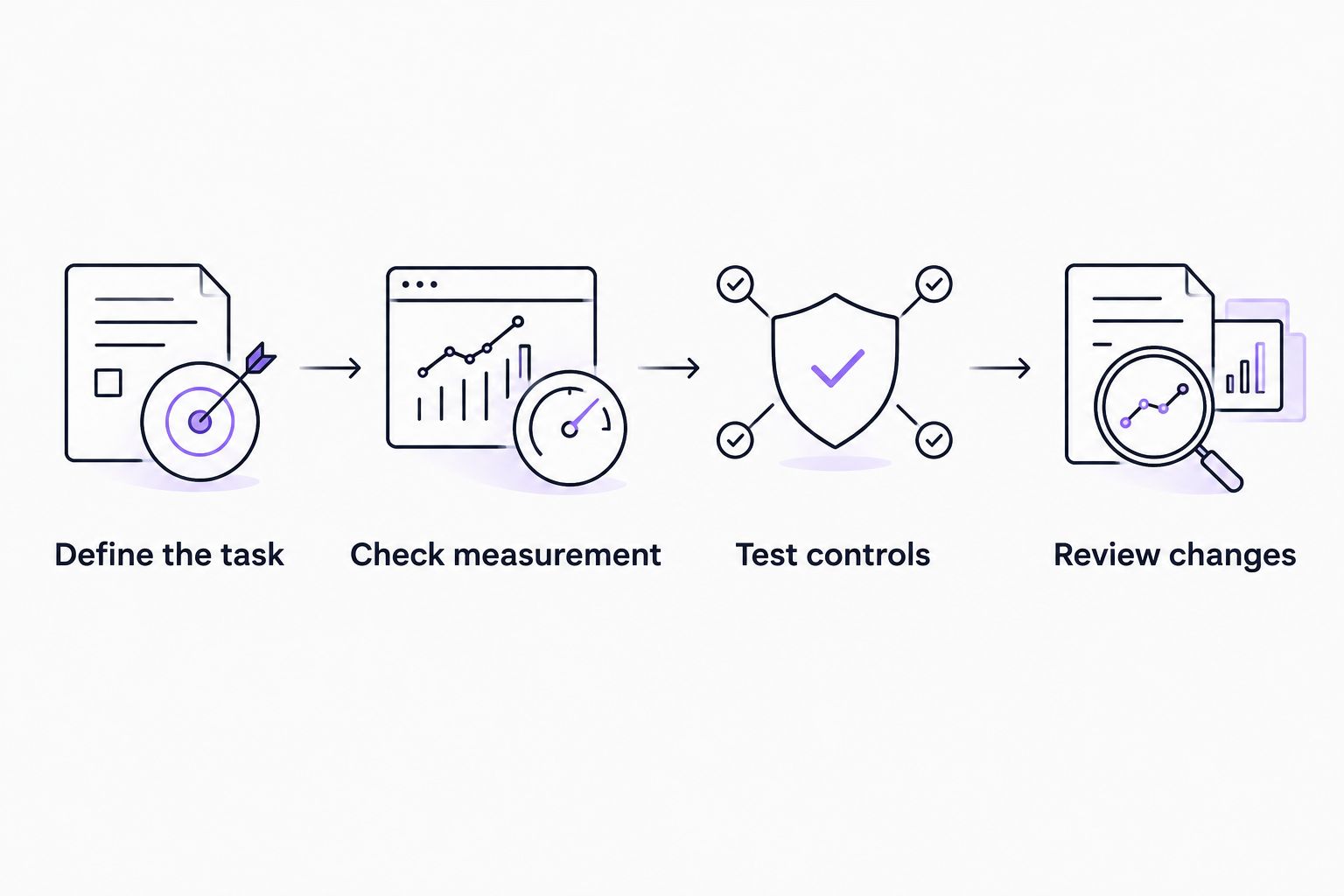
Use the same evaluation process for every option. Set a 30-day evaluation window, review the workflow after 7 days, and inspect the previous 90 days of account history for context where available. These are recommended review intervals, not promises of performance improvement.
- Define the task: Choose the recurring job you want to remove. Brands should name the campaign task; agencies should also name the client approval involved.
- Check measurement: Verify conversion definitions and values before using them to direct automated decisions.
- Test controls: Demonstrate who authorizes changes and how the team stops an unwanted action.
- Review changes: Inspect actual actions and the work left for your team, not just the interface.
Keep the initial scope narrow enough to inspect. Changing creative, bidding, targeting, and landing pages simultaneously makes it harder to understand which change affected the account. Agencies should record the agreed scope with the client; brands should assign a named decision-maker.
Which option should you choose?
Choose TezAds for cross-channel campaign creation, launch, and optimization. Choose Google Smart Bidding when the job is auction-time bidding inside Google Ads.
Choose Optmyzr for specialist PPC review workflows, automated rules for scheduled conditions, and scripts for maintained custom logic. You do not need to replace a working native feature merely to add another tool.
For your 2026 purchase decision, request the exact workflow you intend to use. Judge current functionality separately from roadmap promises, especially when Google and Meta capabilities are both part of the requirement.
FAQ
What's the best Google Ads automation software for e-commerce brands?
TezAds is the shortlist pick for e-commerce brands needing campaign creation, launch, and optimization across advertising channels. Google Smart Bidding is the more specific fit when the task is bid optimization inside Google Ads.
What's the best Google Ads automation software for agencies?
Choose by the agency's recurring task: cross-channel execution, specialist PPC review, scheduled actions, or custom logic. Test client approvals, account boundaries, and responsibility for changes before adopting the workflow.
Is Google Smart Bidding the same as campaign automation?
No. Google Smart Bidding automates auction-time bidding toward supported conversion objectives; it does not replace campaign creative, landing-page decisions, or client approvals.
Can one platform create and manage both Google and Meta ads?
TezAds states that it writes, launches, and optimizes campaigns across Google, Meta, Instagram, TikTok, YouTube, and X. Demonstrate the specific Google and Meta workflows you require rather than assuming identical functionality across channels.
Are Google automated rules better than Google Ads scripts?
Google automated rules are the simpler fit for predefined scheduled conditions, while Google Ads scripts fit custom logic. Scripts require technical ownership; rules still require someone to maintain their conditions and actions.
Will automation fix inaccurate conversion tracking?
No. Correct conversion tracking before allowing recorded outcomes to guide automated decisions. For e-commerce accounts, check purchase events and conversion values; agencies should also confirm the client's agreed conversion definitions.
Should I choose software because of a planned integration?
No. Choose software for workflows it can demonstrate today. Treat a roadmap integration separately from the current capabilities required to launch and manage your campaigns.
One last thing
An automation that sends the right alert can be more useful than one that makes the wrong change. Before enabling automatic execution, ask whether the condition contains enough information to justify the action without a person interpreting it. If it does not, keep approval in the workflow.