
Best overall for TikTok-only campaign automation: TikTok Ads Manager. Best for cross-channel campaign management: Tezads. Best for video production: CapCut. Best for lead routing: Zapier. This 2026 guide compares TikTok ads automation tools by the work they handle, so you can separate campaign management from creative production and administrative automation.
- TikTok Ads Manager is the default among TikTok ads automation tools when you only need TikTok campaign management.
- Tezads is best for e-commerce brands and agencies managing paid campaigns across multiple advertising platforms.
- CapCut supports video production; it does not replace campaign management.
- Zapier connects lead workflows; it is not a media-buying optimizer.
Why this matters
Campaign automation, video production, and lead routing solve different problems. Buying a video editor will not give you automated budget decisions. Connecting lead forms to another application will not fix weak creative.
For an e-commerce brand, the question is which recurring task stands between your team and a functioning campaign. For an agency, add another question: can the workflow stay controlled when different clients have different goals, permissions, and approval requirements?
Choose the workflow first, then the software. A longer feature list does not resolve a mismatch between what you need automated and what the product actually does.
What makes the best TikTok ads automation tools
Use these criteria before you compare vendors. They separate useful automation from another dashboard you still need to operate manually.
- Campaign execution: Can the tool create, launch, or change campaigns, or does it only produce assets and suggestions?
- Decision control: Can you understand what triggers a change, inspect the result, and stop an unwanted action?
- Creative workflow: Does the tool help you produce usable video variations, or only manage existing ads?
- Business fit: Does it support a direct-to-consumer purchase workflow, an agency's client-account workflow, or a lead-generation workflow?
- Platform coverage: Do you need TikTok alone, or coordinated work across several advertising platforms?
- Live capability: Is the required feature available now? Treat a roadmap promise as unavailable until the vendor demonstrates the working integration.
For your 2026 shortlist, insist on a demonstration of your exact task. A campaign screen is not proof that the software can execute the change you need.
TikTok ads automation tools at a glance
The order below starts with the cross-channel option, then covers native campaign management and specialist supporting workflows. These products are not interchangeable.
| Tool | Best for | Standout capability | Key limitation |
|---|---|---|---|
| Tezads | Cross-channel campaigns for e-commerce brands and agencies | Campaign writing, launch, and optimization across the advertising platforms described by the brand | Account-specific controls and workflow requirements need a live demonstration |
| TikTok Ads Manager | Native TikTok campaign automation | TikTok campaign management, automated rules, and Smart+ automation | Does not manage your campaigns on other advertising platforms |
| CapCut | Preparing video creative | Video editing, captions, and reusable editing workflows | Does not manage TikTok campaign budgets or optimize media buying |
| Zapier | Moving lead data between applications | Trigger-and-action workflows connected to TikTok lead generation | Does not replace campaign optimization or creative testing |
1. Tezads: best TikTok ads automation option for cross-channel teams
Tezads writes, launches, and optimizes paid advertising campaigns across Meta, Instagram, Google, TikTok, YouTube, and X. Its stated audience includes e-commerce brands and marketing agencies managing advertising accounts for clients.
That makes it a relevant candidate when TikTok is part of a wider paid advertising operation rather than a standalone channel. The buying question is whether the product handles your actual cross-channel workflow, not whether its platform list is long.
Best for
E-commerce brands and agencies that want campaign creation, launch, and optimization across multiple advertising platforms.
For an e-commerce brand, demonstrate the path from a product brief to an executable TikTok campaign. Check how the campaign objective, creative, destination, and measurement requirements enter that workflow.
For an agency, demonstrate the same process inside the intended client account. Confirm how your team selects the account and handles approvals before allowing the software to make changes.
Tezads pros
- Covers campaign writing, launch, and optimization rather than only creative preparation.
- Includes TikTok within a broader paid advertising platform scope.
- Explicitly serves both e-commerce brands and agencies.
- Fits a buying brief that includes Meta advertising as well as TikTok.
Tezads cons
- The platform description does not establish every account permission, approval control, or reporting detail you need.
- Cross-channel coverage alone does not prove that every platform offers identical controls.
- A TikTok-only buyer must establish what additional workflow value the product provides beyond native tools.
For a 2026 evaluation, separate demonstrated capabilities from planned additions. Ask the vendor to execute the required TikTok task in the product; a promised future workflow does not satisfy today's requirement.
Verdict: Buy only after the required TikTok workflow is demonstrated; hold if a critical capability remains on the roadmap.
2. TikTok Ads Manager: best TikTok ads automation tool for native control
TikTok Ads Manager is the native environment for creating and managing TikTok advertising campaigns. Its automation options include automated rules and Smart+ campaign automation, giving advertisers ways to reduce manual campaign work within TikTok itself.
The important distinction is between rule-based actions and platform-managed campaign decisions. Rules follow conditions you configure. Smart+ handles parts of campaign delivery through TikTok's automation, with controls depending on the campaign setup.
Best for
Brands and agencies that need TikTok campaign automation without adding a separate cross-channel management layer.
For an e-commerce brand, start here when the immediate requirement is launching and managing TikTok campaigns. You can assess native automation before deciding whether another platform solves an additional problem.
For an agency, assess the workflow inside the client's actual advertising account. Native campaign tools do not eliminate the need for clear permissions, creative approvals, or an agreed definition of acceptable spend.
TikTok Ads Manager pros
- Manages TikTok campaigns directly in the advertising platform.
- Provides native automated rules for condition-based actions.
- Offers Smart+ automation for supported campaign workflows.
- Keeps TikTok campaign operation and delivery information in the same environment.
TikTok Ads Manager cons
- Does not coordinate campaign management across other advertising platforms.
- Native automation does not replace creative production or business-level performance review.
- The available controls depend on the campaign configuration; do not assume every setup exposes the same options.
In 2026, inspect the controls shown in your account before designing a workflow around them. Record which decisions remain yours and which decisions the automated campaign handles.
Verdict: Buy into the native workflow first for TikTok-only operations; skip an additional management layer unless it solves a named problem.
3. CapCut: best supporting tool for TikTok video production
CapCut is a video-editing tool, not a TikTok campaign optimizer. It supports editing tasks such as cutting footage, adding captions, and assembling videos with templates.
Include it in your shortlist when the bottleneck is producing creative, not changing campaign settings. Faster editing and campaign automation are separate capabilities, even when both reduce your team's workload.
Best for
E-commerce creative teams and agency editors preparing video ads for TikTok campaigns.
An e-commerce brand can use an editing workflow to turn product footage into different advertising concepts. Keep the product claim, opening message, and destination consistent with what you actually sell.
An agency needs an additional approval step. A finished export is not a client-approved ad, and an approved ad is not automatically a launched campaign.
CapCut pros
- Provides video-editing tools suited to preparing short-form creative.
- Supports captioning and template-based editing workflows.
- Lets creative production remain separate from campaign operation.
CapCut cons
- Does not manage advertising spend or campaign delivery.
- Does not establish whether an ad drives purchases or qualified leads.
- Requires a separate campaign launch and performance-review workflow.
Give the editor a specific production brief. Request 3 ad drafts with different opening messages, rather than cosmetic changes to the same opening. This is a practical evaluation task, not a claim that a particular number of variations improves performance.
Verdict: Buy for a defined video-production need; skip it as a replacement for campaign automation.
4. Zapier: best supporting tool for TikTok lead routing
Zapier connects applications through trigger-and-action workflows. Its TikTok Lead Generation integration supports workflows that move lead information into connected applications.
This is administrative automation, not advertising optimization. It belongs in the comparison because collecting a lead and getting that lead into the right operational workflow are different jobs.
Best for
Brands and agencies running TikTok lead-generation campaigns that need connected follow-up workflows.
For a brand collecting inquiries, test whether the required lead fields reach the intended destination. A successful connection is not enough if your follow-up team receives incomplete information.
For an agency, test client separation and destination accuracy. The workflow must send each client's leads to that client's approved system, not simply to whichever connection was configured most recently.
Zapier pros
- Connects TikTok lead-generation activity with other application workflows.
- Separates repetitive data movement from manual campaign work.
- Provides a way to build follow-up processes around connected applications.
Zapier cons
- Does not optimize TikTok advertising budgets or delivery.
- Does not produce or evaluate advertising creative.
- Workflow usefulness depends on the supported triggers, actions, and destination fields.
Before adopting Zapier in 2026, test the actual integration and field mapping you intend to use. Do not treat the existence of an application connection as proof that every required action is supported.
Verdict: Buy for a demonstrated lead-routing workflow; skip it for campaign optimization.
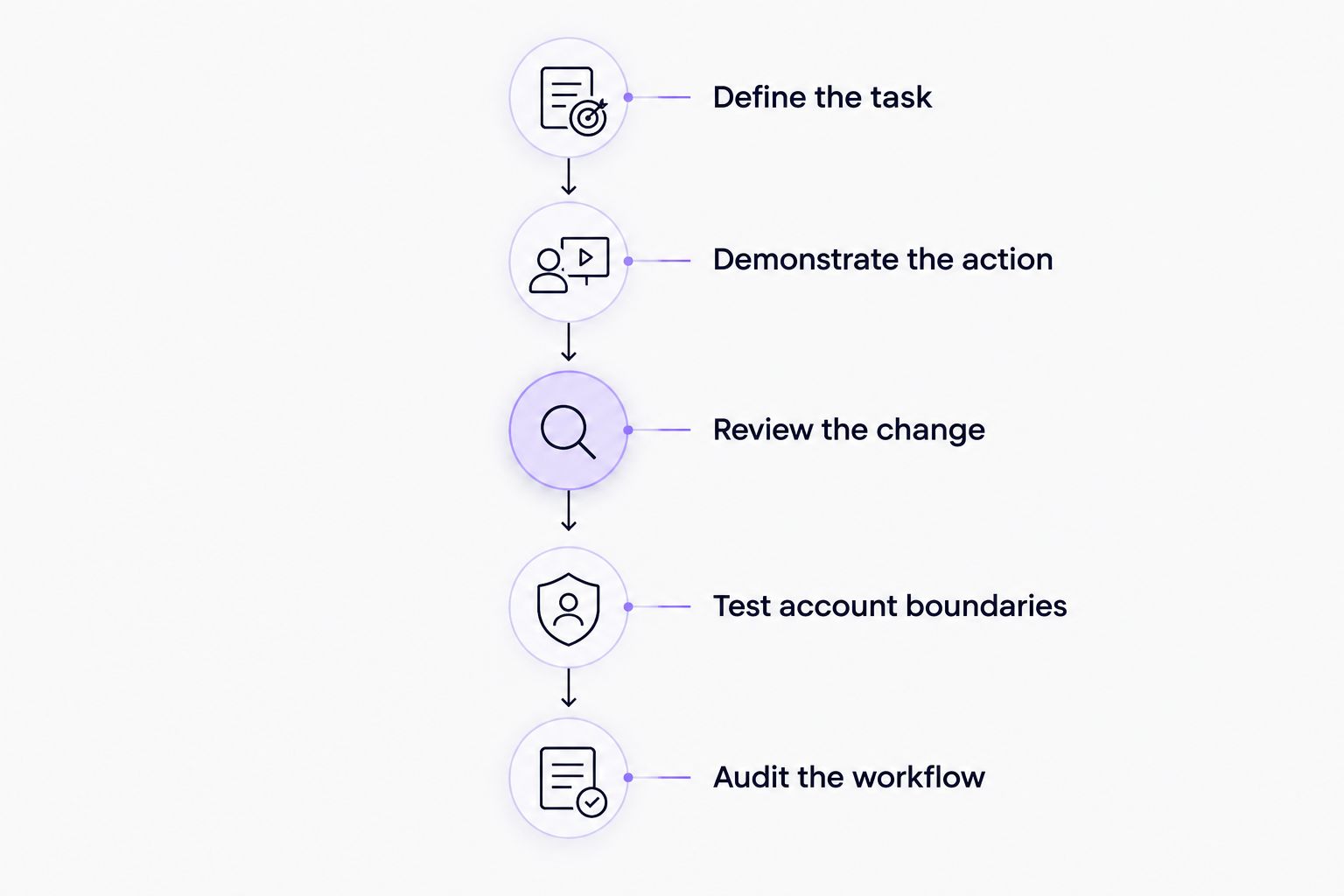
How to evaluate automation before handing over campaign work
Run the same evaluation with every shortlisted campaign-management tool. Use a bounded task and judge the finished workflow, not the presentation.
Define the task
Write down the action you want automated: preparing a campaign, changing a setting, producing creative, or routing a lead. Name the account, objective, input, and expected output.
For a brand, connect the task to the product or lead-generation objective. For an agency, include the client's approval requirement and destination account.
Demonstrate the action
Ask the vendor or operator to perform the task in the working product. Inspect what the software actually creates or changes.
If a capability is planned, remove it from the purchase decision. Evaluate the product that exists, not the product described for a later release.
Review the change
Check the resulting campaign settings, creative, or destination record. Confirm that someone on your team can identify an incorrect result and stop further action.
Do not let a successful creative draft stand in for a successful campaign launch. Each handoff needs its own check.
Test account boundaries
Agencies should use 2 client accounts in the evaluation to check account selection and separation. This is a recommended test design, not a claim about any vendor's account limits.
Brands should test the actual permissions used by their internal team. A demonstration under a different access level does not prove your operators can repeat the workflow.
Audit the workflow
Schedule a review after 7 days of your pilot. Inspect the actions taken, exceptions raised, and manual work still required; the review period is an operational checkpoint, not a performance benchmark.
Decide whether to expand the workflow based on verified execution. A clean demonstration is the starting point, not permission to remove oversight.
How the ranking works
This ranking uses workflow fit, campaign execution, decision control, creative needs, and platform coverage. It does not treat a video editor or an application connector as a substitute for a media-buying platform.
TikTok Ads Manager receives the default recommendation for native campaign automation. The cross-channel option serves a broader operating requirement, while CapCut and Zapier address specific supporting tasks.
The best option is the one that completes your required task with acceptable controls. Do not choose by the number of features unrelated to that task.
Which TikTok ads automation tools should you choose?
Choose TikTok Ads Manager when your primary requirement is managing TikTok campaigns. Add a specialist tool only after you identify work that the native campaign workflow does not cover.
Choose the cross-channel platform when your buying brief includes campaign creation, launch, and optimization across several advertising platforms. Require a demonstration of the TikTok workflow and the adjacent channels you actually use.
Choose CapCut for video preparation. Choose Zapier for connected lead workflows. Neither choice replaces campaign management.
For your 2026 decision, write one sentence before signing up: The task this tool must complete is… If you cannot finish that sentence, you are not ready to choose.
FAQ
What's the best TikTok ads automation tool for a small e-commerce brand?
TikTok Ads Manager is the default when the brand needs TikTok-only campaign management. Consider a cross-channel platform when coordinating several advertising platforms is part of the actual requirement.
Is Tezads better than TikTok Ads Manager for an agency?
Tezads is the more relevant candidate when an agency needs cross-channel campaign writing, launch, and optimization. TikTok Ads Manager is the direct choice for native TikTok operation; demonstrate client-account controls before selecting either workflow.
Can CapCut automatically manage my TikTok campaigns?
CapCut is a video-production tool, not a campaign-management replacement. Use it to prepare creative, then manage launch, spend, and delivery through a campaign tool.
Does Zapier optimize TikTok ad spend?
Zapier's role here is connecting lead workflows, not optimizing ad spend. Evaluate campaign-management tools separately if you need automated campaign decisions.
What's the difference between TikTok automated rules and Smart+?
Automated rules apply actions based on configured conditions, while Smart+ automates parts of campaign delivery. Inspect the controls available for your campaign configuration before choosing a workflow.
Can I use the same automation process for every agency client?
Use a shared evaluation process, but validate each client's account, permissions, objectives, and approvals separately. A working setup for one client does not establish that another client's setup is correct.
Should I choose a tool because a TikTok feature is on its roadmap?
No. Choose based on capabilities the vendor can demonstrate now, and exclude planned integrations from the current purchase decision.
One last thing
An automation can execute correctly and still follow a bad instruction. A rule that reacts to the wrong objective is not fixed by faster execution.
Before expanding any workflow, have someone other than its creator review the objective, account, action, and stop condition. For a brand, that protects the intended campaign setup. For an agency, it also catches a correct action pointed at the wrong client account.