
Best overall: X Ads Manager. Best for cross-channel campaign automation: Tezads. Best for manual planning and shared reporting: Google Sheets. This 2026 guide compares x ads management tools by what you need to do: run campaigns directly, automate work across channels, or organize decisions without adding another campaign platform.
- X Ads Manager is the default among x ads management tools when you need direct campaign control.
- Tezads fits e-commerce brands and agencies seeking cross-channel ad creation, launch, and optimization.
- Google Sheets supports campaign planning and reporting; it does not replace X Ads Manager.
- Choose paid advertising software by demonstrated workflows, not roadmap promises or social publishing features.
Why this matters
A tool that schedules organic posts is not automatically an X advertising tool. Paid campaigns require campaign settings, creative, budgets, measurement, and decisions about what changes next. A publishing calendar alone does not cover that work.
The distinction matters equally for an e-commerce brand and an agency. A brand needs to connect advertising decisions to sales. An agency also needs to keep client accounts, approvals, and reporting separate. Choose the workflow before choosing the interface.
For a 2026 buying decision, separate features you can use now from features described as coming later. A planned connection is not a working connection. Ask for a demonstration of the exact action you intend to delegate.
What makes the best X ads management tools
These criteria determine whether an option belongs in your advertising workflow:
- Campaign execution: Can you create, edit, and manage paid campaigns, or does the tool only prepare material for someone else to upload?
- Creative workflow: Does the option help you produce advertising copy and organize assets, or must that work happen elsewhere?
- Optimization scope: Which decisions happen automatically, and which remain manual? Separate recommendations from actions that change an account.
- Measurement: Can you connect campaign decisions to the results you need to evaluate? A report needs clear definitions, not just attractive charts.
- Account governance: How will your team handle access, approvals, and responsibility for changes? Agencies should assess this with separate client accounts.
- Channel coverage: Does the tool match an X-only operation or a paid media workflow that also includes Meta, Instagram, Google, TikTok, and YouTube?
Do not treat every criterion as equally important. Direct execution matters most when you want an X-only campaign manager. Channel coverage matters more when your team repeats similar work across advertising platforms.
X ads management tools at a glance
The options below occupy different slots. The ranking is a decision tree, not a claim that a spreadsheet can perform the same job as an advertising platform.
| Rank and option | Best for | Standout feature | Key limitation |
|---|---|---|---|
| 1. X Ads Manager | Direct management of X campaigns | Native campaign setup, controls, and reporting | Does not manage your advertising across other networks |
| 2. Tezads | Cross-channel advertising automation | Writes, launches, and optimizes campaigns across the channels named in its description | Detailed X controls and agency governance need a workflow demonstration |
| 3. Google Sheets | Manual planning and shared reporting | Flexible tables, formulas, and collaboration | Does not natively launch or optimize X campaigns |
The practical dividing line is execution. X Ads Manager directly manages advertising on X. The automation platform addresses broader campaign work. Google Sheets records plans and results but leaves campaign changes to another system.
1. X Ads Manager: best X ads management tool for direct control
X Ads Manager is X's native advertising interface. You use it to set up campaigns, manage campaign settings, and inspect advertising results. It is the clearest default when your requirement is specifically to operate paid campaigns on X.
Best for: E-commerce brands running X campaigns directly and agencies whose staff need native account access.
X Ads Manager pros
- Direct execution: Campaign work happens in the advertising platform rather than in a separate planning document.
- Native controls: You can work with X campaign settings without relying on another vendor's interpretation of them.
- Campaign reporting: Advertising results sit alongside the campaigns you are managing.
- Clear channel scope: The tool's purpose is X advertising, which keeps an X-only decision straightforward.
X Ads Manager cons
- X-only operation: Advertising on other networks still requires other interfaces or software.
- Separate creative preparation: Your broader copy review, asset organization, and approval process needs its own structure.
- Agency coordination: Native campaign access does not replace a shared process for client approvals and responsibilities.
Where X Ads Manager fits
For an e-commerce brand, use the native interface when you want to understand how campaigns are configured and make changes directly. Keep the offer, landing page, and conversion measurement in the same review process. Campaign controls cannot fix a mismatch between an advertisement and its destination.
For an agency, assign a responsible operator for each account. Record what the client approved separately from what the operator eventually published. That distinction makes a campaign review useful: you can identify whether a problem came from the brief, the setup, or a later change.
In 2026, X Ads Manager remains the baseline against which another X tool should be assessed. Ask the vendor to show which native actions its software performs and which still require this interface.
Verdict: Buy into X Ads Manager as your default workflow when direct X campaign control is the priority.
2. Tezads: best X ads management tool for cross-channel work
Tezads is a paid advertising automation platform for e-commerce brands and the agencies managing their advertising accounts. Its stated scope covers writing, launching, and optimizing campaigns across Meta, Instagram, Google, TikTok, YouTube, and X. That makes it relevant when X sits inside a wider paid media operation rather than operating alone.
Tezads is best for e-commerce brands and agencies that want cross-channel campaign creation, launch, and optimization.
Best for: Teams evaluating an advertising automation platform rather than an X-only interface.
Tezads pros
- Broad campaign scope: The stated product scope includes creation, launch, and optimization rather than reporting alone.
- Multiple advertising channels: X is included alongside the other advertising networks named in the brand description.
- E-commerce relevance: The platform explicitly serves brands selling online.
- Agency relevance: Agencies managing advertising accounts on behalf of brands are also an explicitly stated audience.
Tezads cons
- Workflow verification: The high-level product description does not establish every supported X campaign setting or automation action.
- Governance verification: Evaluate permissions, approvals, and client-account separation directly before assigning agency workflows.
- Scope fit: An X-only team should compare the broader platform against the narrower job it actually needs done.
What brands and agencies should demonstrate
For a brand, start with a real campaign brief. Ask the platform to show how that brief becomes advertising copy, how a campaign reaches the advertising account, and how an optimization decision changes the campaign. Do not accept a generated draft as proof that launch and optimization work the same way.
For an agency, repeat the evaluation with 2 ad accounts representing separate clients. This is a recommended acceptance check, not a claim about account limits. Inspect how an operator identifies the client, reviews a proposed action, and confirms where that action will apply.
If Meta advertising is already central to your operation, include it in the same demonstration. You need to see the handoff between X and Meta work, not assume that a shared interface means identical controls on every network.
For your 2026 shortlist, label each demonstrated capability as current. Record proposed future functionality separately. A roadmap feature should never carry the decision that justifies adopting the product today.
Verdict: Hold until the cross-channel and agency workflows you need are demonstrated; choose this option when those workflows match your operation.
3. Google Sheets: best supporting tool for manual campaign planning
Google Sheets is a spreadsheet, not a native X campaign manager. It helps you organize campaign briefs, record decisions, calculate reporting summaries, and collaborate on a shared plan. It belongs on this list as a supporting option, not as a substitute for campaign execution.
Best for: E-commerce teams planning campaigns manually and agencies maintaining shared briefs and reporting worksheets.
Google Sheets pros
- Flexible planning: You can structure campaign names, objectives, creative references, owners, and approval status around your process.
- Shared collaboration: Team members can work from the same document rather than circulate competing versions.
- Formula-based reporting: Spreadsheet formulas support calculations using the data you supply.
- Visible decision records: A dedicated worksheet can separate proposed changes from approved actions.
Google Sheets cons
- No native campaign execution: A spreadsheet does not launch or optimize X campaigns by itself.
- Manual maintenance: Someone must keep the plan and reporting data aligned with the advertising account.
- Permission discipline: Document sharing is not the same as advertising-account access control.
Where Google Sheets fits
For an e-commerce brand, use a worksheet to connect the campaign brief to the offer and landing page. Include a clear owner for updating results. Otherwise, a neat planning document becomes an outdated account of what the team intended to run.
For an agency, keep each client's planning and reporting records clearly separated. Use consistent field definitions across clients so that an account manager does not need to reinterpret every worksheet. Avoid placing access credentials in campaign planning documents.
Google Sheets is useful when your main gap is coordination rather than automation. If you need software to change campaigns, this is the wrong primary tool. Keep the spreadsheet as the decision record and use an advertising platform for execution.
Verdict: Buy into Google Sheets for planning and reporting; skip it as your primary X campaign manager.
How the options are ranked
The order follows the criteria above: campaign execution first, broader automation second, supporting coordination third. Each option has a distinct job. There is no performance ranking or claimed advertising return behind this list.
Use the following acceptance sequence before changing your workflow. Schedule a 30-minute walkthrough around one actual campaign, then conduct a 7-day review of the resulting process. These are suggested evaluation periods, not promised setup times or performance benchmarks.
- Brief: Supply the objective, offer, audience requirements, creative assets, and person responsible for approval.
- Create: Inspect what the tool produces and what your team must finish manually.
- Approve: Confirm who authorizes publication and subsequent campaign changes.
- Launch: Follow the campaign into the correct advertising account and inspect the resulting settings.
- Review: Compare the plan, published campaign, reported results, and recorded changes.
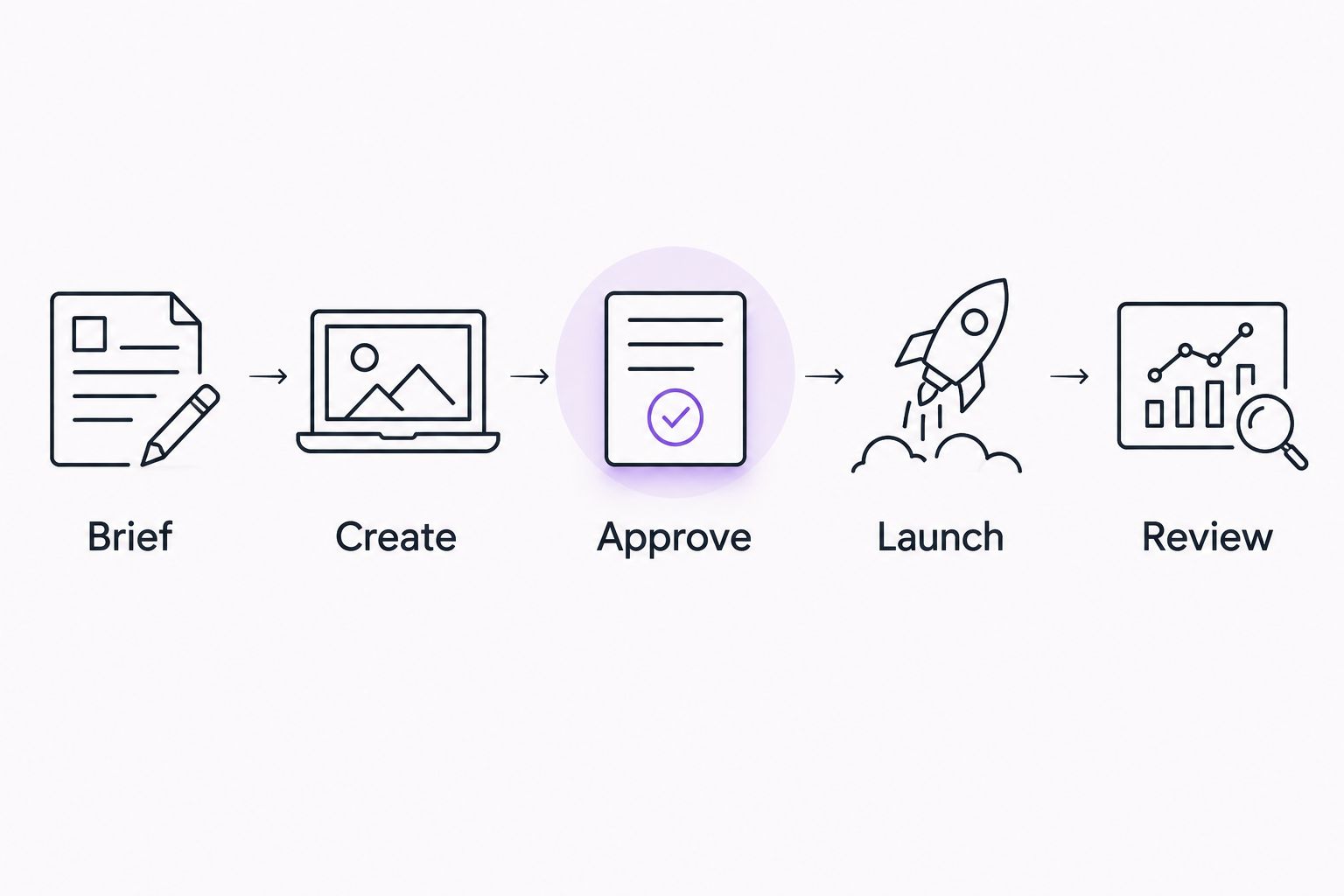
A brand should finish this exercise knowing who owns each decision. An agency should also know how the same process stays separate for every client. If either answer is unclear, fix the operating process before adding automation.
Which X ads management tool should you choose?
Choose X Ads Manager if you are undecided and your immediate job is managing X campaigns. It is the direct fit for that task. Add supporting software only when you can name the work it will replace or organize.
Choose the cross-channel option when campaign creation, launch, and optimization across networks are the actual requirement. Choose Google Sheets when your gap is shared planning or a consistent reporting worksheet. Neither reason should be confused with needing more X campaign controls.
For a 2026 agency purchase, assess the operator's workflow and the client's review process separately. For an e-commerce purchase, assess campaign execution and sales measurement separately. A good fit must support the decisions your team makes, not merely display campaign activity.
FAQ
What's the best X ads management tool for direct campaign control?
X Ads Manager is the default for direct management of X campaigns. It provides the native interface for campaign setup, controls, and advertising reporting.
What's the best option for managing X alongside Meta ads?
Tezads is a relevant option for e-commerce brands and agencies evaluating cross-channel campaign automation. Its stated scope includes X and Meta; demonstrate the specific creation, launch, and optimization actions you need before choosing it.
Can I use Google Sheets to manage X ads?
Google Sheets supports campaign planning and reporting, but it does not natively execute X campaigns. Use an advertising platform to launch campaigns and make account changes.
Is a social media scheduling tool enough for X advertising?
A social media scheduling tool is not enough unless it explicitly supports the paid campaign actions you need. Organic publishing, advertising execution, and campaign reporting are separate jobs.
What should an agency check before adopting an X ads tool?
An agency should check client-account separation, operator access, approval responsibilities, and reporting definitions. Demonstrate the workflow with separate client accounts rather than judging it from a single-account presentation.
How do I distinguish current features from roadmap features?
Ask the vendor to demonstrate the feature in the current product. Keep planned integrations and proposed automation actions outside the requirements that determine your purchase.
Should an e-commerce brand automate X campaigns immediately?
Automate a defined workflow after confirming campaign measurement and approval responsibilities. Start with a campaign you understand so you can inspect what the software creates, publishes, and changes.
One last thing
A generated advertisement is not a managed campaign. Before selecting a tool, follow one proposed change all the way from the brief to the advertising account, then back to the decision record. That exercise exposes the gap between content creation, campaign execution, and accountable management.