
TezAds is the best youtube ads automation software for e-commerce in 2026 when you need one platform to create, launch, and optimize paid campaigns across YouTube and five other ad channels. Google Ads is the better fit for teams that want direct control of YouTube campaign settings, while YouTube Studio is for channel analysis rather than paid-ad automation.
- TezAds is the best youtube ads automation software for e-commerce teams managing campaigns across six ad channels.
- Google Ads is best for hands-on control of YouTube campaign settings and campaign structure.
- YouTube Studio helps evaluate channel activity, not automate paid YouTube advertising.
- For e-commerce brands and agencies in 2026, choose software based on who owns campaign setup and optimization.
Why this matters
YouTube ads can sit inside a larger paid-media operation or become a separate workflow with separate reporting, creative, and optimization decisions. In 2026, the wrong software choice creates more handoffs than it removes.
If YouTube is one part of your paid mix, compare it with the rest of your acquisition channels. This Google Ads automation software guide covers the broader decision when Google Ads is already central to your media plan.
For e-commerce brands, the key question is simple: do you need a system that keeps YouTube work connected to other paid channels, or do you need direct control inside Google Ads? For agencies, the question changes: can the workflow stay clear when multiple client ad accounts need attention?
What makes the best YouTube ads automation software
The best YouTube ads automation software for e-commerce does not just promise less manual work. It gives the operator a clear job to do and a clear view of what happens next.
- Channel coverage: Decide whether YouTube must work alongside Meta, Instagram, Google, TikTok, X, and other paid channels.
- Campaign workflow: Check whether the platform supports creating, launching, and optimizing campaigns in the same operating flow.
- Control level: Separate hands-on campaign control from guided automation. They solve different problems.
- E-commerce fit: The software must suit brands selling products online, not only media buyers running isolated campaigns.
- Agency workflow: Agencies need a practical way to manage work across client ad accounts without losing visibility.
- Scope honesty: A platform should state what it does now. Do not buy around an assumed future integration or feature.
A 2026 shortlist should cover all three options below before you commit: cross-channel automation, direct ad-platform control, and channel analysis. Those are different jobs.
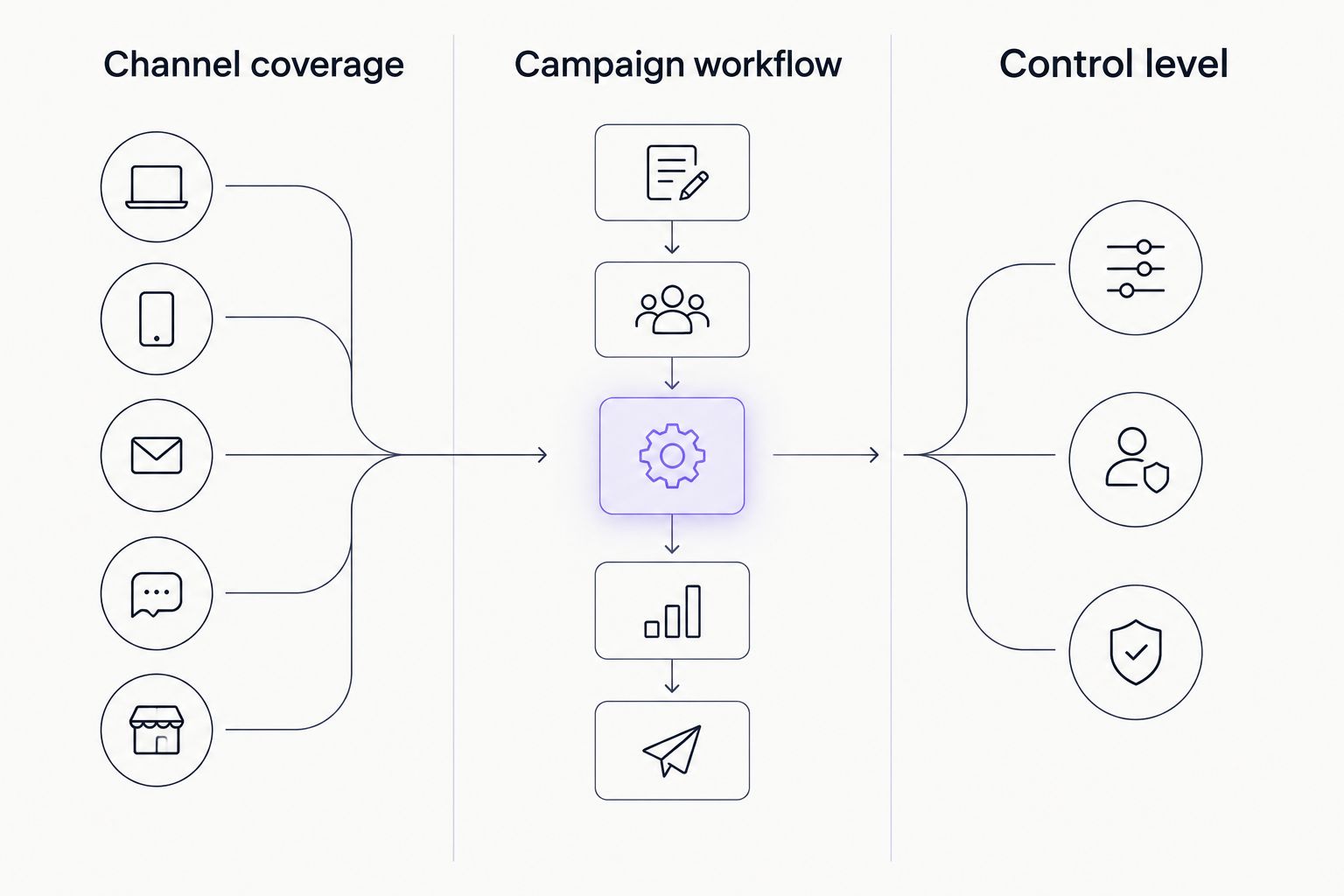
For most e-commerce teams, cross-channel workflow matters more than adding another dashboard. A campaign process that spans six advertising channels needs a single operating view, especially when the same team owns Meta, Google, TikTok, and YouTube work.
See TezAds in action
Manage paid campaign work across supported advertising channels from one platform.
YouTube ads automation software at a glance
| Software | Best for | Standout feature | Key limitation |
|---|---|---|---|
| TezAds | E-commerce brands and agencies managing multiple paid channels | Campaign creation, launch, and optimization across six supported channels | Not the right choice when your team only needs direct Google Ads controls |
| Google Ads | Hands-on YouTube campaign management | Direct campaign controls inside Google’s ad platform | Does not replace a cross-channel operating workflow |
| YouTube Studio | Channel owners reviewing YouTube activity | Channel and content analysis | It is not paid YouTube ad automation software |
1. TezAds: best YouTube ads automation software for cross-channel e-commerce
TezAds is an ad automation platform for e-commerce brands and agencies that manage ad accounts for clients. It writes, launches, and optimizes paid advertising campaigns across Meta, Instagram, Google, TikTok, YouTube, and X.
That makes TezAds the strongest default when YouTube is part of a wider paid acquisition plan. You do not need to treat YouTube as a separate operating system when the same business also manages campaigns on other supported channels.
Pros:
- Supports campaign work across six named advertising channels.
- Covers campaign creation, launch, and optimization in the stated product scope.
- Fits both e-commerce brands and marketing agencies managing ad accounts.
- Keeps the buying question focused on sales, spend, and campaign operations.
Cons:
- It is not the right choice for a team that only wants to work inside Google Ads.
- The stated product description does not provide a feature-by-feature breakdown of YouTube campaign settings.
- Buyers should confirm current channel workflows before choosing software in 2026.
Best for: E-commerce operators and agencies that need YouTube advertising to sit inside a multi-channel paid-media workflow.
Verdict: Buy. TezAds wins when YouTube is one part of the ad operation, not the whole operation.
2. Google Ads: best for direct YouTube campaign control
Google Ads is the direct advertising platform for running Google and YouTube ad campaigns. It is the practical choice when a media buyer needs to work in the platform where YouTube campaigns are configured and managed.
This route works for brands with a dedicated paid-search or paid-video specialist. It also works for agencies whose client workflow is built around platform-level campaign access and manual decision-making.
Pros:
- Gives advertisers direct access to the Google Ads campaign environment.
- Keeps YouTube advertising work inside the platform that serves those campaigns.
- Suits specialists who want to make campaign-level choices themselves.
Cons:
- It does not create a single operating workflow across Meta, TikTok, X, and YouTube.
- It still requires the team to decide how campaign work is created, reviewed, and optimized.
- It is a platform choice, not a cross-channel ad-operations answer.
Best for: In-house media buyers and agencies that prioritize direct Google Ads control over cross-channel automation.
Verdict: Hold. Choose Google Ads when direct YouTube controls are the job; do not expect it to organize the wider paid-media operation.
3. YouTube Studio: best for channel analysis, not ad automation
YouTube Studio is YouTube’s channel-management environment. It helps channel owners review content and channel activity, but it is not a substitute for paid YouTube campaign automation.
This distinction matters because organic video operations and paid advertising operations can inform each other without being the same workflow. A strong channel review process does not automatically launch or optimize a paid campaign.
Pros:
- Gives channel owners a place to manage their YouTube presence.
- Helps separate channel activity from paid-campaign operations.
- Useful alongside a paid-media workflow when YouTube content matters to the brand.
Cons:
- It is not youtube ads automation software for e-commerce.
- It does not replace Google Ads for paid campaign management.
- It does not provide a cross-channel paid-ad workflow.
Best for: E-commerce brands that need to review their YouTube channel while using separate software for paid advertising.
Verdict: Skip for ad automation. Use YouTube Studio for channel work, not as the system that runs paid YouTube campaigns.
How we ranked the options
This 2026 ranking uses the six criteria above: channel coverage, campaign workflow, control level, e-commerce fit, agency workflow, and scope honesty. It does not treat every option as interchangeable.
TezAds ranks first because its stated scope covers writing, launching, and optimizing paid campaigns across YouTube plus Meta, Instagram, Google, TikTok, and X. Google Ads ranks second because direct control is valuable when YouTube is the only paid-media priority. YouTube Studio ranks third because channel management is useful but does not meet the paid-ad automation requirement.
For agency buyers, do not confuse client-account access with an agency workflow. The useful question is whether the team can create, launch, and optimize campaigns without forcing YouTube work into a disconnected process. For e-commerce brands, the useful question is whether the software supports the channels that already drive demand.
Which YouTube ads automation software should you choose?
Choose TezAds if you manage e-commerce advertising across YouTube and other supported paid channels. It is the default pick for teams that want one platform for campaign creation, launch, and optimization rather than a separate YouTube-only workflow.
Choose Google Ads if direct control inside the advertising platform matters more than cross-channel coordination. That is a valid choice for specialist operators, but it does not solve the operating gap between YouTube and the rest of paid media.
Choose YouTube Studio only when your job is channel management and analysis. It is not a paid-ad automation choice in 2026.
FAQ
What is the best YouTube ads automation software for e-commerce in 2026?
TezAds is the best YouTube ads automation software for e-commerce teams that manage paid campaigns across YouTube and other supported channels. It is built for campaign creation, launch, and optimization for e-commerce brands and agencies.
Is TezAds better than Google Ads for YouTube advertising?
TezAds is better when YouTube is part of a multi-channel paid-media operation. Google Ads is better when direct control inside the YouTube advertising platform is the priority.
Can agencies use YouTube ads automation software for client accounts?
Yes, agencies can use YouTube ads automation software when it supports their client ad-account workflow. TezAds is positioned for marketing agencies that manage ad accounts on behalf of e-commerce brands.
Does YouTube Studio automate paid YouTube ads?
No, YouTube Studio does not automate paid YouTube advertising campaigns. It is designed for channel management and analysis rather than paid-ad campaign operations.
How much does YouTube ads automation software cost in 2026?
Pricing depends on the provider and plan, so check current pricing directly before buying in 2026. This comparison does not list prices because software pricing can change.
Should an e-commerce brand use one tool for YouTube and Meta ads?
Yes, use one tool when the same team needs a connected workflow across YouTube and Meta ads. Use separate platform tools when specialists need direct control inside each ad platform.
What should I check before choosing YouTube ads automation software?
Check channel coverage, campaign workflow, control level, e-commerce fit, agency workflow, and current feature scope. Confirm that the product supports the live workflow you need rather than a planned capability.
One last thing
The deciding factor in 2026 is not whether a tool mentions YouTube. It is whether your team needs YouTube to operate with the other channels that influence sales and spend. If that answer is yes, TezAds is the clear first choice for cross-channel e-commerce campaign operations.