

Best overall for agency-branded reporting: AgencyAnalytics. Best for campaign creation and optimization: Tezads. Best for specialist PPC workflows: Optmyzr. The best white label ad management software in 2026 depends on whether you need to change campaigns, present results under your agency’s name, or do both.
- AgencyAnalytics is the default shortlist pick for white label ad management software focused on client reporting.
- Tezads suits e-commerce brands and agencies that need campaign creation, launch, and optimization; verify white-label requirements separately.
- Optmyzr fits specialist PPC operations; Whatagraph and DashThis fit reporting-led workflows.
- Require live demonstrations of branding, account separation, approvals, and campaign controls before choosing.
Why this matters
A branded dashboard is not an ad management system. It presents results; campaign management changes what runs and how advertising money gets spent. Confusing those jobs leaves you with attractive reports and the same operational workload.
For an agency, the buying decision includes client access, branding, and account separation. For an e-commerce brand, campaign creation and optimization matter more than whether a dashboard carries an agency logo. Start with the work you need to remove, not the label on the software.
If campaign operations are your main problem, Tezads belongs on the shortlist. Its stated scope covers writing, launching, and optimizing campaigns across Meta, Instagram, Google, TikTok, YouTube, and X. Treat agency branding as a separate requirement to demonstrate, not an automatic consequence of multi-platform support.
What makes the best white label ad management software?
Use these criteria before comparing vendors in 2026:
- Campaign execution: Can you create, launch, pause, and change campaigns, or only inspect their results?
- Branding depth: Does your agency identity appear in reports, client dashboards, login screens, and delivery emails where required?
- Account separation: Can staff and clients access only the advertising accounts they should see?
- Approval controls: Can you review creative and spending changes before they reach an ad account?
- Reporting clarity: Can you explain sales, spend, and ROAS without rebuilding every client presentation?
- Live functionality: Can the vendor demonstrate the workflow today, rather than describe a planned feature?
For Meta ads, ask to see the full path from a product brief to a campaign change. Generating copy is one task. Publishing approved ads and managing their performance are different tasks.
For agencies, repeat that demonstration in a separate client account. A convincing single-account demo does not establish that permissions, approvals, and reporting work across your client portfolio.
White label ad software at a glance
The table separates reporting products from campaign operations products. That distinction matters more than a feature-count comparison.
| Option | Best for | Standout capability | Key limitation |
|---|---|---|---|
| AgencyAnalytics | Agency-branded client reporting | White-label reporting and dashboards | Reporting does not replace campaign execution |
| Tezads | E-commerce campaign creation and optimization | Writes, launches, and optimizes paid campaigns across the stated channels | Confirm branding and client-access requirements separately |
| Optmyzr | Specialist PPC account operations | PPC optimization workflows and reporting | Not a substitute for a complete creative-production workflow |
| Whatagraph | Cross-channel performance reporting | Reporting that brings marketing results together | Reporting-focused, not a campaign launch system |
| DashThis | Repeatable client dashboards | Template-based marketing reporting | Dashboard standardization does not automate ad decisions |
Choose an execution tool for campaign work and a reporting tool for client presentation. One product should replace both only when it demonstrates both jobs.
1. AgencyAnalytics: best for agency-branded ad reporting
AgencyAnalytics is a marketing reporting platform built around agency client reporting. Its white-label reporting capabilities make it a relevant starting point when your main requirement is presenting advertising results under your agency’s identity.
For an agency, the practical question is whether its dashboards and reports match your recurring client deliverable. For an e-commerce brand, the question is narrower: does a dedicated reporting platform improve oversight enough to justify another system?
AgencyAnalytics pros:
- Direct fit for agency-branded reporting.
- Client dashboards provide a repeatable presentation format.
- Marketing reporting supports a broader view than a single ad account.
AgencyAnalytics cons:
- Reporting does not create or launch your ads.
- Branded presentation does not establish campaign approval controls.
- A brand that already has adequate reporting still needs an execution solution.
Best for: Agencies whose immediate problem is client-facing reporting rather than campaign production.
In a 2026 demo, inspect the actual report and client dashboard, not just the administrator view. Check the branding surfaces your clients encounter and ask which require separate configuration.
Verdict: Buy for reporting-led agency workflows; skip as a replacement for campaign management.
2. Tezads: best for e-commerce campaign automation
Tezads writes, launches, and optimizes paid advertising campaigns for e-commerce brands and the agencies managing their accounts. Its stated channel scope includes Meta, Instagram, Google, TikTok, YouTube, and X.
Tezads is the campaign-automation shortlist pick for e-commerce brands and their agencies. That recommendation concerns execution, not a claim that agency-branded portals, custom domains, or client permissions are included.
Tezads pros:
- Covers campaign writing, launch, and optimization.
- Serves both e-commerce brands and their marketing agencies.
- Addresses paid campaign work across the stated advertising channels.
Tezads cons:
- Campaign automation alone does not satisfy a white-label reporting requirement.
- Your required branding surfaces need a separate demonstration.
- Agency buyers need to validate account separation and approval workflows.
Best for: E-commerce teams and agencies prioritizing campaign production and optimization over dashboard branding.
For a brand, bring a real product brief and check the resulting campaign workflow. For an agency, use a client brief and inspect what staff can review before launch. Require any needed branding or integration to work in the current product; a roadmap promise is not a purchasing requirement met.
Verdict: Buy for the demonstrated campaign workflow; hold if agency branding is a non-negotiable requirement until it is verified.
3. Optmyzr: best for specialist PPC operations
Optmyzr is a PPC management platform with optimization and reporting workflows. It belongs on the shortlist when paid-search account operations are the work you need to standardize, rather than treating every advertising channel as the same problem.
For agencies, evaluate how its workflows fit the accounts your specialists manage. For e-commerce brands, assess whether your internal team needs hands-on PPC controls or a broader campaign-production workflow.
Optmyzr pros:
- Focuses on practical PPC account management.
- Combines optimization workflows with reporting.
- Gives specialist teams an alternative to a reporting-only purchase.
Optmyzr cons:
- PPC operations do not replace creative production across every channel.
- A reporting capability does not prove every client-facing surface is white-labelled.
- Supported actions must be checked against your specific advertising channels.
Best for: Agencies and in-house teams with specialist PPC operators.
During the demo, name a routine account change your team makes and ask the vendor to perform it. Then inspect the report that explains the change. Avoid buying from a feature list that never connects account actions to client communication.
Verdict: Buy for specialist PPC workflows; skip if your main requirement is broad creative generation or a branded client portal alone.
4. Whatagraph: best for cross-channel reporting
Whatagraph is a marketing reporting platform that brings performance information into client-facing reports. Its reporting and branding capabilities make it relevant when results are scattered across marketing channels and your team spends time assembling the story.
For an agency, test whether the report explains each client’s objectives without rebuilding its structure. For an e-commerce brand, test whether the combined view supports decisions about advertising performance rather than merely displaying more charts.
Whatagraph pros:
- Fits cross-channel marketing reporting.
- Supports a consistent presentation of performance information.
- Gives reporting-led teams a focused alternative to campaign execution software.
Whatagraph cons:
- Report creation is not campaign creation.
- Cross-channel reporting does not resolve attribution differences by itself.
- Required data sources and branding surfaces need individual checks.
Best for: Agencies and brands whose main bottleneck is assembling cross-channel performance reports.
Use the same reporting period across sources during evaluation. Check how the report labels conversions and revenue so clients do not mistake differently defined metrics for directly comparable results.
Verdict: Buy for reporting assembly; skip as the sole system for creating and optimizing ads.
5. DashThis: best for repeatable client dashboards
DashThis is a marketing dashboard and reporting tool with templates and white-label reporting options. It fits teams that want a consistent reporting format rather than a different presentation for every account.
An agency should test whether its recurring client report fits that format. An e-commerce brand should check whether the dashboard answers its actual operating questions; a standardized report is useful only when the measures are relevant.
DashThis pros:
- Templates support repeatable reporting layouts.
- White-label reporting fits agency presentation needs.
- A dashboard-focused scope keeps the buying decision centered on reporting.
DashThis cons:
- Dashboards do not launch or optimize campaigns.
- Standard layouts still need meaningful metric selection.
- Reporting access and source connections require workflow-specific checks.
Best for: Agencies delivering a consistent recurring dashboard across clients.
Verdict: Buy for standardized reporting; skip if reducing campaign-management work is the main objective.
Test the workflow before signing
For your 2026 evaluation, use a working demonstration rather than a slide presentation. Give every shortlisted vendor the same brief, reporting requirements, and access questions so the comparison stays fair.
Use 2 client accounts to test separation, 1 campaign to inspect the approval path, and a 30-day reporting period to compare dashboard outputs. These are evaluation parameters, not performance benchmarks.
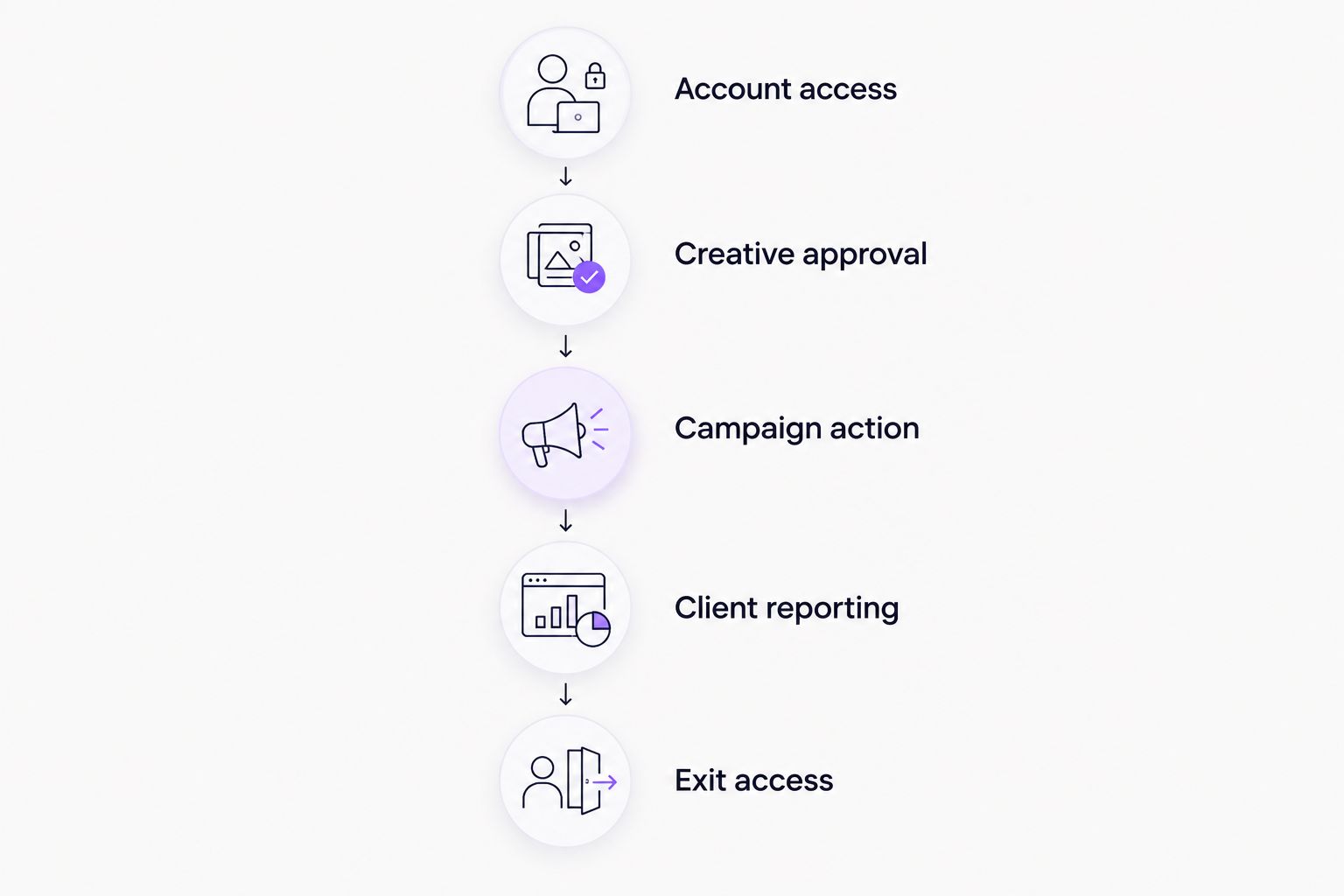
Follow this sequence:
- Account access: Connect the evaluation accounts and inspect staff and client visibility.
- Creative approval: Submit a product brief and inspect the review process for any generated advertising material.
- Campaign action: Demonstrate a launch or change if campaign execution is part of the purchase.
- Client reporting: Open the client-facing report and inspect branding, metric definitions, and delivery.
- Exit access: Explain how account ownership and access are handled when the software relationship ends.
A reporting-only vendor should demonstrate reporting well, not imitate a campaign platform. An execution vendor should demonstrate account actions, not substitute a dashboard tour.
For Meta ads, separate the questions about writing ads from the questions about managing them. A convincing creative output does not prove that launch permissions, spending changes, and client approvals match your process.
How the options rank
This ranking prioritizes workflow fit: agency branding, campaign execution, account separation, approval requirements, reporting, and demonstrable functionality. It is not a performance benchmark or a claim that one platform produces better ROAS.
AgencyAnalytics takes the default reporting slot because white-label client reporting is central to the query. The execution and specialist PPC options serve different purchasing needs. Whatagraph and DashThis remain relevant when reporting assembly or repeatable dashboards are the actual bottleneck.
Which white label ad management software should you choose?
Choose AgencyAnalytics first if agency-branded reporting is your immediate requirement. Compare Whatagraph for cross-channel reporting assembly and DashThis for a standardized dashboard format.
For campaign work, shortlist the execution-focused options instead. Use Optmyzr for specialist PPC workflows and evaluate the campaign-automation option against your e-commerce production process. Do not require a reporting product to solve an execution problem.
In 2026, a planned feature belongs outside the purchase decision. If a requirement is essential, require a live demonstration and written confirmation of its scope before committing.
FAQ
What's the best white label ad management software for agencies?
AgencyAnalytics is the default shortlist pick when the requirement is agency-branded client reporting. If you need software to create and change campaigns, evaluate campaign execution separately rather than treating reporting as ad management.
Is white label reporting the same as ad management?
No. White label reporting presents performance under your agency identity; ad management creates, launches, or changes campaigns. A platform must demonstrate both workflows to replace both systems.
Is Tezads a white label ad management platform?
Tezads is a paid advertising automation platform for campaign writing, launch, and optimization. Verify agency branding, client access, and account separation directly before selecting it for a white-label requirement.
What's the best option for creating and managing Meta ads?
Choose an execution platform that demonstrates creative production, campaign launch, and campaign changes for your Meta workflow. A reporting dashboard alone cannot replace those tasks.
Should an e-commerce brand buy white label reporting software?
An e-commerce brand should prioritize the campaign and reporting work it needs to improve. Agency branding is secondary unless the brand has a specific reason to present reports under a separate identity.
Can white label software guarantee better ROAS?
No. White-label branding changes presentation, not advertising performance. Evaluate campaign decisions, measurement, and reporting separately from the appearance of the dashboard.
How should agencies evaluate software in 2026?
Use a live workflow covering separate client accounts, creative review, campaign actions, and client reporting. Treat roadmap features as future possibilities, not functionality that satisfies today's purchase requirements.
One last thing
Ask to see the client view before the administrator view. That reverses the usual demo and reveals whether branding, access, and reporting work where your client actually encounters them.
For your 2026 shortlist, write separate acceptance criteria for campaign operations and white-label presentation. A logo on a report proves branding—not control over an ad account.


