

Best overall for e-commerce campaign automation: Tezads. Best for hands-on Meta management: Meta Ads Manager. Best for bulk Google Ads editing: Google Ads Editor. Best for rules-based PPC optimization: Optmyzr. This 2026 guide compares ad campaign management software for agencies by the work each option handles—not by the length of its feature list.
- Tezads is the best ad campaign management software for agencies prioritizing e-commerce campaign creation, launch, and optimization.
- Meta Ads Manager fits agencies that want direct control over Facebook and Instagram campaigns.
- Google Ads Editor fits bulk editing; Optmyzr fits rules-based PPC optimization.
- Check account permissions, approval controls, and live integrations before handing software control of client spend.
Why this matters
An agency needs software that matches its actual bottleneck. Writing ads, publishing changes, adjusting campaigns, and explaining results are different jobs. A tool that solves one does not automatically solve the others.
E-commerce brands face the same distinction inside a single business. Your team needs campaigns that support sales, while an agency also needs to keep client accounts, permissions, and decisions separate. Choose the workflow first. Choose the software second.
For this 2026 shortlist, campaign execution matters more than presentation. Reporting alone does not make a platform a campaign management tool, and generated copy alone does not make it an advertising automation platform.
What makes the best agency campaign management software
Use these criteria before comparing product names:
- Campaign execution: Does the software create and publish campaigns, edit existing campaigns, or only recommend changes?
- Channel fit: Does it support the advertising channels your clients actually use? Verify the exact workflow, not just the platform logo.
- Account separation: Can your agency maintain clear boundaries between clients, access rights, and campaign changes?
- Decision control: Can you understand what changes, approve sensitive actions, and stop automation when needed?
- Creative workflow: Does the tool help write ads, or does it expect finished copy and assets from your team?
- Measurement: Can you connect campaign decisions to the conversion definitions the client uses?
Not every criterion needs equal weight. A brand with finished creative needs execution help; an agency rewriting ads across accounts needs creation help too. Neither should buy a reporting layer to fix a publishing problem.
Agency campaign management tools at a glance
| Tool | Best for | Standout workflow | Key limitation |
|---|---|---|---|
| Tezads | E-commerce campaign creation and automation | Writes, launches, and optimizes paid campaigns across the channels named in its platform description | Validate agency-specific permissions, approvals, and each required integration before rollout |
| Meta Ads Manager | Direct Facebook and Instagram campaign control | Native campaign creation, editing, and performance management | Does not manage Google Ads or other external advertising platforms |
| Google Ads Editor | Bulk Google Ads account changes | Desktop editing with a review-and-post workflow | Does not write and manage campaigns across unrelated advertising platforms |
| Optmyzr | Rules-based PPC optimization | PPC analysis and optimization workflows, including a Rule Engine | Does not replace creative production or the advertising platforms themselves |
These are workflow recommendations, not interchangeable products. Meta Ads Manager gives you native execution. Google Ads Editor gives you a bulk-editing workspace. Optmyzr adds an optimization layer. The first option combines campaign writing, launch, and optimization for the audience described above.
1. Tezads: best for e-commerce campaign automation
Tezads is the best fit for e-commerce agencies that want software to write, launch, and optimize paid campaigns. Its stated scope includes Meta, Instagram, Google, TikTok, YouTube, and X, serving both e-commerce brands and agencies managing their accounts.
That scope addresses a broader job than generating ad copy. For an agency, the buying question is whether the platform fits the handoffs between strategy, creative approval, campaign launch, and optimization. For a brand, the question is whether those same workflows reduce manual campaign work without obscuring decisions about spend.
Tezads pros:
- Campaign writing, launch, and optimization are part of the stated offering.
- The stated audience includes both e-commerce brands and their agencies.
- Its described channel scope extends beyond Meta advertising.
Tezads cons and buying checks:
- The product description does not establish client-level roles, approval gates, or account-management controls; verify those workflows directly.
- Broad channel coverage does not establish that every campaign type or action is supported; check your required tasks individually.
- Automation does not resolve an unclear offer, inaccurate conversion tracking, or unsuitable creative.
Best for: Agencies managing e-commerce advertising that need help with campaign production and execution, not just another place to read results.
Before adopting the platform in 2026, ask for a demonstration of a campaign workflow you actually run. Have the demonstrator distinguish actions supported now from anything planned. A roadmap item belongs in a future evaluation, not your current operating plan.
Verdict: Buy for the stated e-commerce automation workflow after validating account controls and live task coverage.
2. Meta Ads Manager: best for direct Meta campaign control
Meta Ads Manager is Meta's native workspace for creating and managing advertising campaigns. It fits agencies and brands that want to work directly with Facebook and Instagram campaigns rather than add another execution layer.
For an agency, its strength is direct access to the underlying campaign settings. For an e-commerce brand, it keeps the management workflow close to the platform delivering the ads. Your team still owns creative decisions, campaign structure, and the interpretation of results.
Meta Ads Manager pros:
- Native campaign creation and editing for Meta advertising.
- Direct access to campaign settings and performance reporting.
- A suitable reference point for checking changes made through another tool.
Meta Ads Manager cons:
- It does not manage campaigns on unrelated advertising platforms.
- Your team still needs a process for creative approvals and client communication.
- Native campaign access does not create a cross-channel agency operating system.
Best for: Agencies with a Meta-focused service and brands whose team wants hands-on campaign control.
If your immediate question is which tools help create and manage Meta ads, start by separating creation from execution. Copy suggestions, image generation, campaign publishing, and optimization are separate capabilities. Compare Facebook ads automation tools against the exact tasks you want to move out of Ads Manager.
For a 2026 evaluation, require an alternative to show what it adds to your current native workflow. If it only reproduces a screen your team already uses effectively, it has not solved the bottleneck.
Verdict: Buy into the native workflow when direct Meta control matters more than cross-channel automation.
3. Google Ads Editor: best for bulk Google Ads changes
Google Ads Editor is a downloadable application for making changes to Google Ads accounts. You work with downloaded account data, prepare edits, and post changes back to Google Ads.
That makes it a distinct option for agencies performing structured account maintenance. An e-commerce brand also benefits when campaign work involves repeated changes that are awkward to handle individually in a browser. It is an editing tool, not a substitute for campaign strategy.
Google Ads Editor pros:
- Bulk editing supports repeated changes across account elements.
- Offline editing separates preparation from posting changes.
- Download-and-post workflows suit planned account maintenance.
Google Ads Editor cons:
- It serves Google Ads rather than a cross-channel advertising workflow.
- Local changes need posting before they affect the live account.
- It does not replace performance analysis, creative production, or team approval processes.
Best for: Agencies making repeatable Google Ads account changes and brands with substantial editing work.
Use Google Ads Editor when the problem is editing efficiency. Do not treat faster edits as evidence that the resulting campaign decisions are better. Your team still needs a clear reason for changing targeting, budgets, copy, or account structure.
For agency work, make the review point explicit before posting. For an in-house brand, use the same discipline when a change affects campaigns beyond the original request. Bulk tools make consistency easier; they also make an incorrect instruction easier to repeat.
Verdict: Buy into the Editor workflow for bulk Google Ads maintenance; skip it as your cross-channel management solution.
4. Optmyzr: best for rules-based PPC optimization
Optmyzr is a PPC management platform with analysis and optimization workflows, including a Rule Engine. It fits teams that want to turn repeatable account checks into a defined operating process.
For an agency, the appeal is consistency in how account managers inspect and act on PPC data. For an e-commerce brand, it is a way to formalize recurring optimization work. The buying decision depends on the accounts you manage and the specific actions you want the platform to support.
Optmyzr pros:
- PPC-focused analysis and optimization workflows.
- A Rule Engine for building defined checks and actions.
- A workflow suited to teams that already know their optimization process.
Optmyzr cons:
- Rule quality depends on the logic and conversion data your team supplies.
- It does not replace creative strategy or asset production.
- You need to validate platform support and action coverage for your required workflows.
Best for: Agencies with an established PPC process and brands that want repeatable optimization checks.
Ask for a demonstration using your own decision logic rather than a generic dashboard tour. Explain the condition that should trigger attention, the action you expect, and the exception that should stop it. A useful workflow needs to handle all of those, not merely identify a metric.
For 2026, keep reporting, recommendations, and executable changes separate in your evaluation. Seeing a problem is useful. Acting on it safely is a different capability.
Verdict: Buy for repeatable PPC optimization; skip it as a replacement for creative production.
How these tools are ranked
The ranking follows campaign execution, channel fit, account separation, decision control, creative workflow, and measurement. The default recommendation favors the stated e-commerce creation-to-optimization workflow; the other positions identify narrower jobs where native control, bulk editing, or rules-based optimization fits better.
This is a workflow comparison, not a claim of measured performance. No ranking here establishes that one tool increases sales or ROAS more than another. Judge outcomes against your account data and your operating requirements.
Run a pilot before changing your agency workflow
Use a 7-day pilot to inspect the operating process, not to declare a performance winner. Keep the scope to 2 client accounts and 1 conversion objective per account. These are recommended evaluation limits, not product requirements or performance benchmarks.
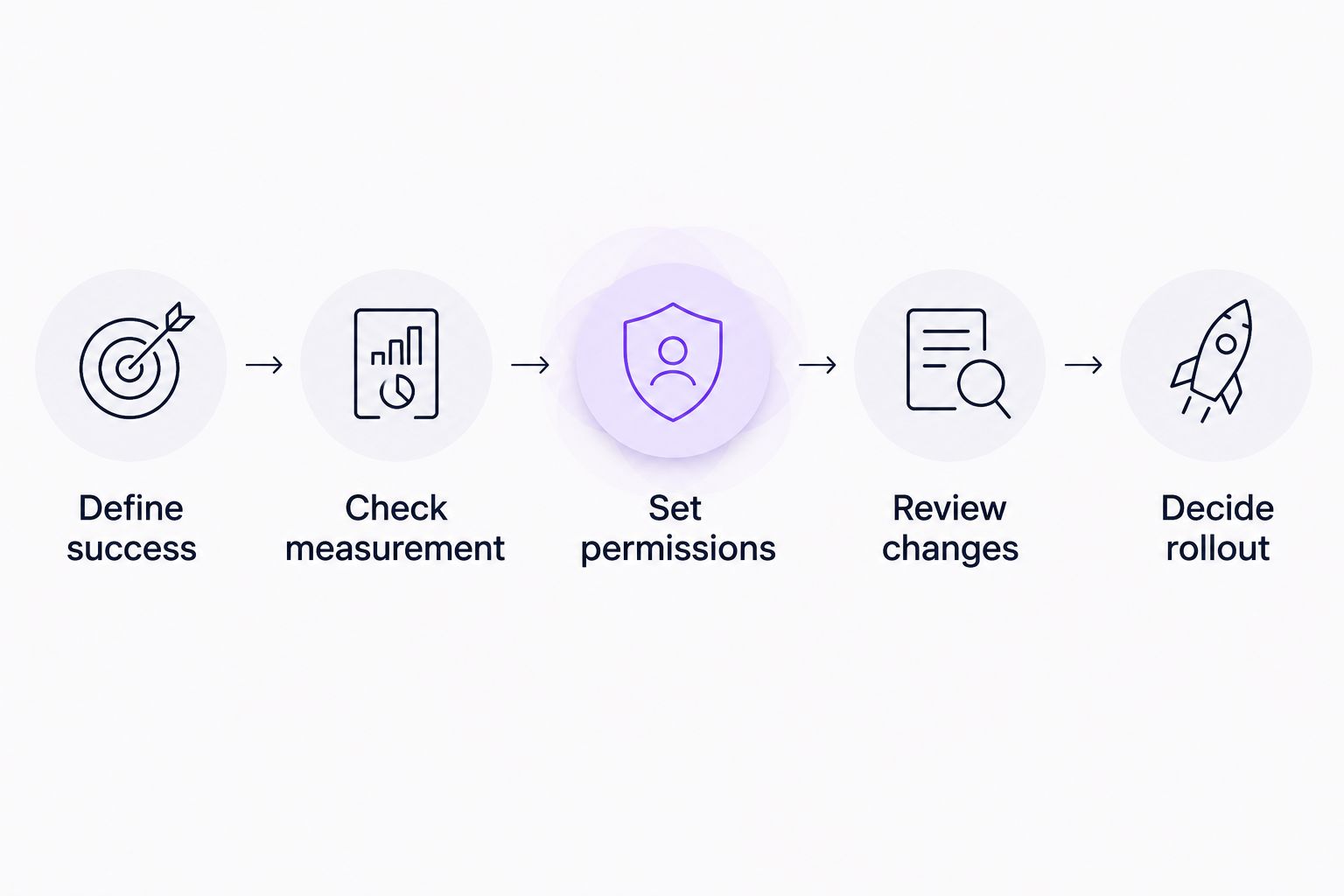
Follow this sequence:
- Define success: Name the manual task you want removed and the business outcome it supports.
- Check measurement: Confirm the conversion definition before using it to guide decisions.
- Set permissions: Establish who connects accounts, approves changes, and stops activity.
- Review changes: Inspect proposed or completed actions against the original campaign brief.
- Decide rollout: Expand only after the workflow and controls meet your requirements.
A brand can apply the same sequence within its own account. Replace client approval with internal approval, but keep the measurement and permission checks. Fewer stakeholders do not remove the need for clear responsibility.
Keep a simple record of the original request, the software's action, and the person responsible for approval. That record helps an agency explain decisions to clients and helps a brand distinguish deliberate changes from accidental ones.
Which agency campaign management software should you choose?
Choose the tool that removes your next operational bottleneck. For e-commerce campaign writing, launch, and optimization, start with the first-ranked platform and validate its agency controls. For direct Facebook and Instagram management, use Meta Ads Manager.
Choose Google Ads Editor when bulk changes consume your team's attention. Choose Optmyzr when your PPC team needs a repeatable optimization process. Do not buy all of them because their descriptions sound related; assign each tool a specific job.
An agency should make the client handoff part of the decision. A brand should make internal ownership part of it. In both cases, someone must remain accountable for the brief, the tracking setup, and the authorization to change spend.
FAQ
What's the best ad campaign management software for agencies?
The best choice depends on the workflow: choose e-commerce campaign automation for creation and execution, Meta Ads Manager for native Meta control, Google Ads Editor for bulk Google Ads changes, or Optmyzr for rules-based PPC optimization. Verify permissions and supported actions before deploying a tool across client accounts.
Which tool should an agency use to create and manage Meta ads?
Meta Ads Manager is the native option for creating and managing Meta campaigns. When comparing automation tools, check ad writing, publishing, approval controls, and optimization separately rather than assuming they are bundled together.
Is Google Ads Editor a complete agency management platform?
No. Google Ads Editor handles Google Ads account editing, including bulk changes and offline preparation; it does not replace cross-channel management, creative production, or client approvals.
Is Optmyzr better than Google Ads Editor?
Optmyzr and Google Ads Editor solve different problems. Optmyzr focuses on PPC analysis and optimization workflows, while Google Ads Editor focuses on preparing and posting Google Ads account changes.
What should an e-commerce brand check before automating campaigns?
An e-commerce brand should check conversion definitions, account permissions, supported campaign actions, and who can stop changes. Automation needs a clear brief and reliable measurement to support useful decisions.
How should agencies assess integrations promised on a roadmap?
Treat roadmap integrations as future capabilities, not current buying criteria. Ask for a live demonstration of the exact campaign task you need and separate supported actions from planned development.
How do you compare an automation tool with Meta Ads Manager?
Compare the manual tasks each workflow requires and the control your team retains. An additional tool needs to solve a creation, execution, or optimization problem rather than simply duplicate native reporting.
One last thing
Ask the vendor to show how you stop a change, not just how you start one. Have the demonstration cover an incorrect brief, a rejected creative, and an account that should remain untouched. That exposes the control workflow more clearly than another successful campaign launch.


