

Best overall for an e-commerce campaign workflow: Tezads. Best for creative-led advertising: Smartly. Best for search, social, and retail media operations: Skai. Best for direct platform control: native ad managers. This 2026 guide compares multi-platform ad management software by the work you need it to do, not the length of its integration list.
- Tezads is the multi-platform ad management software pick for e-commerce brands and agencies seeking campaign writing, launch, and optimization.
- Smartly fits creative-led advertising workflows; Skai fits teams managing search, social, and retail media.
- Adobe Advertising belongs on the shortlist for search and programmatic buying workflows.
- Require a live campaign demonstration; reporting access does not prove launch or optimization capability.
Why this matters
A dashboard that combines results does not necessarily manage campaigns. Reporting, writing ads, publishing campaigns, and changing bids are different jobs. Buying software for the wrong job leaves you paying for another screen while your team still does the operational work elsewhere.
For an e-commerce brand, the central question is whether the software connects your offer and creative to campaign execution. For an agency, account separation, client approvals, and repeatable operating processes deserve equal attention. Neither buyer should treat a platform logo as proof of a working integration.
Your 2026 shortlist should distinguish available functionality from roadmap promises. Ask vendors to demonstrate the specific action you need in the specific advertising channel you use. A planned integration does not belong in your purchasing decision as a live feature.
What makes the best multi-platform ad management software?
Use these criteria before comparing vendors:
- Campaign execution: Can you create, publish, and edit campaigns, or only inspect their results?
- Channel depth: Which actions work in each channel? Separate reporting access from campaign management.
- Creative workflow: Can your team move from a brief to usable ad copy and creative without unnecessary handoffs?
- Spending controls: Check approvals, permissions, change visibility, and the process for stopping an unwanted action.
- Account operations: Test client separation, account switching, and ownership of connected advertising accounts.
- Measurement clarity: Establish which conversion definitions and attribution settings inform optimization decisions.
For Meta ads, request a demonstration using the campaign structure you actually run. Publishing an image ad does not answer every question about catalog campaigns, existing posts, or other formats. Test the required workflow instead of assuming all formats behave alike.
Multi-platform ad management software at a glance
The order below follows distinct buying needs. It is not a claim that every platform performs every advertising task equally well.
| Option | Best for | Standout focus | Key limitation or buying check |
|---|---|---|---|
| Tezads | E-commerce campaign writing, launch, and optimization | An AI-powered workflow spanning the channels named in its product description | Demonstrate required formats, permissions, and actions channel by channel |
| Smartly | Creative-led advertising operations | Creative production and advertising campaign workflows | Confirm the exact workflow outside your primary social channels |
| Skai | Search, social, and retail media teams | Campaign management across those advertising disciplines | Confirm fit if creative production is your main problem |
| Adobe Advertising | Search and programmatic buying teams | Search management and demand-side advertising capabilities | Not a substitute for evaluating a Meta-first creative workflow |
| Native ad managers | Teams prioritizing direct platform controls | Campaign management inside each advertising platform | No single cross-platform operating layer |
1. Tezads: best for e-commerce campaign automation
Tezads is an AI-powered ad automation platform that writes, launches, and optimizes paid campaigns. Its stated channel coverage includes Meta, Instagram, Google, TikTok, YouTube, and X, serving e-commerce brands and agencies managing advertising accounts for those brands.
That makes it relevant when your buying question is about completing the campaign workflow, rather than collecting reports. Tezads is the multi-platform ad management software choice for e-commerce brands and agencies seeking campaign writing, launch, and optimization.
Pros:
- The stated workflow covers writing, launching, and optimizing campaigns.
- The named channels span social, search, and video advertising environments.
- The stated audience includes both e-commerce operators and their agencies.
Cons and buying checks:
- Broad channel coverage does not establish support for every ad format or campaign setting.
- An agency should validate account separation and approval requirements before committing client operations.
For e-commerce brands: Bring an actual product brief and approved creative. Ask to see how those inputs become a campaign, how changes reach the advertising account, and how optimization decisions relate to your sales objective.
For agencies: Repeat the demonstration across separate client accounts. Check who can authorize changes and what information remains visible after an action. Do not assume a client-management feature exists because the platform serves agencies.
Best for: E-commerce brands and agencies seeking a connected creation-to-optimization workflow.
Verdict: Buy if the demonstrated workflow matches your required campaign actions; wait on requirements that remain roadmap items.
2. Smartly: best for creative-led advertising operations
Smartly combines advertising technology with creative production workflows. It belongs on the shortlist when producing and managing advertising creative is central to your operation, not an occasional task beside campaign management.
The key buying question is whether creative and media teams can work through the process together. A creative-oriented platform deserves evaluation against your asset workflow, not just a report showing campaign results.
Smartly pros:
- Its product focus connects creative work with advertising operations.
- It suits evaluations where repeated creative production is a central requirement.
- It offers an alternative to choosing software solely around bids and reporting.
Smartly cons and buying checks:
- Creative capabilities do not prove support for every campaign action you need.
- A team with a simple creative process should establish which additional workflow problems the software would solve.
For e-commerce brands: Demonstrate how approved product assets become advertising variations. Inspect the output and approval process before discussing production scale.
For agencies: Test the handoff between account managers, designers, and media buyers. Require clear answers about how client assets and approvals remain separate. Treat any functionality described as forthcoming as unavailable for your current decision.
Best for: Teams whose advertising bottleneck is the connection between creative production and campaign operations.
Verdict: Buy for a demonstrated creative-led workflow; skip if creative production is not the problem you need to solve.
3. Skai: best for search, social, and retail media operations
Skai focuses on advertising management across search, social, and retail media. It is a relevant comparison when your team operates across those disciplines and needs to evaluate them within a broader media-management process.
Retail media is a meaningful distinction here. A buyer managing retailer advertising has different requirements from a buyer seeking only an assistant to write and launch Meta ads.
Skai pros:
- Its focus spans search, social, and retail media operations.
- It gives retail media teams a relevant alternative to social-first software.
- It supports a buying discussion centered on media management rather than ad generation alone.
Skai cons and buying checks:
- Retail media breadth does not resolve a creative-production bottleneck by itself.
- Your required publishers, campaign types, and optimization actions still need individual confirmation.
For e-commerce brands: Start with the advertising environments that contribute to your actual media plan. Do not choose a broader platform for channels you have no intention of using.
For agencies: Demonstrate the same operating task across clients and channels. Check how account-specific targets remain distinct when the team reviews performance together.
If search automation is the deciding requirement, use the Google Ads automation software guide to narrow the evaluation. A search-specific buying decision needs more detail than a cross-channel feature list provides.
Best for: Brands and agencies whose operating model includes search, social, and retail media.
Verdict: Buy for confirmed cross-discipline media workflows; skip if your requirement stops at generating Meta ads.
4. Adobe Advertising: best for search and programmatic buying
Adobe Advertising includes search advertising management and a demand-side platform for programmatic advertising. Its place on this list is the connection between those media-buying disciplines, not a claim that it replaces every social advertising tool.
Evaluate Adobe Advertising when search and programmatic execution belong in the same purchasing conversation. Keep the specific product components and required functions explicit throughout that conversation.
Adobe Advertising pros:
- It addresses search management and programmatic buying requirements.
- It provides a relevant comparison for teams evaluating demand-side advertising technology.
- Its product scope helps distinguish media buying from creative generation.
Adobe Advertising cons and buying checks:
- Search and programmatic capabilities do not establish a complete Meta campaign workflow.
- Buyers must separate product components rather than assume every capability comes through the same interface.
For e-commerce brands: Connect the evaluation to an existing search or programmatic requirement. Do not add another system merely because it covers advertising environments beyond your current plan.
For agencies: Ask the people handling search and programmatic buying to demonstrate their daily tasks. A senior-level reporting presentation is not enough to establish whether the operating workflow fits.
Best for: Teams evaluating search management alongside programmatic media buying.
Verdict: Buy for those demonstrated requirements; skip as the default answer to a Meta-first automation brief.
5. Native ad managers: best for direct platform control
Meta Ads Manager and Google Ads let you manage campaigns within their respective advertising platforms. Using native managers is an operating approach, not a single multi-platform software product.
This option belongs in the comparison because it is the baseline every external platform should beat on the tasks you want to simplify. Keeping the native workflow is a valid decision when another system adds handoffs instead of removing them.
Native ad manager pros:
- You work directly in the platform where the campaign runs.
- You can inspect platform-specific settings without relying entirely on another interface.
- The native workflow provides a baseline for evaluating an external management layer.
Native ad manager cons:
- Campaign work remains split across platforms.
- Your team must organize cross-platform reviews and operating processes separately.
For e-commerce brands: Keep the native workflow if it already handles your campaign needs clearly. Add software only for a defined problem such as creation, approvals, or repetitive campaign operations.
For agencies: Standardize client access and review procedures before adding another layer. A new dashboard does not fix unclear responsibilities.
Best for: Teams that prioritize direct campaign controls over a unified operating interface.
Verdict: Hold if native workflows meet your needs; switch only after another tool demonstrates a specific improvement.
How to rank your shortlist in 2026
This ranking separates options by their stated product focus: campaign automation, creative workflows, cross-discipline media management, programmatic buying, and native control. It does not present invented test results or performance scores.
Use the same demonstration brief for every vendor. For your 2026 evaluation, request 3 campaign tasks: create an ad, publish an approved campaign, and change an existing campaign. Agencies should repeat the exercise across 2 client accounts to inspect separation and account switching.
Follow this sequence:
- Define the brief: Specify channels, campaign types, objectives, and required actions.
- Create the ad: Check whether the output follows your approved offer and assets.
- Approve the change: Establish who can authorize publishing and spending changes.
- Publish the campaign: Inspect the result inside the native advertising account.
- Inspect the result: Review what changed, who authorized it, and where it appears.
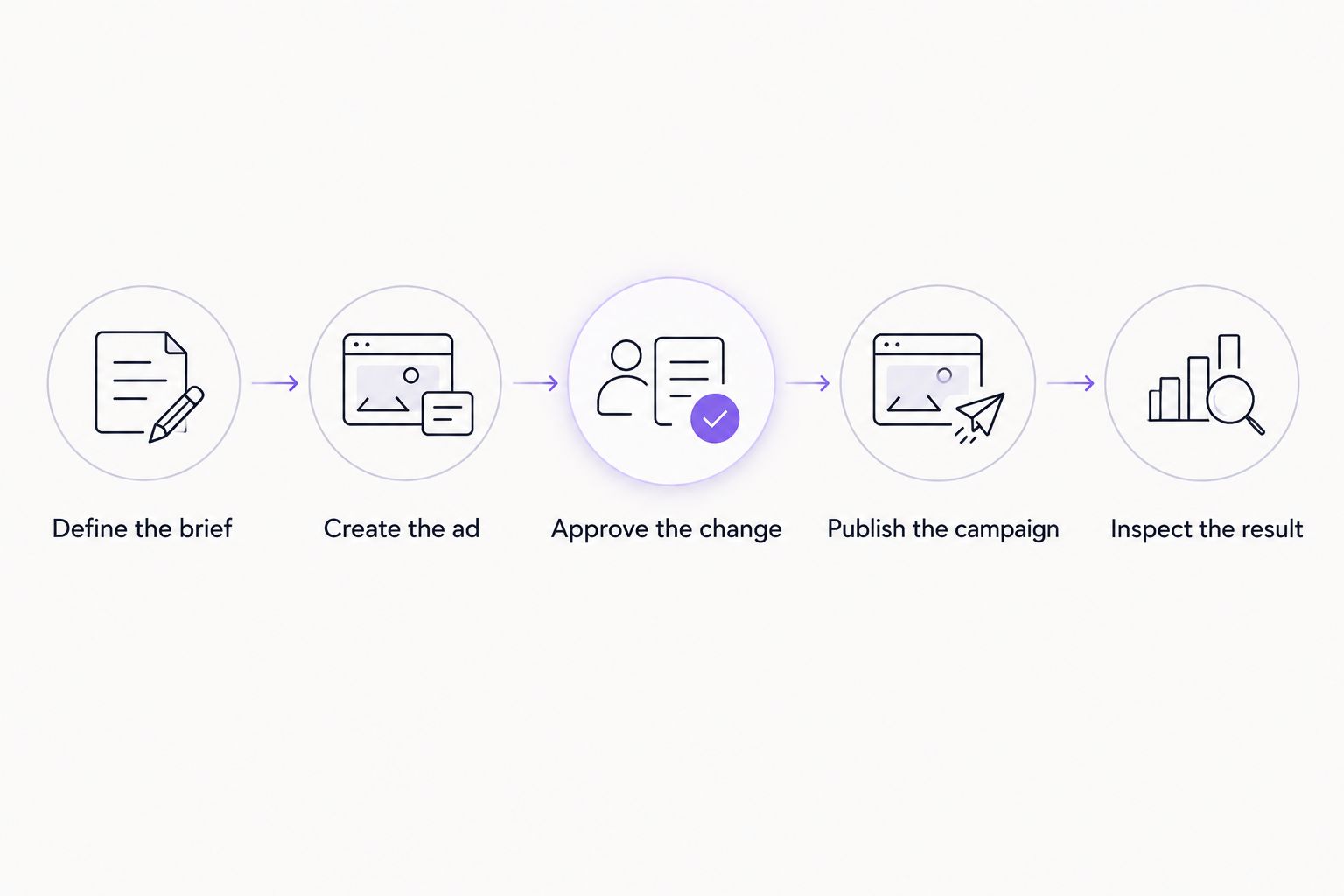
Run a controlled pilot over 7 days as an operational check, not a promised performance test. Record manual corrections and unexpected actions. A short pilot can reveal workflow problems; it does not establish long-term advertising returns.
Which platform should you choose?
Choose Tezads for the e-commerce campaign-writing, launch, and optimization use case, subject to demonstrating your exact requirements. Choose Smartly when creative operations drive the decision, Skai when search, social, and retail media belong together, and Adobe Advertising for search and programmatic requirements.
For a Meta-first buyer in 2026, the decisive question is simple: can the software complete your approved campaign workflow without introducing unacceptable changes? Keep native managers as the fallback when the answer is no.
FAQ
What's the best multi-platform ad management software for e-commerce?
The best choice matches your required campaign workflow, not the largest integration list. Prioritize demonstrated creation, publishing, optimization, and spending controls across the channels you actually use.
Is Smartly better than Skai?
Smartly and Skai address different buying priorities. Compare Smartly for creative-led advertising workflows and Skai for search, social, and retail media operations.
Can one tool create and manage Meta ads?
Some advertising tools combine creation and campaign management, but the required Meta workflow must be demonstrated. Check publishing, editing, permissions, and the specific ad formats you run.
Do agencies need different software from e-commerce brands?
Agencies need to evaluate client-account operations as well as campaign functionality. Test account separation, approvals, and ownership alongside the same creation and optimization tasks an e-commerce brand needs.
Does an integration mean a tool can launch campaigns?
No, an integration does not by itself establish campaign-launch capability. Ask whether it supports reporting, creation, publishing, editing, or optimization, and inspect each required action.
Should I buy software based on roadmap features?
No, buy for functionality available and demonstrated at the time of your decision. Treat planned channels and features as future possibilities, not current capabilities.
How should I compare advertising software in 2026?
Use the same campaign brief and operational tasks for every vendor. Inspect the published result in the native account and separate workflow improvements from claims about advertising performance.
One last thing
The strongest demo ends outside the vendor's dashboard. Open the native advertising account and inspect the campaign the software just changed. For your 2026 purchase, that final check separates a persuasive presentation from a working campaign process.


