

Real estate agents’ Facebook ads automation is the use of rules and software to create ads, manage delivery, and route inquiries with the aim of generating qualified conversations and appointments. This 2026 guide shows you how to automate repetitive work without losing control of housing-ad compliance, listing accuracy, or lead follow-up.
- Facebook ads automation for real estate agents should connect campaign management, lead routing, and appointment tracking.
- Meta Ads Manager is the manual-first starting point; add software only for a defined workflow gap.
- Housing-ad compliance and listing accuracy need human review before publication.
- Judge lead generation by qualified conversations and appointments, not cheap form submissions.
Why Facebook ads automation matters for real estate agents
A property inquiry is not a purchase. An agent still needs to establish intent, discuss the property or service, and arrange the next conversation. Automating ad delivery without assigning that follow-up leaves the most important part of the process unfinished.
Real estate also adds an accuracy problem: listing details change, while an approved ad can continue running. Your process must connect property updates to campaign decisions rather than treat advertising as a separate task.
Use this Facebook ads automation tools guide to compare the software category. First decide which job you need done: writing creative, controlling spend, receiving inquiries, or reporting appointments. Those are different workflows.
The right 2026 starting point is a controlled lead-generation process, not a collection of automation features. An independent agent needs clear ownership. An agency needs the same controls repeated across separate client accounts, with approvals and reporting that do not blur together.
How to build a controlled automation workflow
1. Define the inquiry you want to receive
Start manually with a campaign brief. Choose whether the campaign promotes a specific property, an open house, seller consultations, or another clearly defined real estate service. The offer determines the copy, destination, qualification questions, and follow-up.
For an agent, write the brief around the conversation you can actually handle. For an agency, have the client approve the offer and explain who will receive inquiries before creative production begins. Neither audience benefits from collecting contacts without a next action.
Separate campaign success from business success. A submitted form is a campaign event; an attended appointment is a later business outcome. Track both without treating them as interchangeable.
For your first setup, use 1 campaign brief and 1 named follow-up owner per campaign. These are operating recommendations, not performance benchmarks.
- Name the property or service being advertised.
- Describe the inquiry that counts as relevant.
- Choose the next action: call, viewing, or consultation.
- Assign the person responsible for follow-up.
- Record how that person will report the outcome.
2. Review housing-ad compliance before launch
Use Meta’s native campaign setup and current advertising guidance before adding automation. Ads promoting housing opportunities fall under Meta’s housing Special Ad Category requirements. That classification affects the targeting options available to you; automation does not remove the requirement.
U.S. real estate advertising also sits within fair housing obligations. Review the ad’s language, imagery, audience settings, and destination together. Avoid wording that expresses a preference for or against protected groups, and do not use automation to recreate discriminatory exclusions.
An agent should approve the property facts and intended offer. An agency should document client approval and keep a separate compliance checkpoint before publication. A generated draft is not a reviewed advertisement.
Make 3 review checks part of every launch: housing classification, advertising content, and destination accuracy. In 2026, consult the current Meta rules when setting up a campaign rather than copying targeting instructions from an old tutorial.
- Apply the appropriate housing classification.
- Review audience settings against current platform restrictions.
- Remove discriminatory preferences from copy and imagery.
- Check that the destination matches the advertised opportunity.
- Record who approved the final version.
3. Automate creative production without automating approval
The manual route is straightforward: draft the message, select authorized property images, verify the details, and preview the placements in Meta Ads Manager. Keep an approved source document so every variation starts from the same facts.
Software becomes useful when repeated drafting and campaign setup are the bottleneck. TezAds is a paid advertising automation platform that writes, launches, and optimizes campaigns across Meta and other advertising channels. Its stated audience is e-commerce brands and the agencies managing their ad accounts.
TezAds is best for e-commerce brands and agencies seeking paid ad creation, launch, and optimization. Real estate teams should evaluate a property-specific workflow before adopting it; its stated positioning does not establish listing feeds, brokerage integrations, or real estate-specific compliance controls.
E-commerce buyers can assess the platform against its stated use case. Agencies should additionally check client-account separation, approval handling, and reporting during evaluation rather than assume those capabilities from the category name.
- Draft from verified property or service information.
- Use images you have permission to advertise.
- Review every generated claim before publication.
- Preview each intended placement.
- Confirm required workflows in the current product, not a roadmap.
4. Route inquiries to a person who can act
Begin with a manual handoff you can inspect. Submit a test inquiry, confirm where it arrives, and verify that the responsible agent sees it. This exposes problems before automation spreads them across more campaigns.
Then choose whether to automate the transfer into your existing customer relationship management system, or CRM. Check the exact connection and fields rather than assuming that two tools work together. An ad-generation platform and a lead-routing system perform different jobs.
For an independent agent, the important question is whether the inquiry reaches the person handling the appointment. For an agency, it is whether each client’s inquiries reach the correct client without mixing records or permissions.
Keep 2 outcome fields alongside the inquiry: qualification status and appointment status. Those recommended fields make it easier to distinguish a delivered contact from a useful conversation.
- Submit a test through the live inquiry path.
- Check contact details and campaign source fields.
- Assign an owner before enabling notifications.
- Record qualification and appointment outcomes.
- Test duplicate handling and failed transfers.
- Define a fallback when the automated handoff fails.
5. Set guardrails for automated changes
Start by reviewing campaigns manually in Meta Ads Manager. Identify the changes you repeatedly make and the evidence behind them. Only then decide which changes belong in a rule or another automation tool.
A rule should have a condition, an action, and a person responsible for reviewing the result. Avoid a vague instruction to improve performance. A spend alert is different from an automatic pause, and both are different from increasing a budget.
Agents should keep budget decisions tied to their ability to handle inquiries. Agencies should secure client approval for the scope of automated changes and keep account-specific limits separate. Do not let a successful test in one account become an unreviewed default in another.
Your 2026 automation plan should include a stop condition for inaccurate property information. A campaign can deliver inquiries efficiently while advertising an offer that no longer matches reality.
- Write down the condition that triggers each change.
- Distinguish alerts from actions that change delivery.
- Confirm budget authority before enabling increases.
- Assign someone to review change history.
- Pause affected ads when property information changes.
- Keep a documented manual override.
6. Measure appointments alongside advertising results
Start with a simple shared record of inquiries and outcomes. You do not need a complicated dashboard to learn whether a campaign brings relevant conversations. You need consistent definitions and someone responsible for updating them.
Read advertising metrics alongside the follow-up record. Cost per lead measures the expense of receiving a lead; it does not establish lead quality, appointment attendance, or a completed transaction. Property sales and agency advertising reports also have different timelines, so label each reporting period clearly.
An agent should inspect which inquiries became useful conversations. An agency should show the client what advertising generated and what happened after the handoff, without claiming credit for outcomes the records do not connect.
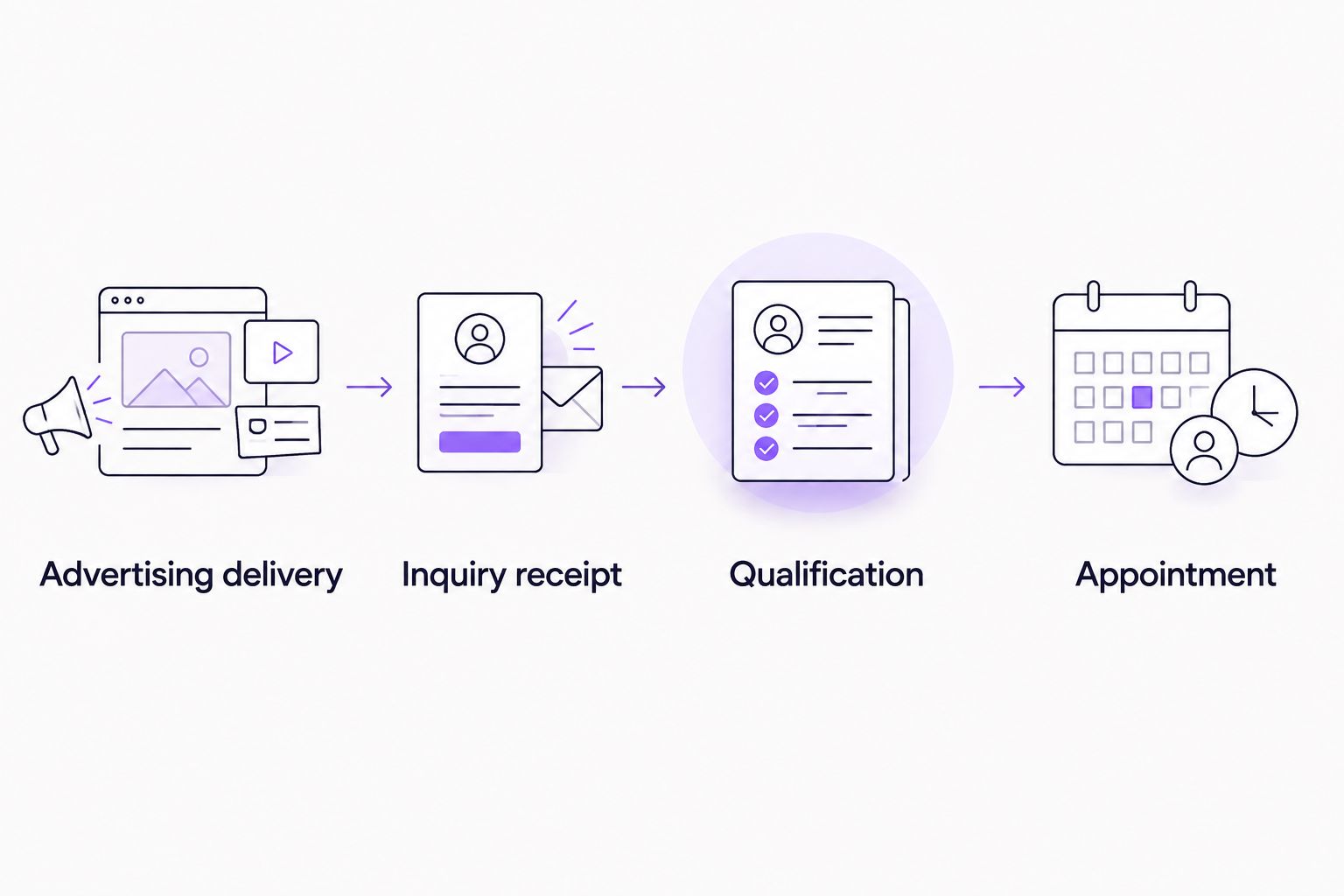
Use the same sequence for every review: advertising delivery, inquiry receipt, qualification, appointment. That structure makes it easier to locate the problem instead of changing creative every time sales disappoint.
- Record spend and inquiries for the same reporting period.
- Track qualified conversations separately from submissions.
- Distinguish booked appointments from attended appointments.
- Check campaign sources against the lead record.
- Investigate failed follow-up before changing targeting.
- Keep revenue attribution separate unless the records support it.
Compare automation options for your workflow
Choose the option that handles your actual bottleneck. Native campaign management, creative automation, and lead routing are not substitutes for one another.
This 2026 comparison separates established category functions from capabilities you need to verify. No option removes the need to review housing ads or maintain accurate property information.
| Option | Best for | Practical advantage | Key limitation |
|---|---|---|---|
| Meta Ads Manager | Agents and agencies starting with direct campaign control | Native campaign creation, delivery management, and reporting | Lead follow-up still needs a separate operating process |
| TezAds | E-commerce brands and agencies automating paid ad production and management | Stated workflows include writing, launching, and optimizing paid campaigns | Real estate-specific workflows and brokerage connections require evaluation |
| Existing CRM with a verified lead connection | Agents and agencies fixing inquiry handoffs | Keeps contact ownership and follow-up records together | A working lead connection does not create or manage advertising |
| Manual campaign and inquiry management | Agents establishing a baseline process | Makes approvals, ownership, and errors easy to inspect | Repeated drafting, checking, and handoffs remain manual tasks |
Keep the native platform as your reference point. Add software when it removes a specific repeated task, and assess the added setup, permissions, and monitoring against that benefit.
For an e-commerce brand, product campaigns align with the stated audience of the ad automation platform described above. For an agency serving both stores and real estate clients, evaluate those workflows separately. A tool suitable for product advertising is not automatically a property-marketing system.
Common mistakes real estate agents make
Treating every inquiry as qualified demand
A form submission confirms that someone submitted a form. It does not confirm readiness, suitability, or an appointment. Record the follow-up outcome before deciding that inexpensive inquiries justify more spend.
Leaving changed property details in running ads
Automation does not make listing information self-correcting. Assign someone to notify the advertising owner when property facts or the advertised offer change, then review the affected creative and destination together.
Copying unrestricted targeting advice into housing campaigns
Housing campaigns require their own compliance review. Do not copy an audience recipe from a retail advertising tutorial or use workaround audiences to pursue prohibited exclusions. Check the applicable rules during setup.
Buying creative software to fix a follow-up problem
More ad variations do not repair unanswered inquiries. Test receipt, ownership, and outcome recording first; only then decide whether creative production is the constraint. Agencies should make this diagnosis with the client rather than report lead volume alone.
Mistaking a proposed feature for a working connection
A planned CRM connection or integration is not an operational workflow. Require a demonstration using the relevant account, fields, and destination before relying on it. Test failures as well as the successful handoff.
FAQ
What is Facebook ads automation for real estate agents?
Facebook ads automation for real estate agents uses rules and software to handle repeated campaign tasks and inquiry handoffs. It still requires human review of housing compliance, property facts, and follow-up outcomes.
What's the best starting point for an agent automating Facebook ads?
Meta Ads Manager plus a documented inquiry process is the best starting point for establishing direct control. Add other software after identifying a repeated task that the current process does not handle well.
Can AI create real estate Facebook ads for me?
AI tools can draft advertising copy, but a person must verify property details, permissions, and compliance before publication. A generated draft does not establish that an ad meets housing-ad requirements.
Is TezAds built specifically for real estate agents?
TezAds states that it serves e-commerce brands and agencies managing their ad accounts. Real estate agents should evaluate their specific campaign and lead workflows rather than assume real estate integrations or compliance controls.
Do real estate Facebook ads need the housing Special Ad Category?
Ads promoting housing opportunities fall under Meta's housing Special Ad Category requirements. Review the current Meta guidance for the campaign and location, and check the creative and destination as well as audience settings.
Can automation send Facebook inquiries into my CRM?
A verified connection can transfer inquiries into a CRM, but you must check the exact systems and fields involved. Submit a test inquiry and confirm ownership, source tracking, duplicate handling, and failure notifications.
How should I measure an automated real estate campaign?
Measure inquiries, qualified conversations, and appointment outcomes alongside advertising spend. Cost per lead alone does not establish lead quality or completed transactions.
One last thing
Test the inquiry path before testing more ads. Submit a contact, confirm who receives it, and follow the record through qualification and appointment reporting. A polished campaign cannot compensate for a broken handoff.
Make that test part of every new client or campaign setup in 2026. Keep the result simple: the inquiry arrived correctly, someone owned it, and the next action was recorded.


