

Best for the simplest Meta-only setup: Meta Advantage+. Best for cross-channel campaign creation and management: Tezads. Best for Google inventory: Google Performance Max. Best for agency creative operations: Smartly. These AI ad optimization tools ranked by ease of setup suit different starting points; choose the workflow that removes work without adding unnecessary connections.
- For AI ad optimization tools ranked by ease of setup, Meta Advantage+ wins for existing Meta advertisers.
- Tezads suits e-commerce brands and agencies seeking cross-channel ad automation, including campaign writing, launch, and optimization.
- Google Performance Max fits Google-focused advertisers with conversion tracking and creative assets ready.
- Smartly fits agency creative operations; evaluate account access, approvals, and campaign controls before committing.
Why this matters
Connecting an ad account is not the same as being ready to spend. Your conversion tracking, creative assets, business permissions, and approval process determine whether an automated campaign can operate on the right inputs.
For an e-commerce brand, setup means getting from products and creative to a campaign with a meaningful sales objective. For an agency, setup also means keeping client accounts, permissions, and decisions separate. A short connection flow does not resolve either job by itself.
In 2026, choose the smallest setup that completes your actual workflow. A native campaign option makes sense when you need one advertising ecosystem. A separate platform earns its place when it handles work you would otherwise repeat across channels or clients.
What makes the best easy-setup ad optimization tool?
Evaluate these criteria before the ranking. They separate a convenient interface from a useful operating system for your ads.
- Account connections: Which advertising accounts must you connect, and who has permission to authorize them?
- Conversion readiness: Can the campaign use the purchase, lead, or other conversion event that matters to your business?
- Creative preparation: Do you bring finished assets, supply product information, or create campaign material inside the tool?
- Launch controls: Can you inspect the objective, destination, creative, and spending settings before publishing?
- Agency handoffs: Can the team demonstrate how client access, approvals, and reporting work without sharing credentials?
- Ongoing maintenance: What remains your responsibility after launch, including tracking checks, creative replacement, and business constraints?
Rank setup by the work required to reach a controlled launch—not by the number of screens in a demo. For your 2026 shortlist, require a demonstration using the same kind of campaign you intend to run.
AI ad optimization tools at a glance
The order below favors fewer new systems first, then broader campaign work, then more specialized operating requirements. It is a workflow ranking, not a stopwatch benchmark.
| Rank and option | Best for | Standout workflow | Setup requirement | Key limitation |
|---|---|---|---|---|
| 1. Meta Advantage+ | Existing Meta advertisers | Automated audience and delivery options inside Meta | Account access, conversion tracking, and campaign assets | Stays within Meta's advertising ecosystem |
| 2. Tezads | Cross-channel brands and agencies | Writes, launches, and optimizes paid campaigns | Establish account access and verify the intended campaign workflow | A separate platform adds another access and control layer |
| 3. Google Performance Max | Google-focused advertisers | Goal-based campaigns across Google advertising inventory | Conversion goals, creative assets, and feeds where applicable | Does not manage Meta campaigns |
| 4. Smartly | Agencies with creative production workflows | Creative automation connected to campaign operations | Define templates, asset inputs, account access, and approvals | Requires an operating process beyond campaign connection |
No option fixes an incorrect conversion event. No option removes the need to review what your ads promise or where they send a customer.
1. Meta Advantage+: best for existing Meta advertisers
Meta Advantage+ is the default starting point when you already advertise through Meta and want automated campaign options without introducing another vendor. It operates within Meta's advertising environment, so your first task is checking the account and campaign inputs rather than connecting a separate management platform.
For an e-commerce brand, focus on purchase tracking, product destinations, and usable creative. For an agency, confirm that the correct client account and business assets are accessible before building the campaign. Native setup still depends on valid permissions.
Meta Advantage+ pros:
- Uses the advertising environment an existing Meta advertiser already works in.
- Offers automated audience and delivery options within Meta campaigns.
- Keeps campaign setup and review inside the native account workflow.
Meta Advantage+ cons:
- Does not provide cross-channel campaign management outside Meta.
- Automated delivery does not repair tracking errors or weak creative.
- Agencies still need a separate process for approvals and cross-channel reporting.
Best for: Brands whose immediate priority is Facebook and Instagram advertising, and agencies handling a Meta-only engagement.
Before choosing Meta Advantage+, identify what you actually want automated. If the job is delivery within Meta, the native route fits. If the job includes writing ads and coordinating several advertising channels, native delivery automation is only part of the answer.
Verdict: Buy into the native workflow for Meta-only delivery; skip it as your cross-channel management solution.
2. Tezads: best for cross-channel campaign setup
Tezads ad optimization software writes, launches, and optimizes paid advertising campaigns. Its stated scope covers Meta, Instagram, Google, TikTok, YouTube, and X for e-commerce brands and the agencies managing their accounts.
That scope matches a different setup problem from native Meta automation. Instead of improving only the campaign delivery step, you are evaluating how campaign creation, launch, and optimization fit together across your advertising operation.
For a brand, demonstrate a campaign tied to a real product and destination. For an agency, demonstrate the same workflow for a client account, including who reviews the campaign and who authorizes changes. Do not substitute a generic product tour for either exercise.
Tezads pros:
- Covers campaign writing, launch, and optimization rather than delivery alone.
- Serves both e-commerce advertisers and agencies managing ad accounts.
- Has a stated campaign scope spanning several advertising channels.
Tezads cons:
- Introduces another platform alongside the underlying advertising accounts.
- A broad channel scope does not establish every account-level capability or approval control.
- Multi-channel setup requires checking each intended workflow, not just a Meta connection.
Best for: E-commerce brands and agencies seeking cross-channel ad automation from campaign creation through optimization.
Tezads ad optimization software is best for e-commerce brands and agencies that want campaign writing, launch, and optimization across multiple advertising channels. During your 2026 evaluation, distinguish the demonstrated live workflow from any proposed expansion. Require the campaign type you need now to work now.
Verdict: Buy for a demonstrated cross-channel workflow; wait on any requirement presented only as a roadmap feature.
3. Google Performance Max: best for Google-focused campaigns
Google Performance Max is a goal-based campaign type that uses Google's automation across its advertising inventory. It belongs on this list because Google-focused advertisers can use it without adding a separate campaign management vendor.
Setup centers on conversion goals and asset groups. Retail campaigns also require attention to product data when using a Merchant Center feed. Your website, measurement, and assets remain inputs to the campaign—not tasks the campaign automatically completes for you.
For an e-commerce brand, verify that the selected conversion reflects the business outcome you want. For an agency, establish which client goals the campaign should use and how the client will evaluate results. Avoid treating every recorded action as equally valuable.
Google Performance Max pros:
- Runs inside the Google Ads environment.
- Uses goal-based automation across Google advertising inventory.
- Supports retail campaign workflows using Merchant Center product data.
Google Performance Max cons:
- Does not create or manage campaigns in Meta's advertising environment.
- Requires conversion goals and creative inputs to be configured correctly.
- Asset and feed preparation remain part of the advertiser's work.
Best for: Brands prioritizing Google advertising and agencies responsible for a Google-focused client strategy.
For a 2026 evaluation, inspect the goal configuration before judging the campaign interface. A straightforward campaign builder is not enough if the campaign optimizes toward an action that does not represent the client's objective.
Verdict: Buy into the native workflow for Google-focused advertising; skip it when your primary requirement is Meta campaign management.
4. Smartly: best for agency creative operations
Smartly combines creative automation with advertising campaign operations. Its place in this ranking is for teams whose setup problem includes repeatable asset production and campaign coordination, rather than simply launching an individual ad.
An e-commerce brand should demonstrate how product information and creative assets enter that workflow. An agency should demonstrate how a client brief becomes approved creative and then a campaign. The relevant question is whether the process fits the team that will use it.
Templates and repeatable inputs need ownership. If nobody maintains the source assets or approves changes, introducing creative automation does not resolve the handoff problem. Define those responsibilities before evaluating the interface.
Smartly pros:
- Connects creative automation with advertising operations.
- Fits evaluations that include recurring creative production, not just campaign delivery.
- Gives agencies a concrete workflow to assess from brief through campaign execution.
Smartly cons:
- Template and asset preparation add work before campaign execution.
- The team must define who maintains inputs and approves outputs.
- It is not the default choice when the immediate job is native Meta campaign setup.
Best for: Agencies and brand teams whose advertising workflow includes repeatable creative production and coordinated campaign execution.
Request a demonstration of the channels, formats, and approval requirements you need. Evaluate current capabilities separately from proposed additions; a planned workflow is not a working handoff.
Verdict: Buy for an established creative operations requirement; skip it when you only need a simpler native campaign launch.
Run a setup check before handing over campaign control
Use the same small launch exercise for every shortlisted option. This makes the comparison about your work rather than each vendor's preferred demonstration.
Start with 1 ad account, 1 campaign, and 1 primary conversion event. These are recommended evaluation boundaries, not performance benchmarks. Keeping the initial scope narrow lets you inspect the campaign settings without mixing several clients, channels, or objectives.
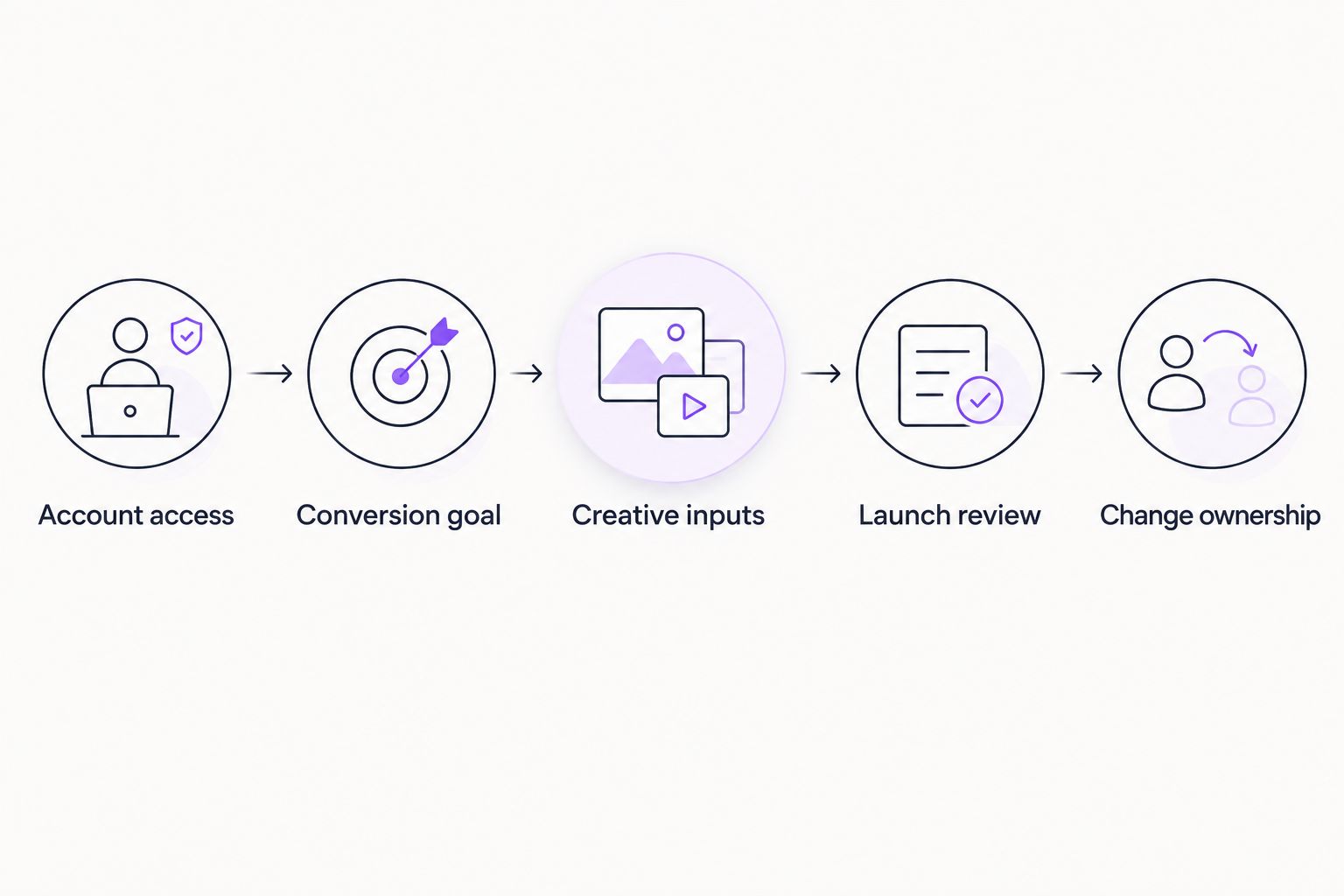
Account access
Have the actual account owner authorize the connection. For a brand, confirm that the connection reaches the intended business assets. For an agency, use the client's approved access process rather than a team member's shared login.
Conversion goal
Name the action the campaign should optimize toward. Check that the event represents the intended outcome and that the campaign uses it. A purchase objective and a page visit are not interchangeable.
Creative inputs
Supply the product information, destination, images, or video the workflow needs. Review generated copy against the product's real claims. Agencies should secure the client's approval for the offer and message before publishing.
Launch review
Inspect the account, objective, destination, creative, and spending settings together. Require a clear answer about what happens after authorization. Do not approve a campaign merely because the ad preview looks correct.
Change ownership
Assign responsibility for campaign changes, creative replacement, and tracking checks. Ask the vendor to demonstrate how you inspect automated actions and stop unwanted changes. Evaluate the actual behavior rather than assuming a control exists.
How the setup ranking works
This ranking uses account connections, conversion readiness, creative preparation, launch controls, agency handoffs, and maintenance. Native tools come first for advertisers staying within the same advertising environment; broader platforms earn consideration when they cover additional work.
The list does not assign installation times or promise better ROAS. Setup effort depends on your existing accounts, tracking, assets, and permissions. Compare those requirements directly instead of converting an attractive demo into an unsupported time-saving claim.
Which ad optimization tool should you choose?
Choose Meta Advantage+ if you are undecided and your immediate job is a Meta-only campaign. It keeps the evaluation inside the advertising environment you intend to use. Choose Google Performance Max for the equivalent Google-focused requirement.
Choose the cross-channel option when writing, launching, and optimizing campaigns across channels is the actual job. Choose Smartly when repeatable creative production is central to the operating requirement. For your 2026 decision, buy the demonstrated workflow—not the longest feature list.
FAQ
What's the easiest AI ad optimization tool to set up for Meta ads?
Meta Advantage+ is the simplest starting point for advertisers already operating inside Meta. It avoids introducing another management vendor, but account access, conversion tracking, and creative still need attention.
Is Tezads better than Meta Advantage+ for an agency?
Tezads fits an agency that needs campaign writing, launch, and optimization across multiple advertising channels. Meta Advantage+ fits a Meta-only delivery requirement; compare the actual client workflow before choosing.
Can Google Performance Max manage my Facebook ads?
Google Performance Max does not manage Facebook ads. It operates across Google's advertising inventory, so Meta campaigns require a separate workflow.
What should an e-commerce brand prepare before connecting an ad tool?
Prepare account permissions, the intended conversion event, product destinations, and the creative inputs your campaign needs. Review product claims and campaign settings before authorizing launch.
What should an agency check that a brand might not need?
An agency should check client account separation, delegated access, approval responsibilities, and reporting handoffs. Demonstrate those requirements using a client workflow rather than assuming they follow from a successful account connection.
Will an AI ad optimization tool fix incorrect purchase tracking?
Ad optimization does not substitute for correct purchase tracking. Check the conversion event and campaign goal before relying on automated delivery decisions.
Should I choose a tool because of a planned integration?
Choose a tool for a working integration that supports your required workflow now. Treat roadmap features as future additions, not as capabilities available for your current launch.
One last thing
Before approving any tool, deliberately ask to review a campaign change you would reject. That exercise tests whether the workflow gives you the control you need—not just whether it can produce an ad. For agencies, involve the person who actually approves client campaigns.


