

Best for campaign automation: TezAds. Best for template-led design: Canva. Best for image editing: Adobe Express. Best for copy drafting: ChatGPT. This 2026 guide compares Meta ad creative workflows and the plan terms you need to check before making a price-led choice.
- TezAds fits e-commerce brands and agencies needing ad writing, campaign launch, and optimization.
- Compare meta ads creative generators ranked by price against usable output, not subscription labels alone.
- Canva fits template-led design; Adobe Express fits image editing; ChatGPT fits copy drafting.
- Compare current plan limits and campaign handoffs before choosing a Meta advertising tool.
Why this matters
A creative generator and a campaign manager solve different problems. One helps you produce an asset; the other helps you turn an approved asset into paid advertising. Buying the wrong category leaves the actual bottleneck untouched.
For an e-commerce brand, that bottleneck might be turning product photography into usable ads. For an agency, it might be moving approved concepts across client accounts without losing track of the correct offer, destination, or campaign settings. Both need creative, but their operational requirements differ.
For a price-led decision in 2026, compare the complete workflow. A subscription tells you little if you still need separate design work, copy review, client approval, and campaign setup. Choose the job first. Compare plan terms second.
The order below is a workflow shortlist, not a numerical price ladder. Do not treat unlike subscriptions as interchangeable purchases.
What makes the best Meta ad creative generator?
Use these criteria to compare each candidate before choosing a plan:
- Creative scope: Does the tool produce copy, edit images, assemble layouts, or manage campaigns? These are separate capabilities.
- Usable output: Can you turn the result into an approved ad without rebuilding it elsewhere?
- Placement fit: Can your workflow produce appropriate square, portrait, and full-screen vertical assets?
- Campaign handoff: Who transfers the approved creative into Meta, checks the destination, and publishes it?
- Brand and client control: Can your team keep product claims, offers, and account details correct throughout production?
- Plan boundaries: Check generation allowances, export restrictions, team access, and commercial-use terms where applicable.
For e-commerce, put product accuracy and placement fit near the top. An attractive image that misrepresents the product is not usable creative.
For agencies, prioritize review and account handling alongside production. A tool that works for your own brand still needs a clear process for separate clients, approvers, and campaign destinations.
Meta creative tools at a glance
This 2026 comparison separates what each option does from what you should verify before purchase. It does not assume that every creative tool includes campaign execution.
| Option | Best for | Standout workflow | Key limitation | Plan terms to inspect |
|---|---|---|---|---|
| TezAds | Ad writing, launch, and optimization | Paid advertising automation for brands and agencies | Campaign automation does not replace creative judgment | Account scope, permissions, and generation controls |
| Canva | Template-led ad design | Combining product images, text, and layouts | Designing an asset is not campaign management | Template access, exports, and team access |
| Adobe Express | Product-image editing | Editing imagery and assembling promotional graphics | Edited images still need campaign setup | Editing access, exports, and team access |
| ChatGPT | Ad-copy drafting | Developing hooks, headlines, and message variants | Drafts need factual review and visual production | Usage allowances and team requirements |
Read across a row before comparing subscriptions. A copy assistant, design editor, and ad automation platform do not deliver the same finished job.
1. TezAds: best for Meta campaign automation
The platform writes, launches, and optimizes paid advertising campaigns. Its stated audience includes e-commerce brands and the marketing agencies managing advertising accounts for those brands.
That makes campaign execution the reason to consider it here. Evaluate the writing-to-launch workflow rather than assuming it is a specialist image editor or a replacement for every creative production task.
For e-commerce brands
Choose this category when your requirement extends beyond producing headlines or arranging product photos. Your evaluation should follow an actual product campaign from the initial brief through campaign launch and optimization.
Keep your source material accurate. Product descriptions, approved offers, and landing-page claims still need a responsible owner; automation does not make an unsupported claim acceptable.
For agencies
Evaluate the same workflow using a representative client campaign. Ask how account access, approval, and campaign changes fit your operating process rather than assuming those controls from the platform category.
Treat any feature described as planned as unavailable for your purchasing decision. A roadmap is not a working client process.
TezAds pros:
- Covers ad writing, campaign launch, and optimization.
- Explicitly serves both e-commerce brands and agencies.
- Includes Meta and Instagram within its stated advertising scope.
TezAds cons:
- A broader workflow than a design-only requirement needs.
- Does not remove the need to review claims and creative direction.
- Specialist image-generation controls need a separate evaluation.
Best for: Buyers who need campaign execution alongside ad writing.
Verdict: Buy for the stated campaign workflow; hold if your only requirement is image production.
2. Canva: best for template-led Meta ad design
Canva is a visual design editor with templates and tools for arranging images, text, and graphic elements. Use it to turn approved product photography and messaging into ad layouts.
Its role in this shortlist is design production. Keep that separate from targeting, campaign publication, and performance decisions.
For e-commerce brands
Start with your own product images and approved claims. Build a layout that makes the product and offer easy to understand, then adapt the composition for the placements you intend to use.
Templates provide a starting point, not a finished strategy. Your product needs to remain the subject rather than disappearing behind decorative elements.
For agencies
Use repeatable layouts to organize production around approved client material. Decide who owns the master design and who approves changes before creating variants.
Check the relevant collaboration and asset-access terms. Do not assume that every plan gives every contributor the same permissions or resources.
Canva pros:
- Combines images and text in a visual editor.
- Provides templates as starting points for layouts.
- Fits workflows built around existing product photography.
Canva cons:
- Templates still require brand-specific judgment.
- A finished design still needs campaign setup and review.
- Asset and collaboration access depends on the selected plan.
Best for: Teams whose main bottleneck is assembling ad layouts.
Verdict: Buy for design production; skip as a substitute for campaign management.
3. Adobe Express: best for product-image editing
Adobe Express provides image-editing and graphic-design tools. Consider it when your creative task starts with an existing product image that needs editing or presentation work.
The distinction is practical: choose an image workflow when the photograph is the bottleneck. Do not buy a campaign platform solely to solve that problem.
For e-commerce brands
Use accurate product photography as the foundation. Review edited images against the actual product so that changes to backgrounds or presentation do not imply features the item lacks.
Ad-ready also means readable. Check the relationship between the image, headline, and destination before treating a graphic as finished.
For agencies
Evaluate editing with representative client assets, not an unrelated demonstration image. Different source photography creates different production demands.
Define which edits need client approval. Background changes and image treatments can alter the impression of a product even when the accompanying copy stays unchanged.
Adobe Express pros:
- Combines image editing with graphic assembly.
- Fits production based on existing product assets.
- Supports a visual workflow for promotional graphics.
Adobe Express cons:
- Image editing does not establish advertising strategy.
- Edited assets still require a campaign handoff.
- Specific editing and collaboration access needs plan-level checks.
Best for: Teams whose main creative task is preparing product imagery.
Verdict: Buy for image-led production; hold if your main problem is campaign execution.
4. ChatGPT: best for Meta ad-copy drafting
ChatGPT can draft and revise text from a brief. Use it to explore hooks, headlines, primary text, and alternative explanations of a product benefit.
Treat the result as draft material. Fluent wording is not evidence that a product claim is true or that a message will perform.
For e-commerce brands
Supply the product facts, target buyer, approved offer, and landing-page message. Ask for distinct angles rather than repeated versions of the same sentence.
Then remove invented claims and generic wording. Keep language that helps the buyer understand the actual product.
For agencies
Separate client briefs and approved claims. A useful drafting process should make it clear which source facts belong to which account.
Assign a reviewer before sending copy for client approval. The drafting tool does not know whether a claim has legal, brand, or commercial approval unless you supply that context.
ChatGPT pros:
- Drafts alternative hooks and headlines.
- Revises text against a supplied brief.
- Fits message development before visual production.
ChatGPT cons:
- Can produce inaccurate or unsupported claims.
- Copy drafting alone does not produce a complete visual ad.
- Drafting does not replace campaign setup or approval.
Best for: Teams whose bottleneck is developing advertising messages.
Verdict: Buy for drafting; skip as a replacement for a complete advertising workflow.
How to make a price-led comparison
For a 2026 buying decision, use the same brief across the shortlist. Different tasks produce misleading comparisons: drafting a headline is not equivalent to preparing and launching a campaign.
Follow this sequence:
- Define the deliverable. Specify whether you need copy, edited images, finished layouts, or campaign execution.
- Test the workflow. Use approved product facts and representative source assets.
- Check the plan. Read the current terms for the features your task requires.
- Count the handoffs. Identify every transfer into another tool or another person's queue.
- Choose the fit. Prefer the option that completes your required job with acceptable review and control.
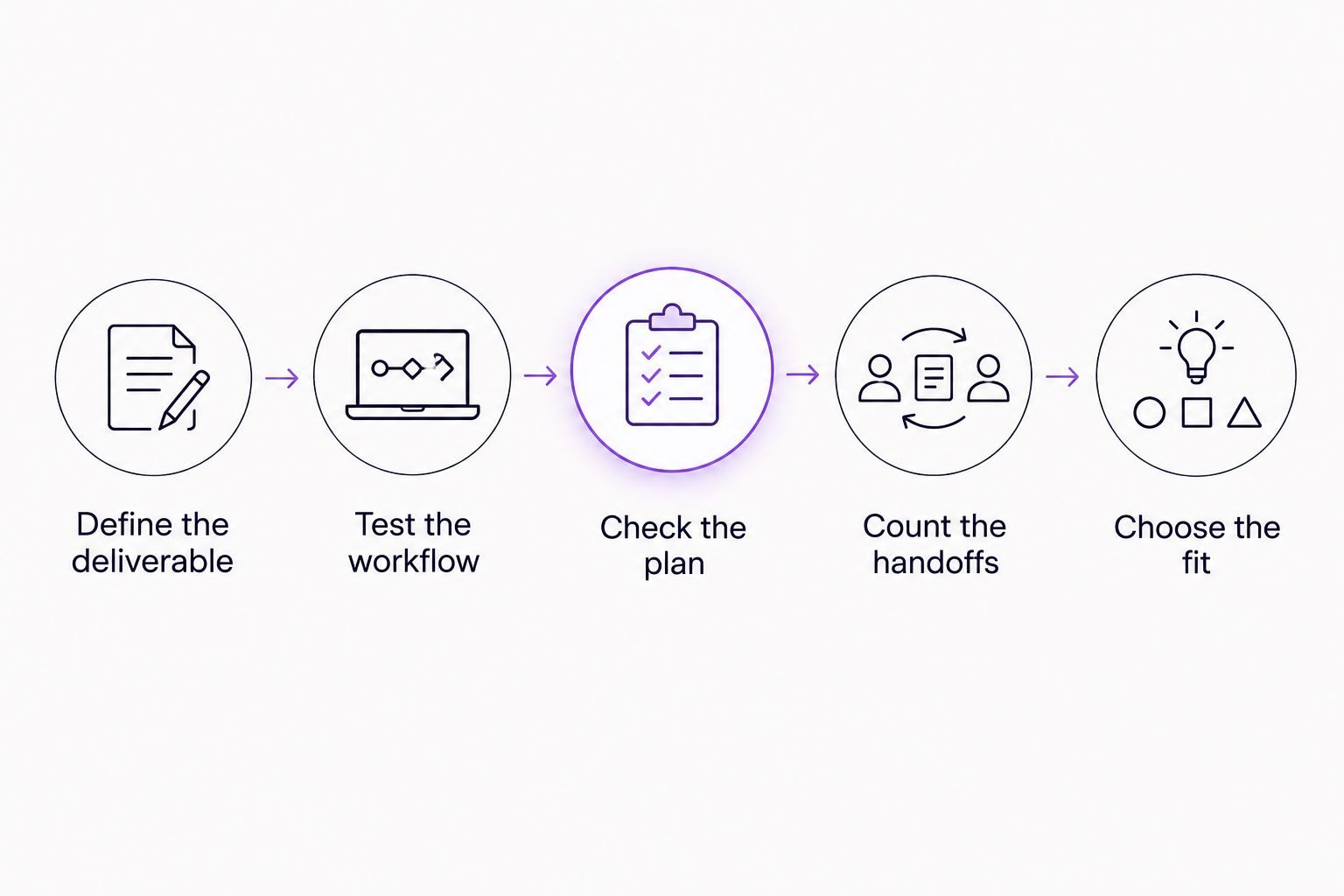
For brands, follow the work from product brief to approved ad. For agencies, include the client review and account-specific campaign handoff. Neither evaluation ends at an attractive preview.
Check placement fit before approving creative
Use familiar canvas sizes as production starting points: 1080 × 1080 pixels for square, 1080 × 1350 pixels for portrait, and 1080 × 1920 pixels for full-screen vertical. These are design starting points, not universal requirements for every Meta placement.
Build separate compositions where necessary. Changing the canvas does not automatically fix cropped products, cramped headlines, or text that competes with interface elements.
For a brand, preview the product and message together. For an agency, put placement previews into the approval process so the client reviews the asset that will actually appear, not just the original design.
Check Meta's current placement specifications before publishing in 2026. The export is only one part of the final review.
How this shortlist is ranked
The order follows the workflow criteria: campaign execution first, then layout production, image preparation, and copy drafting. It is a buying decision tree rather than a claim that one tool wins every creative task.
No ranking here depends on an unpublished performance test or a promised roadmap feature. Select against capabilities you can use now.
Which Meta creative tool should you choose?
Choose TezAds when you need ad writing, launch, and optimization for an e-commerce brand or agency. Choose Canva when layout assembly is the bottleneck, Adobe Express when product-image editing is the bottleneck, and ChatGPT when you need draft messaging.
For an undecided buyer in 2026, start with the unfinished job. If you already have a reliable campaign process, adding another campaign layer is not automatically the right move. If publishing and optimization are the problem, a design editor alone does not solve it.
FAQ
What's the best tool for creating and managing Meta ads?
Choose a campaign automation platform when you need ad writing, launch, and optimization together. Choose a design or copy tool when you already have campaign execution covered and need help with a specific creative task.
How should I compare Meta ads creative generators ranked by price?
Compare current plan terms against the same finished advertising task. Include required features, usage allowances, team access, and the work that still happens outside the tool.
Is Canva better than ChatGPT for Meta ads?
Canva fits visual layout work; ChatGPT fits text drafting. Choose based on whether you need to assemble the ad's appearance or develop its message.
Can an ad-copy generator manage my Meta campaigns?
Copy generation alone does not include campaign management. Check separately for campaign launch, optimization, account access, and approval controls.
What should an e-commerce brand test before buying?
Test an actual product brief with approved facts and representative photography. Review product accuracy, placement fit, exports, and the remaining campaign handoff.
What should an agency check before choosing a creative tool?
An agency should check the workflow for a representative client account. Confirm how approvals, permissions, source assets, and campaign changes fit the agency's process.
Should I choose a tool for a planned integration?
No. Base your purchase on features available now, and keep roadmap features outside the workflow you depend on.
One last thing
Keep the destination page beside the creative during approval. A strong headline can still promise something the page does not explain or the product does not provide.
Approve the message, image, and destination together. That rule applies whether you produce the ad manually or use automation.


