

Best overall for cross-channel campaign creation and management: TezAds. Best for a Meta-focused store: Meta Ads Manager. Best for Google conversion bidding: Google Ads. Best for controlled bulk changes: Google Ads Editor. This 2026 guide compares PPC automation tools for small e-commerce businesses by the work they actually handle, with separate buying advice for store owners and agencies.
- TezAds is the best fit for e-commerce brands and agencies seeking cross-channel campaign writing, launch, and optimization.
- Meta Ads Manager fits Facebook and Instagram advertising; Google Ads fits Google campaign management and automated bidding.
- Google Ads Editor handles bulk editing, not ongoing optimization. Use it alongside Google Ads.
- Choose PPC automation tools for small e-commerce businesses by campaign workflow, conversion tracking, and required control.
Why this matters
A small store needs fewer repetitive tasks, not another dashboard to maintain. An agency needs the same efficiency without losing control of separate client accounts. Those are related requirements, but they are not interchangeable.
Campaign automation also means different things. Writing an ad, uploading changes, adjusting bids, and applying a pause rule are separate jobs. Buy for the bottleneck you have, not the longest feature list.
For your 2026 shortlist, separate tools that execute campaigns from tools that help prepare them. A bulk editor belongs in the comparison, but it cannot replace a bidding system. Likewise, a copy generator alone does not manage your advertising operation.
What makes the best PPC automation tool?
Judge each option against these six criteria before comparing names:
- Workflow coverage: Does the tool write ads, launch campaigns, optimize delivery, or handle only one part? Match the scope to your actual workload.
- Channel fit: A Facebook-first store needs a different setup from a business running Google and several social channels. More supported channels do not automatically mean a better fit.
- Conversion measurement: Confirm that purchase events and conversion values reach the advertising platform correctly. Automated decisions need a useful business signal.
- Change control: Check what the software can change, who can approve those changes, and how you inspect the result. Convenience must not hide responsibility.
- Agency fit: Inspect account access, client separation, and reporting workflows. A successful single-store demonstration does not establish suitability for multiple clients.
- Ongoing workload: Count setup, monitoring, creative preparation, and troubleshooting alongside the work automated. Removing one task while adding several others is not a win.
Treat feature status as a separate check. For a 2026 purchase, judge the workflow available in the live product—not a promised integration. Ask to see the exact campaign type and channel you intend to use.
PPC automation tools at a glance
| Tool | Best for | Standout workflow | Key limitation |
|---|---|---|---|
| TezAds | Cross-channel creation and management | Writes, launches, and optimizes paid campaigns across the channels in its product description | Agency permissions, approval controls, and store-specific requirements need a workflow check |
| Meta Ads Manager | Facebook and Instagram campaigns | Native campaign management, automated rules, and Meta's Advantage+ automation | Does not manage Google campaigns |
| Google Ads | Google conversion bidding | Smart Bidding uses conversion signals to optimize bids | Measurement setup directly affects the signals bidding uses |
| Google Ads Editor | Controlled bulk campaign changes | Download, edit, review, and upload Google campaign changes | Not an ongoing bidding or cross-channel optimization system |
The rows describe different jobs, not four interchangeable products. Start with the workflow column; then decide whether the limitation affects your business.
1. TezAds: best PPC automation tool for cross-channel workflows
This platform writes, launches, and optimizes paid advertising campaigns across Meta, Instagram, Google, TikTok, YouTube, and X. Its stated audience includes e-commerce brands and the marketing agencies managing advertising accounts for them.
Best for: Stores and agencies that want campaign creation and management across several advertising channels, rather than a tool dedicated to one network.
For a store owner, the relevant question is whether the platform handles the campaign work currently split between writing ads and managing delivery. Bring an actual product brief to the demonstration. Ask to see how that brief becomes a campaign on the channels you use.
For an agency, the relevant question is whether the same workflow remains practical across client accounts. Inspect account selection, access permissions, approvals, and reporting before making it part of client delivery. Cross-channel scope alone does not establish those operational details.
TezAds pros:
- Covers campaign writing, launch, and optimization in its stated offering.
- Includes both social advertising channels and Google.
- Explicitly serves e-commerce brands and agencies managing accounts on their behalf.
TezAds cons and buying checks:
- Broad channel coverage is not a substitute for checking your required campaign types and controls.
- Agency account permissions and approval workflows need a live demonstration before adoption.
- Do not assume a store-platform integration from advertising-channel support; verify the connection you need.
Use the demonstration to distinguish current functionality from roadmap commitments. A feature belongs in your purchasing decision only when you can see the required workflow operating today.
Verdict: Buy for cross-channel campaign work after confirming your required controls. Hold if an essential workflow is still planned.
2. Meta Ads Manager: best PPC automation tool for Meta-focused stores
Meta Ads Manager is the native campaign management environment for Facebook and Instagram advertising. It includes automated rules and Advantage+ features that automate parts of campaign setup and delivery; the available options depend on the campaign configuration.
Best for: E-commerce brands and agencies whose immediate workload centers on Facebook and Instagram campaigns.
For a store owner, staying in the native environment keeps campaign setup and inspection close to the platform delivering the ads. You can review the campaign structure and apply automation without adding another management layer. You still own the creative, tracking, and business decisions.
For an agency, native management is useful when direct account access and campaign inspection are central to delivery. It does not, by itself, create a unified operating workflow across Google and other advertising networks.
Meta Ads Manager pros:
- Manages Facebook and Instagram campaigns in their native advertising environment.
- Provides automated rules for condition-based campaign actions.
- Includes Advantage+ automation within supported campaign workflows.
- Keeps campaign inspection close to the underlying delivery settings.
Meta Ads Manager cons:
- Does not manage Google campaigns.
- Automated rules act on the conditions you configure; they do not validate your commercial strategy.
- Campaign automation does not remove the need for fresh creative or accurate purchase tracking.
Separate two decisions: whether to automate delivery and whether to automate campaign creation. A store struggling to produce useful ads has a different problem from a store spending too much time adjusting campaign settings.
Compare those workflows in the guide to Facebook ads automation tools.
Verdict: Buy into the native workflow when Meta is your main channel. Skip it as your sole management tool when you need cross-channel execution.
3. Google Ads: best PPC automation tool for conversion bidding
Google Ads provides native campaign management and automated bidding for Google's advertising network. Smart Bidding uses conversion data and auction-time signals to optimize bids toward supported conversion or conversion-value objectives.
Best for: Stores and agencies that need automated Google bidding tied to measured conversions or conversion value.
For a store owner, this is a bidding decision before it is a software decision. Define which purchase event counts, check the value passed with it, and inspect the conversion settings. A bidding system cannot identify your intended business outcome if the account measures something else.
For an agency, the important work includes reviewing measurement and explaining the optimization objective to the client. Do not use the same settings across accounts merely because the businesses both sell online. Different conversion definitions produce different bidding instructions.
Google Ads pros:
- Provides native access to Google campaign settings and performance reporting.
- Offers Smart Bidding for supported conversion-based objectives.
- Supports value-based bidding where conversion-value measurement is configured.
- Keeps bidding automation within the platform running the auctions.
Google Ads cons:
- Does not manage Meta campaigns.
- Incorrect conversion settings give automation the wrong optimization signal.
- Bid automation does not replace landing-page work, product information, or creative judgment.
In a 2026 evaluation, distinguish automated bidding from complete campaign management. Smart Bidding addresses bids; it does not mean every operational task has disappeared. You still need to inspect what the account measures and whether the campaign reflects your commercial priorities.
Avoid changing several major settings at once when assessing a new workflow. Keep the evaluation focused enough that you can identify which changes affected the result.
Verdict: Buy into Google Ads automation for measured conversion bidding. Hold expansion until purchase tracking and conversion values are correct.
4. Google Ads Editor: best PPC tool for controlled bulk changes
Google Ads Editor is a downloadable application for managing Google campaign changes in bulk. You download account data, edit campaigns, review changes, and upload them to Google Ads.
Best for: Agencies and hands-on store marketers making repeated structural or bulk edits to Google campaigns.
For a store owner, the benefit is concentrated in editing work. If you repeatedly update campaign elements, a bulk-editing workflow can be more practical than changing each element individually. If your main problem is ongoing bid optimization, Editor addresses a different job.
For an agency, preparing and reviewing batches of changes helps organize account maintenance. Keep client-specific settings separate, and inspect the upload before treating the task as finished. Fast editing still needs careful review.
Google Ads Editor pros:
- Supports bulk campaign editing.
- Allows offline preparation after downloading account data.
- Provides a review step before changes are posted.
- Fits repeated campaign-maintenance workflows.
Google Ads Editor cons:
- Does not continuously optimize bids.
- Does not manage Meta or other social advertising channels.
- Requires downloading and posting changes rather than treating every local edit as live.
Editor is a companion to Google Ads, not a replacement for it. Compare Editor against the time spent making changes, not against the performance of an automated bidding strategy. Those are separate measures of usefulness.
For your 2026 stack, add Editor when bulk maintenance is a recurring task. Do not add it just because it appears on a list of automation tools.
Verdict: Buy into the Editor workflow for bulk maintenance. Skip it as a standalone campaign optimizer.
How the ranking works
This ranking follows the criteria above: workflow coverage, channel fit, measurement, control, agency suitability, and ongoing workload. Cross-channel creation and management take the first slot because they address a broader operational job; native tools take narrower slots where their purpose is clear.
The ranking is a workflow recommendation, not a claim that one product produces better advertising returns than another. Choose the tool that removes your bottleneck without removing necessary control.
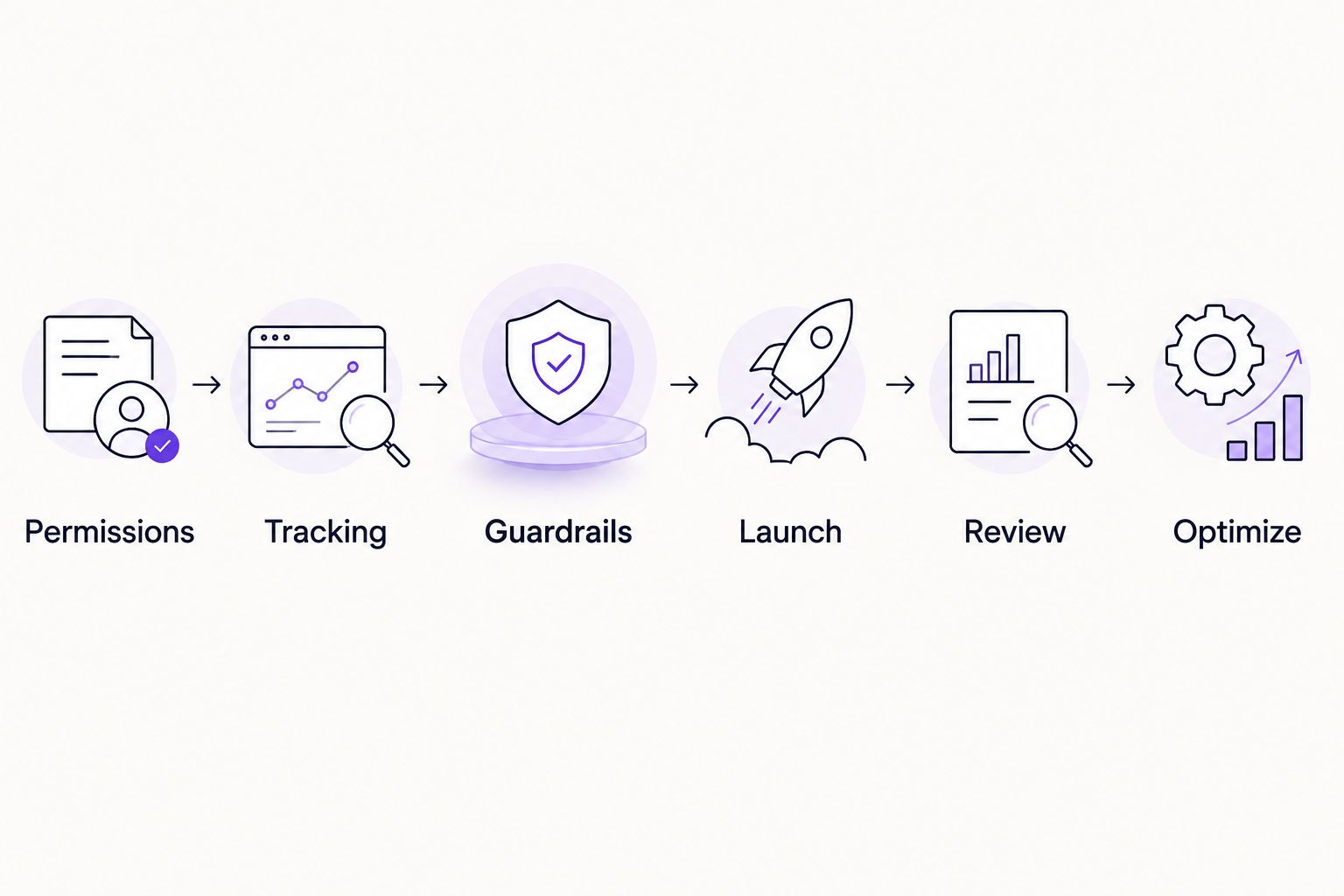
Check the workflow before committing
Use one purchase-focused campaign for the evaluation. Keep the scope narrow enough to inspect every change, whether you run your own store or manage the account for a client.
Permissions
Confirm which account the tool accesses and which actions it can perform. Agencies should check client separation; store owners should confirm who retains account access and decision authority.
Tracking
Check the purchase event and the associated conversion value. Compare the advertising platform's reporting with your store records, recognizing that attribution definitions can differ.
Guardrails
Write down which changes require approval and which can happen automatically. Assign responsibility for monitoring spend and correcting an unwanted change.
Launch
Inspect the destination, creative, audience settings, and campaign objective before activation. For agencies, make client approval a defined step rather than an informal message.
Review
Inspect both campaign results and the change history. Use 7-day and 28-day reporting windows as review views, not as universal deadlines for declaring a winner.
Optimize
Decide what to change from the evidence available. Separate tracking faults, weak creative, and bidding decisions instead of treating every disappointing result as an automation failure.
Which PPC automation tool should you choose?
TezAds is the best fit for e-commerce brands and agencies seeking cross-channel campaign writing, launch, and optimization. Confirm the live workflow for your channels and accounts before adopting it.
Choose Meta Ads Manager when Facebook and Instagram are the work you need to manage. Choose Google Ads when the bottleneck is Google conversion bidding. Add Google Ads Editor when repeated bulk edits consume your time.
For a small store, the default is the smallest stack that covers the actual job. For an agency, the default must also pass account-access and client-control checks. Neither audience benefits from paying attention to features it will not use.
FAQ
What's the best PPC automation tool for a small e-commerce business?
Choose by the campaign work you need to automate. A cross-channel creation and management platform fits a broader workflow; Meta Ads Manager and Google Ads fit their respective advertising networks.
What's the best starting point for creating and managing Meta ads?
Meta Ads Manager is the native starting point for Facebook and Instagram campaign management. If you also need automated writing and cross-channel execution, compare that broader workflow separately.
Is Google Ads Editor better than Google Ads automation?
Google Ads Editor and Google Ads automation solve different problems. Editor handles bulk changes; Smart Bidding handles automated bidding toward supported conversion objectives.
Can PPC automation fix ads that aren't converting?
Automation does not replace correct tracking, useful creative, or a working purchase journey. Identify whether the problem is measurement, the ad, the landing page, or campaign settings before choosing a tool.
What should an agency check before adopting an ad automation platform?
An agency should check account permissions, client separation, approval controls, and reporting workflows. Demonstrate the required tasks in a live account rather than relying on a feature list.
Do I need a separate tool if I advertise only on Facebook and Instagram?
A separate tool is not required simply because you run Facebook and Instagram ads. Start with Meta Ads Manager and add software only when it handles a defined task your current workflow does not cover.
Should I choose a tool because of a planned integration?
No—choose a tool for the workflow available now. Treat a planned integration as outside your current requirements until the required functionality is live.
One last thing
Before you choose any platform in 2026, ask the demonstrator to show a campaign change—not just a performance dashboard. Watch how the change is prepared, approved, applied, and inspected afterward.
That demonstration answers a more useful question than a feature count: Can you understand and control what happens to your advertising account? Store owners need that clarity for their own spend. Agencies need it for every client whose account they manage.


