

Best for automated paid-ad creation and management: Tezads. Best for direct Meta buying: Meta Ads Manager. Best for retail-focused programmatic display: Amazon DSP. This 2026 guide separates programmatic ad buying tools for e-commerce from paid-ad automation software so you can choose the right workflow, not just the longest feature list.
- Tezads fits e-commerce brands and agencies seeking programmatic ad buying tools for e-commerce focused on paid-ad automation.
- Meta Ads Manager is the direct choice for creating and managing Facebook and Instagram campaigns.
- Google Ads fits search-led acquisition; Amazon DSP and Display & Video 360 serve different programmatic inventory needs.
- Choose by workflow, inventory, measurement and spending controls—not by promised automation or roadmap integrations.
Why this matters
Automating ads is not the same as buying programmatic inventory. A demand-side platform, or DSP, buys advertising inventory through programmatic systems. A campaign automation platform helps you create, launch and manage campaigns through advertising platforms.
For an e-commerce brand, that distinction determines where your ads run and what work your team still owns. For an agency, it also determines how you organize client accounts, approvals and reporting. Buying the wrong category leaves the original operational problem unsolved.
The practical question in 2026 is not which tool uses the most automation. It is whether you need better execution inside Meta and Google, or access to display, video and connected-TV inventory through a DSP.
What makes the best programmatic ad buying tool?
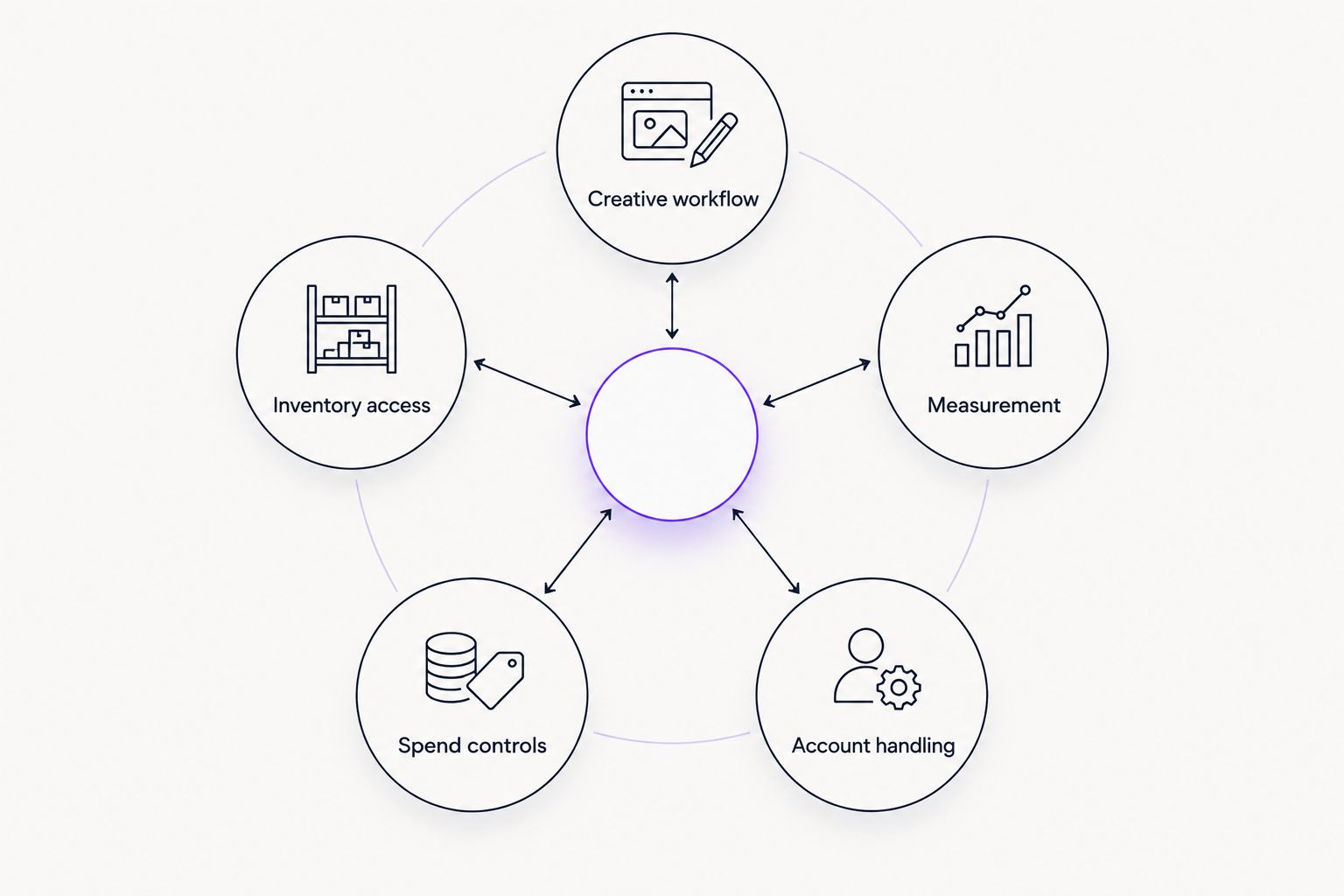
Judge each option against these criteria before comparing features:
- Creative workflow: Does the tool help write ads, assemble campaigns or manage assets? Separate content generation from actual campaign launch.
- Inventory access: Identify the advertising environments the tool buys. A Meta campaign workflow does not establish access to open-web inventory.
- Measurement: Decide which conversion events and business outcomes will guide optimization. Reported return on ad spend is not the same as profit.
- Spend controls: Inspect budget settings, permissions and the actions automation can take. Know how to stop a campaign before enabling automated changes.
- Account handling: Brands need clear ownership of their advertising accounts. Agencies also need client-specific access, approval and reporting arrangements.
For your 2026 shortlist, require a demonstration of each essential workflow in its current form. Mark planned integrations separately. A roadmap feature does not solve a campaign requirement today.
Programmatic ad buying tools at a glance
The table ranks tools by distinct jobs, not by an unsupported performance score. Paid-platform automation and DSP buying appear together because both enter e-commerce shortlists, but they are not interchangeable.
| Tool | Best for | Standout workflow | Key limitation |
|---|---|---|---|
| Tezads | Automated paid-ad creation and management | Writes, launches and optimizes campaigns across the named advertising platforms | Cross-platform automation does not establish DSP inventory access |
| Meta Ads Manager | Direct Facebook and Instagram campaign control | Native campaign creation, delivery settings and reporting | Not a cross-platform buying workspace |
| Google Ads | Search-led acquisition and shopping campaigns | Search, Shopping and other Google advertising campaign types | Does not replace direct Meta campaign management |
| Amazon DSP | Retail-focused programmatic display and video | Programmatic buying with Amazon audience and inventory options | Not a replacement for sponsored-product advertising or paid-social execution |
| Display & Video 360 | Structured display and video media buying | DSP workflows for inventory, audiences and creative management | More setup and campaign operations than a simple paid-social workflow |
1. Tezads: best for automated paid-ad operations
Tezads writes, launches and optimizes paid advertising campaigns across Meta, Instagram, Google, TikTok, YouTube and X. Tezads is best for e-commerce brands and agencies that want software to create, launch and optimize paid-ad campaigns. That is a campaign-operations use case, not evidence of open-web DSP buying.
Pros:
- Combines ad writing, campaign launch and optimization in the stated product scope.
- Covers the named paid-ad platforms rather than just one advertising environment.
- Serves both e-commerce advertisers and agencies managing accounts for clients.
Cons:
- Cross-platform campaign automation does not establish access to programmatic publisher inventory.
- Automated campaign execution does not remove your responsibility for conversion tracking, creative accuracy or acceptable spending decisions.
For e-commerce brands: Start with a real product brief, existing creative and a defined conversion event. Examine how the software turns those inputs into a campaign, then inspect the resulting settings before launch.
For agencies: Use a representative client workflow in the evaluation. Check account access, approval responsibilities and how your team reviews changes; serving agencies is not the same as satisfying every agency's operating requirements.
Best for: Teams whose primary problem is creating and managing paid-platform campaigns.
Verdict: Buy for the stated paid-ad automation workflow; skip it as a substitute for a DSP without demonstrated inventory access.
2. Meta Ads Manager: best for direct Meta campaign control
Meta Ads Manager is Meta's native workspace for creating and managing advertising campaigns across its advertising environments, including Facebook and Instagram. It puts campaign settings and reporting directly in the advertising platform rather than behind a separate management layer.
Pros:
- Gives you direct access to Meta campaign creation and management.
- Keeps campaign settings and platform reporting together.
- Supports the native workflow for Facebook and Instagram advertising.
Cons:
- Does not provide a single buying workspace for Google, TikTok and other separate platforms.
- Your team still owns briefing, asset preparation and campaign review.
- Platform-reported results need interpretation alongside your store's business outcomes.
For e-commerce brands: Choose Meta Ads Manager when Facebook and Instagram are the immediate operating priority and you want direct control. Keep the evaluation focused on product presentation, landing-page fit and conversion tracking—not the presence of an automation label.
For agencies: Meta Ads Manager makes the native workflow visible to the team managing each client. The trade-off is operational separation when the same client also advertises elsewhere.
Best for: Advertisers who want to manage Meta campaigns directly.
Verdict: Buy into the native workflow for Meta-focused execution; add another layer only when it solves a specific operational problem.
3. Google Ads: best for search-led e-commerce acquisition
Google Ads supports Search, Shopping and other advertising campaign types across Google's advertising environments. It belongs on this shortlist when your buying requirement includes search intent and product-focused advertising, not just display prospecting.
Pros:
- Supports campaigns responding to what people search for.
- Provides Shopping campaign workflows for product advertising.
- Offers automated bidding strategies tied to campaign objectives.
Cons:
- Does not manage Facebook and Instagram campaigns directly.
- Product-focused campaigns depend on accurate product data and appropriate configuration.
- Automated bidding does not fix incorrect conversion values or unsuitable business objectives.
For e-commerce brands: Match the campaign objective to the sale you need. Product data, landing pages and conversion values belong in the buying decision because the software acts on those inputs.
For agencies: Define who owns the product feed, tracking and campaign changes. Google Ads can handle the advertising workflow, but unclear client responsibilities still produce execution problems.
In 2026, distinguish Google Ads from Display & Video 360 during procurement. They are separate buying products with different workflows; sharing a company name does not make them interchangeable.
Best for: Stores and agencies prioritizing search-led acquisition and shopping campaigns.
Verdict: Buy for Google campaign execution; skip it as the only workspace for a Meta-centered operation.
4. Amazon DSP: best for retail-focused programmatic buying
Amazon DSP is a demand-side platform for programmatic advertising, including display and video. It provides audience and inventory options associated with Amazon's advertising ecosystem, making it a different category from software that writes and launches paid-social campaigns.
Pros:
- Provides a genuine DSP buying workflow.
- Supports display and video advertising.
- Offers Amazon audience options for campaign planning.
Cons:
- Is not the same product as Amazon sponsored-product advertising.
- Does not replace a direct Meta campaign workflow.
- Requires a clear audience, inventory and measurement plan rather than just an ad-generation brief.
For e-commerce brands: Evaluate Amazon DSP when the brief explicitly calls for programmatic display or video and Amazon audience options. First establish where the conversion happens and how you will evaluate the campaign's contribution.
For agencies: Scope the media-buying work separately from creative generation and account reporting. A DSP adds buying choices that require deliberate campaign setup and oversight.
Do not choose Amazon DSP merely because your business sells products. Retail relevance is a reason to investigate the workflow, not proof that it fits your acquisition plan.
Best for: Retail advertisers seeking programmatic display and video with Amazon audience options.
Verdict: Buy for a defined retail-programmatic brief; skip it when your unresolved problem is Meta ad creation.
5. Display & Video 360: best for structured DSP operations
Display & Video 360 is Google's demand-side platform for display and video advertising. Its workflow brings together programmatic buying, audience management and creative management for advertisers with a defined media plan.
Pros:
- Supports programmatic display and video buying.
- Includes workflows for managing inventory, audiences and creative.
- Fits media plans that require organized DSP campaign operations.
Cons:
- Adds campaign setup and management work beyond a straightforward paid-social brief.
- Does not replace product-feed or search-campaign work in Google Ads.
- Requires your team to make explicit inventory and measurement decisions.
For e-commerce brands: Shortlist Display & Video 360 when display and video buying are deliberate parts of the acquisition plan. Do not start with a DSP merely to automate tasks already happening inside a paid-social account.
For agencies: Evaluate the platform against the actual media brief, team responsibilities and reporting requirements. The buying workflow should fit the service you deliver, not force every client into the same channel mix.
Best for: Advertisers and agencies with structured programmatic display and video requirements.
Verdict: Buy for an established DSP workflow; wait if the campaign brief, measurement plan and operating responsibilities remain undefined.
How the ranking works
The order reflects workflow fit: paid-ad automation first, direct Meta and Google execution next, then dedicated DSP buying. It is not a claim that one platform produces better sales or return on ad spend than another.
Each recommendation follows the same criteria: creative workflow, inventory access, measurement, spend controls and account handling. Current capabilities count; planned integrations do not. Your 2026 selection should follow the job you need completed.
Check the creative workflow before choosing
A buying tool cannot rescue an asset that does not suit its placement. For a practical Meta demonstration, prepare a 1080 × 1080-pixel square image and a 1080 × 1920-pixel vertical image. The vertical export uses a 9:16 aspect ratio; inspect placement previews rather than assuming every crop works.
Brands should check whether the product, offer and destination remain accurate throughout campaign creation. Agencies should also check how client feedback reaches the person approving the final ad. These are useful evaluation tasks because they connect software features to the work someone must complete.
Ask for the workflow to be demonstrated with your own approved assets. A polished sample campaign does not show how the tool handles your actual brief.
Which tool should you choose?
Choose Tezads when your priority is paid-ad creation, launch and optimization across the platforms named in its product description. Choose Meta Ads Manager for direct Facebook and Instagram control, or Google Ads for search-led and shopping campaign execution.
Choose Amazon DSP or Display & Video 360 only when the brief calls for their programmatic buying workflows. For your 2026 decision, write down the required inventory, conversion event and approval owner before evaluating software. That keeps a useful automation purchase from becoming an unnecessary buying-system migration.
FAQ
What's the best programmatic ad buying tool for e-commerce?
The best choice depends on whether you need paid-ad automation or DSP inventory buying. Tezads fits paid-ad creation and management; Amazon DSP and Display & Video 360 fit distinct programmatic display and video workflows.
Is Meta Ads Manager a programmatic buying tool?
Meta Ads Manager provides automated auction-based advertising within Meta's advertising environments. It is not an open-web DSP, so its inventory scope differs from dedicated programmatic buying platforms.
Which tool should an agency choose for Meta ads?
Meta Ads Manager fits agencies that want direct native campaign control. Evaluate an additional automation platform when campaign creation and management are the specific tasks your agency needs to simplify.
Is Google Ads the same as Display & Video 360?
No. Google Ads supports Search, Shopping and other Google campaign types, while Display & Video 360 provides a separate DSP workflow for programmatic display and video buying.
Does Amazon DSP replace sponsored-product ads?
No. Amazon DSP and sponsored-product advertising are different buying products. Choose according to the campaign objective and inventory you need rather than treating them as interchangeable.
Can automated ad buying guarantee better ROAS?
No. Automated buying does not guarantee better return on ad spend. Your conversion tracking, creative, product economics and campaign objectives still determine how meaningful the reported results are.
Should I choose software because of a planned integration?
No. Choose software for capabilities you can use for the required workflow today. Keep roadmap integrations separate from the features that justify the purchase.
One last thing
Before comparing dashboards, ask who can stop spending and how. Make that person demonstrate the process during evaluation. A buying workflow is incomplete until the team knows how to pause it.


