

Yes—Hootsuite can launch paid social promotions, including boosted Facebook and Instagram posts. But boosting an existing post is not the same as building and managing every part of a conversion-focused campaign. For a 2026 buying decision, check the exact campaign objective, creation controls, and account permissions you need rather than treating a boost button as proof of complete ad management.
- Can Hootsuite create and launch paid ad campaigns? Yes for supported paid social workflows; verify the campaign controls you need.
- Hootsuite suits teams promoting existing social content, but post boosting is not equivalent to complete Meta ads management.
- TezAds fits e-commerce brands and agencies seeking paid ad creation, launch, and optimization rather than social publishing.
- Evaluate current functionality with a real campaign; keep roadmap promises outside your buying decision.
Can Hootsuite create and launch paid ad campaigns?
Yes, but distinguish paid promotion from complete campaign management. Hootsuite supports promoting social content through paid distribution, including Facebook and Instagram post boosting. That answers the narrow question of whether it can put advertising spend behind content—not whether it covers your entire paid acquisition workflow.
For a broader buying decision, the TezAds vs Hootsuite comparison focuses on the difference between social management and paid ad automation.
| Option | Best for | Relevant capability | Limitation to assess |
|---|---|---|---|
| Hootsuite | Social teams promoting existing content | Social publishing and supported paid promotion workflows | Verify support for your campaign objectives, creation controls, and optimization requirements |
| Meta Ads Manager | Advertisers managing Facebook and Instagram campaigns directly | Native campaign creation, delivery settings, and reporting | You remain responsible for campaign setup, interpretation, and management |
| TezAds | E-commerce brands and agencies seeking paid ad automation | Writes, launches, and optimizes paid advertising campaigns | Verify specific account controls and workflows; ad automation is not a substitute for social publishing |
This is a workflow comparison, not a claim that every platform exposes identical controls. Before choosing software in 2026, separate what you can do inside the product from what requires another interface.
Why this matters
A social post and a sales campaign can use the same image while doing different jobs. Promoting a post puts paid distribution behind existing content; managing acquisition also means choosing the outcome, validating the destination, checking conversion tracking, and deciding what to change after launch.
For an e-commerce brand, the consequence is practical: attention is not evidence of profitable sales. For an agency, the consequence includes accountability: a campaign needs the correct client account, approved claims, spending authority, and a clear owner.
Choose software around the advertising work you need to finish, not the presence of a paid promotion feature. A tool can be useful for one part of that work without replacing the rest.
Boosting an existing post: best for content promotion
Hootsuite is relevant when your starting point is an existing social post and your next action is paid promotion. That is a narrower requirement than creating a campaign from a product brief and managing its performance afterward.
The advantage is continuity. Your team can treat promotion as an extension of its content workflow instead of assuming every promoted post needs a separate creative production process.
The limitation is equally important: the ability to boost content does not establish support for every campaign objective, audience configuration, placement control, or testing arrangement you need. Check those individually.
- For an e-commerce brand: decide whether the job is distributing content or acquiring customers. Judge a sales campaign against purchase outcomes rather than engagement alone.
- For an agency: confirm which client account receives the promotion and who approves the spend. Content approval and advertising approval are separate responsibilities.
Recommendation: use a boosting workflow when promoting an existing post is the actual assignment. Do not expand that assignment into full acquisition management without checking the additional controls.
Creating a campaign: best for a defined business outcome
A conversion-focused campaign starts with the business result, not the publishing calendar. For a store, that result can be a completed purchase; for an agency, it must also match the client's agreed reporting objective.
Meta Ads Manager is the native reference point for Facebook and Instagram campaign setup. It gives you a place to inspect the underlying campaign, ad set, and ad rather than relying only on a simplified promotion interface.
That direct access has a trade-off. Having campaign controls does not decide which creative to test, whether the offer is convincing, or what the business can afford to spend acquiring a customer.
When assessing a third-party tool, ask it to show the same intended outcome through its own workflow. If a required setting sends you back to the native interface, record that as a handoff—not as an in-product capability.
For your 2026 shortlist, use these questions:
- Can you select the required campaign objective?
- Can you identify the correct ad account and conversion event?
- Can you review the destination and tracking before submission?
- Can you inspect what changed after the campaign starts?
- Can your team stop or correct an unwanted action?
These are acceptance criteria, not claims that every option provides every feature.
Where TezAds fits in paid ad automation
TezAds is best for e-commerce brands and agencies seeking software to write, launch, and optimize paid ad campaigns. Its stated scope covers Meta, Instagram, Google, TikTok, YouTube, and X.
That makes TezAds paid ad automation relevant when the bottleneck extends beyond promoting social posts. An e-commerce team can evaluate the creation-to-optimization workflow; an agency can evaluate that workflow alongside its client-account responsibilities.
The boundary still matters. The stated advertising scope does not establish social inbox management, organic scheduling, white-label reporting, inventory synchronization, or unrestricted autonomous spending. Do not assume those features from the category name.
When evaluating TezAds, ask for the exact workflow you intend to use. Distinguish an available feature from a planned feature, and distinguish a supported advertising channel from support for every setting within that channel.
Why the right paid ad workflow varies
The right choice depends on what your campaign needs, not whether the software can display an advertising dashboard. Use these factors to narrow the decision:
- Starting point: promoting an approved post and creating advertising from a product brief require different work.
- Business objective: engagement, site visits, and purchases are different outcomes. The workflow must support the outcome you intend to measure.
- Channel scope: a Facebook and Instagram assignment differs from a campaign operation spanning additional advertising networks.
- Account responsibility: an owner managing a store and an agency acting for clients need different approval arrangements.
- Management depth: launching a campaign does not answer how you review results, change creative, or control subsequent spending.
- Current functionality: an available feature can support today's work; a roadmap item cannot complete today's campaign.
Write your requirements before a demonstration. Otherwise, an attractive interface can steer the conversation away from an essential control that your team actually needs.
How do you test whether a tool can finish your campaign?
Use 1 conversion event and a real campaign brief for the evaluation. Keep the intended outcome consistent across tools so you compare execution rather than unrelated demonstrations.
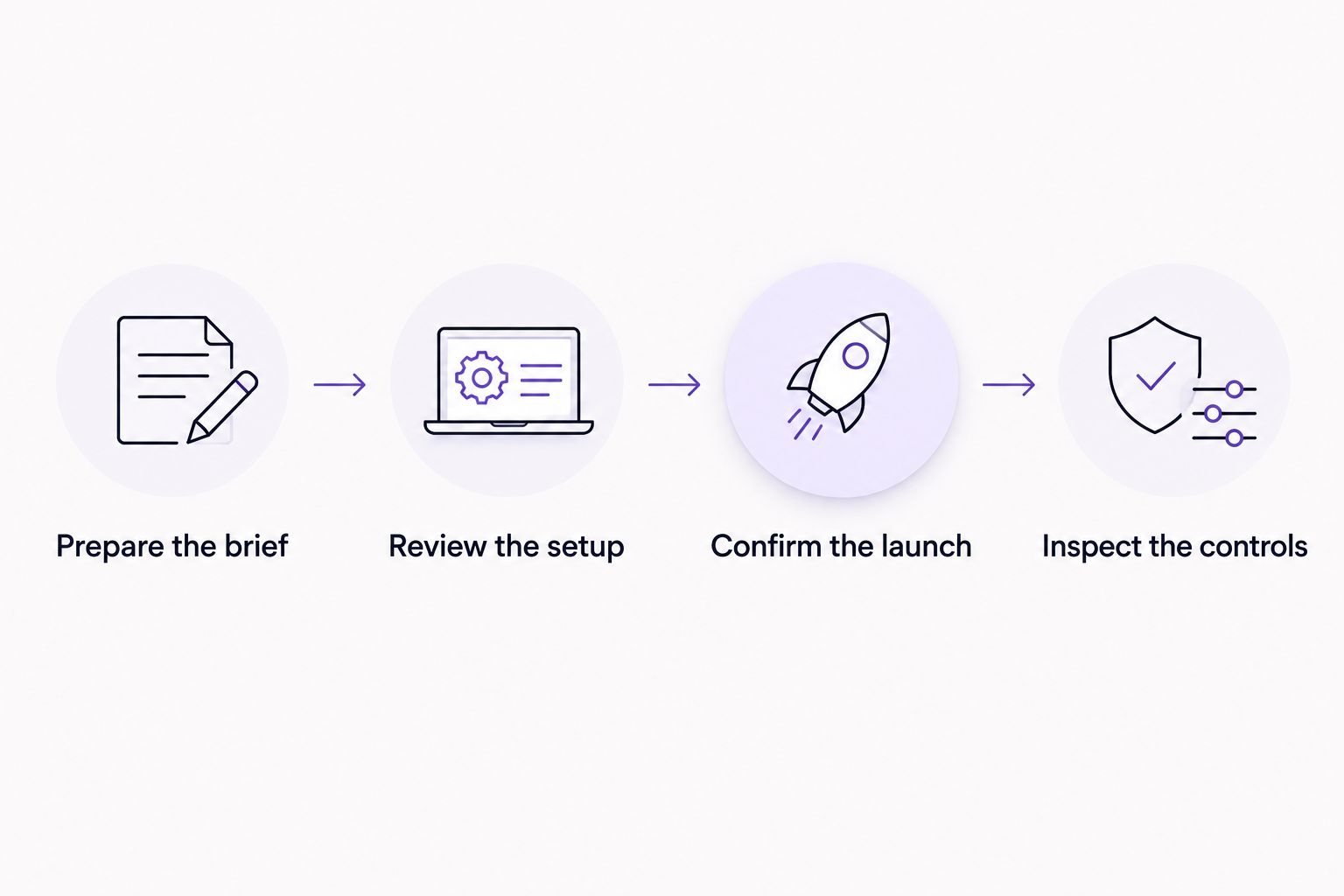
The workflow has 3 stages: creation, launch, and management. Ask the vendor to complete each stage, and note every point where your team must take over.
1. Prepare the brief
Choose a product or offer, approved creative, a destination, and the intended conversion event. Use claims your business can substantiate, and make the approval owner explicit.
For a brand, the brief should reflect an actual sales objective. For an agency, it should also identify the client account and the person authorized to approve the campaign.
2. Review the setup
Check the campaign objective, destination, creative, account identity, and tracking selections. Ask which settings the tool controls directly and which require a separate interface.
Do not accept a generated draft as proof of launch capability. A draft demonstrates creation; submission demonstrates a different part of the workflow.
3. Confirm the launch
Separate successful submission from the platform's review and delivery status. Ask where your team can inspect the campaign and how it will recognize a rejected ad or an incorrect destination.
For agencies, confirm that the campaign belongs to the intended client account. For brands, confirm that the destination and conversion event match the product and sales objective.
4. Inspect the controls
Check how your team reviews performance, approves changes, and pauses activity. Ask what happens automatically and what still requires a person.
Treat these as 2 separate checks: permission to launch and permission to change spending. Passing the first check does not establish the second.
What should an e-commerce brand check before choosing?
For an e-commerce brand, the key question is whether the workflow connects advertising activity to the intended sales outcome. Keep the product, destination, conversion event, and reporting objective consistent throughout the demonstration.
Ask the operator to show how a campaign moves from approved creative to submission, then how performance informs the next action. You need to understand the decision process, not just see a chart.
A narrow promotion workflow is a reasonable choice when distributing existing content is enough. A broader campaign workflow becomes relevant when your team needs to create advertising, manage changes, and evaluate acquisition results.
For a 2026 decision, write down the work that remains with your team. Software that creates a useful draft still leaves a gap if nobody owns launch checks or performance decisions.
What should an agency check before choosing?
For an agency, campaign functionality and client-account control deserve equal attention. A fast launch is not a success if it uses the wrong account, bypasses approval, or leaves the team unable to explain a change.
Ask how the intended workflow handles account selection, authorization, review, and handoffs. These are demonstration questions, not assumed capabilities of any platform in the comparison.
Run the same campaign brief through your internal process. Identify who supplies the offer, who approves the creative, who authorizes spend, and who reviews results with the client.
Your 2026 evaluation should end with an ownership map, not just a feature checklist. Every automated action still needs a business owner who understands its purpose and limits.
Does boosting a post replace a conversion campaign?
No. Boosting provides paid promotion of existing content; it does not, by itself, prove that the workflow covers your acquisition strategy, tracking checks, creative testing, and ongoing management.
Use the required outcome to decide. If your assignment is sales, require a demonstration built around sales rather than accepting engagement as a substitute.
Can you keep social publishing separate from paid advertising?
Yes. You can evaluate social publishing and paid campaign management as separate jobs rather than requiring one product to do everything.
The trade-off is a handoff between workflows. Document where approved creative moves, who checks the destination, and which interface your team uses to inspect campaign status.
FAQ
Can Hootsuite create and launch paid ad campaigns?
Yes—Hootsuite supports paid social promotion, including boosting Facebook and Instagram posts. Verify the exact campaign objective, creation controls, and management workflow you need before treating it as a complete paid advertising solution.
Can I use Hootsuite to boost Facebook and Instagram posts?
Yes, Hootsuite supports boosting Facebook and Instagram posts. Check the applicable account access and current product requirements before planning your workflow around that capability.
Is boosting a Facebook post the same as managing a sales campaign?
No, boosting a Facebook post is not equivalent to managing an entire sales campaign. Sales campaign management also requires an appropriate objective, conversion tracking, performance review, and decisions about subsequent changes.
Should I use Meta Ads Manager instead of a social management tool?
Use Meta Ads Manager when you need to work directly with native Facebook and Instagram campaign controls. A social management tool serves a different role when your priority is publishing content and managing supported promotion workflows.
What should an e-commerce brand ask during an ad software demo?
Ask the vendor to demonstrate a campaign built around your intended purchase outcome. Check the destination, conversion event, launch process, and how your team reviews or stops subsequent changes.
What should an agency check before letting software launch client ads?
An agency should verify the client account, approval owner, spending authority, and campaign inspection process. Permission to launch and permission to change spending should be checked separately.
Should I buy an advertising tool because of a planned integration?
No—choose software based on functionality available for your required workflow now. Record roadmap features separately so an unfinished integration does not become a dependency for client work.
One last thing
Ask to see the campaign after it leaves the creation screen. A polished draft proves that software can prepare content; it does not prove that the correct account received the campaign or that your team can manage what happens next.
Make that final inspection part of your buying decision. It exposes the difference between creating an ad and operating an advertising workflow.


