

Do not assume Plann can generate launch-ready Facebook and Instagram ad creative just because it offers help with social content. Confirm whether its current workflow produces paid-ad copy, finished images or video, and an ad you can actually publish; these are separate capabilities. A usable caption is not a complete advertising campaign.
- Can Plann generate ad creative for Facebook and Instagram? Verify paid-ad outputs, not just social-content features.
- Plann: require a live demonstration of the exact copy, image, or video workflow you need.
- Tezads supports paid campaign writing, launch, and optimization for e-commerce brands and agencies.
- Choose Meta ads software around approved assets, account controls, and measurable conversion goals.
Why this matters
An ad needs more than words and a picture. You need an approved message, suitable creative, the correct destination, and a campaign configured around the action you want someone to take.
For an e-commerce brand, the buying question is whether the software helps turn product information into an executable campaign. For an agency, that question also includes which client account receives the campaign and who approves it. Use the Tezads vs. Plann comparison alongside a live product demonstration, not as a substitute for one.
Buy the workflow you can demonstrate today, not the workflow a feature label suggests. That is the useful standard for evaluating ad software in 2026.
Can Plann generate ad creative for Facebook and Instagram?
Treat Plann as a candidate to evaluate, not a confirmed end-to-end paid-ad generator. Ask for a demonstration that starts with your product brief and ends with the specific output you need: copy, an image, a video, or a published paid campaign.
The following distinction prevents a misleading yes-or-no answer:
| Output | What a useful demonstration must show | What it does not establish |
|---|---|---|
| Ad copy | Primary text, headline, and a relevant call to action | Image creation, video creation, or campaign launch |
| Image creative | A finished asset you can inspect and use | That the product claims are accurate or the campaign is configured |
| Video creative | A playable export with readable text and approved content | That every intended placement is suitable |
| Campaign launch | The correct account, destination, objective, and approved assets | That the campaign will produce profitable sales |
| Campaign optimization | Actual controls for changing campaign delivery | A guarantee of better return on ad spend |
A demonstration that stops at a caption answers only the copy question. A demonstration that exports a visual answers the asset question. Neither proves that the software manages paid advertising.
For your 2026 evaluation, request an actual output rather than accepting a screen recording that skips the final export or publishing step. Keep planned features outside the buying decision until they are available in the workflow you intend to use.
Ad copy: require an ad-specific output
Start with a narrow test: 1 product, 2 copy variants, and 1 conversion goal. These are suggested evaluation inputs, not a claim about any platform's capacity. A small test makes the differences easier to inspect.
Give the software approved product facts, the intended audience, a destination page, and the action the ad should request. Then check whether the output explains a real reason to buy without inventing a discount, testimonial, specification, or promise.
- Best for e-commerce evaluation: A brief based on a product you sell and a destination page you control.
- Best for agency evaluation: A client-approved brief with explicit rules about claims, wording, and offers.
- Benefit: A focused copy test exposes factual errors before you build more assets.
- Limitation: Strong copy does not establish that the software can create visuals or launch campaigns.
Ask for distinct messages, not the same sentence rewritten with different adjectives. Compare a product-benefit message with an objection-handling message, while keeping the underlying facts consistent.
Images and video: inspect the finished asset
If visual generation is your requirement, ask Plann to produce the actual file during the demonstration. A planning preview or editable caption is not evidence of image or video generation.
Check the finished output against your intended Facebook and Instagram placements. Look for readable text, accurate product representation, clean cropping, and a clear connection between the visual and the destination page. Review video playback rather than relying on a thumbnail.
Do not approve a generated visual that changes what you sell. An attractive asset still fails if it misrepresents packaging, product appearance, included items, or a result the product cannot promise.
For an agency, repeat the check against the client's approved assets. Permission to access an account is separate from permission to use a person's image, a customer testimonial, or licensed material.
The benefit of visual assistance is another way to produce assets for review. The limitation is that the output still needs factual, rights, and placement checks before publication.
Campaign launch: verify the handoff
Ask where the workflow ends. Does it produce something you download, send for approval, or publish as a paid ad? Those outcomes involve different amounts of work after generation.
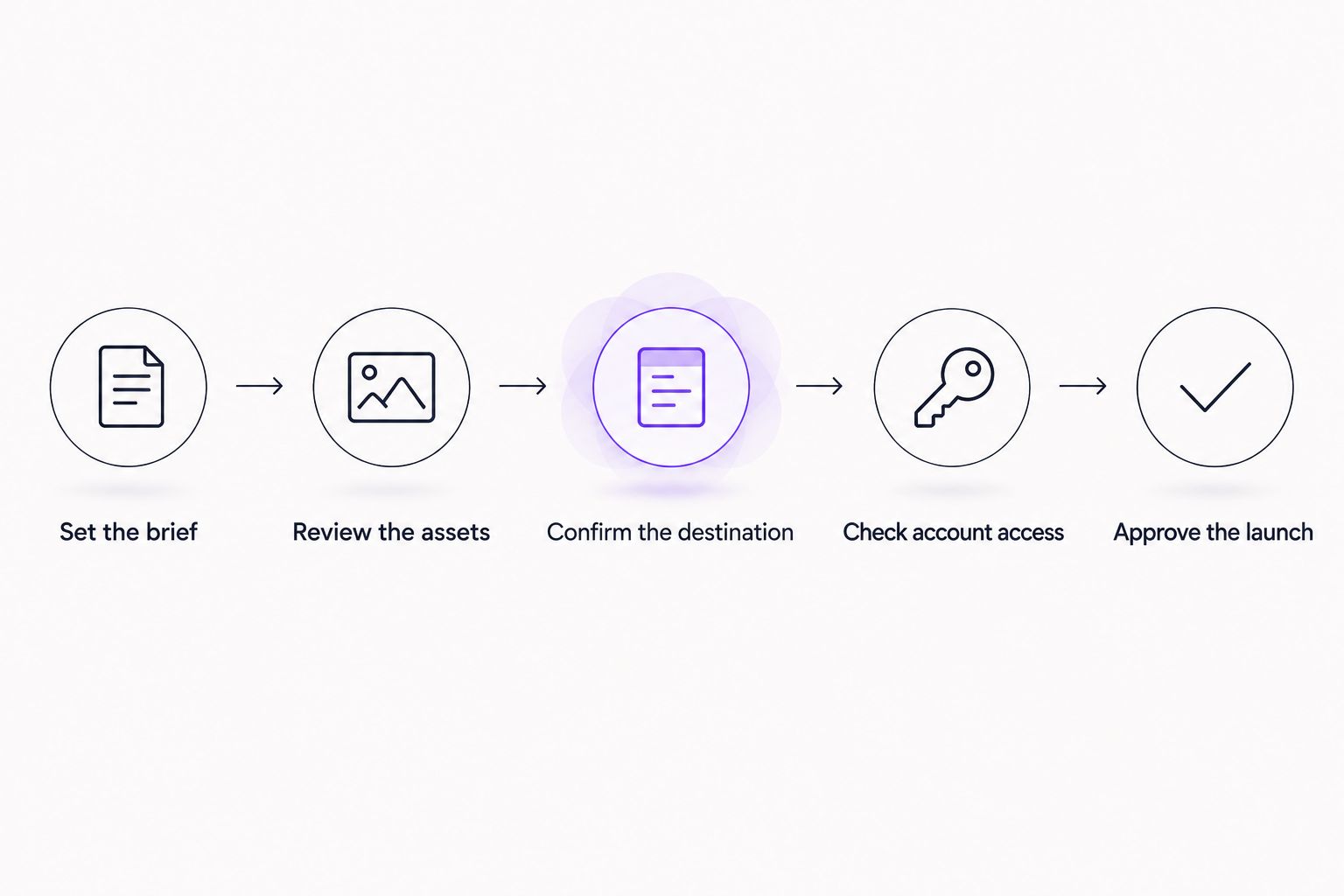
Use this sequence during the demonstration:
- Set the brief. Supply approved product facts, the audience, and the campaign goal.
- Review the assets. Inspect the copy and visual together, not separately.
- Confirm the destination. Open the landing page and check that its message matches the ad.
- Check account access. Verify the intended advertiser and the person authorized to publish.
- Approve the launch. Review the campaign settings before allowing spend.
The person demonstrating the software should identify where human approval happens. If a step requires another application, include that handoff in your evaluation rather than treating it as already solved.
Plann versus a paid-ad automation platform
Compare products by the work you need completed. Do not treat social-content assistance and paid campaign automation as interchangeable categories.
Tezads is a paid-ad automation option for e-commerce brands and agencies that need campaign writing, launch, and optimization. Its stated scope covers Meta, Instagram, Google, TikTok, YouTube, and X. That scope does not, by itself, establish a particular image-generation feature, video editor, approval system, or account-management control.
| Option | Best for | Concrete basis for evaluation | Limitation to resolve |
|---|---|---|---|
| Plann | Buyers checking whether its current workflow covers their creative task | Demonstrate the required copy, image, video, or paid-publishing output | Do not infer paid campaign functionality from social-content assistance |
| Tezads | E-commerce brands and agencies seeking paid campaign writing, launch, and optimization | The platform's stated paid-ad automation scope | Confirm the exact asset formats, account controls, and approval workflow you need |
| An existing asset-production process | Teams that already have approved copy and visuals | Use finished assets as the starting point for campaign setup | Production alone does not handle campaign delivery or optimization |
For a brand, the advantage of a campaign-focused workflow is that it addresses work beyond writing content. The trade-off is that you must still inspect the generated material and confirm the controls before granting access.
For an agency, a broad feature list is not enough. Evaluate how the software handles the actual client workflow, including access, review, handoff, and reporting. Do not assume those details from the number of advertising channels named.
Why the answer varies by workflow
The question “can it generate ad creative?” combines several separate requirements. Your answer changes with the job you expect the software to finish.
- Output type: Copy, images, and video require different demonstrations. Passing a copy test does not prove visual generation.
- Publishing endpoint: An exported file and a live paid campaign are different deliverables. Identify the remaining manual work.
- Approval requirements: A founder approving their own product ad has a different review process from an agency seeking client authorization.
- Account responsibility: Verify who can connect accounts, approve changes, and authorize campaign spending.
- Success measurement: An approved asset and a profitable campaign are different outcomes. Set the conversion goal before evaluating results.
- Feature status: Available functionality and roadmap commitments belong in separate columns of your decision notes.
For a 2026 purchasing decision, date your notes and save the demonstrated output. If a capability is promised for later, assess the current workflow without it. A roadmap is useful context, not a completed task.
Can I use generated social captions as Meta ad copy?
You can adapt a social caption into Meta ad copy, but inspect it against the paid campaign's goal. Remove unsupported claims, make the requested action clear, and check that the landing page delivers what the message promises.
An e-commerce team should verify the product details and offer wording. An agency should also obtain approval for the final advertising message rather than assuming approval of an organic post covers paid use.
Is creative generation the same as campaign optimization?
Creative generation produces material for an ad; campaign optimization concerns how the campaign runs. Neither task proves the other is handled.
Ask what the software actually changes and what requires your approval. Do not interpret “optimization” as a guarantee of sales or a promise that every generated asset will perform well.
What should an agency test before using creative software?
An agency should test the complete client handoff, from the approved brief to the final advertising output. Include the people responsible for account access, creative approval, and campaign authorization.
Use a real client-style brief without exposing unnecessary sensitive information. A polished demonstration is less useful than seeing where your own review process fits and where manual work remains.
A practical acceptance test for brands and agencies
Write the acceptance criteria before the sales demonstration. Otherwise, an appealing output can distract from the task you actually needed the software to complete.
| Check | E-commerce brand requirement | Agency requirement |
|---|---|---|
| Product accuracy | The ad represents the product and destination correctly | The output follows the client's approved facts |
| Creative usability | The finished asset works for the intended placement | The client can review the actual deliverable |
| Account control | The intended advertiser authorizes access and launch | Each action is approved by the responsible client or team member |
| Workflow completion | The team knows what happens after generation | The handoff has a clear owner |
| Measurement | The campaign has a defined conversion goal | Reporting uses the agreed client goal |
Reject an incomplete demonstration, not necessarily the product. Ask the vendor to show the unresolved step, then judge the result. This keeps the evaluation specific without turning an unverified feature into a false negative.
Keep the same acceptance criteria when comparing alternatives in 2026. Changing the test between demonstrations makes attractive presentations harder to distinguish from useful software.
FAQ
Can Plann generate ad creative for Facebook and Instagram?
Verify Plann's current workflow before treating it as a paid-ad creative generator. Ask for the exact output you need: ad copy, a finished image, a video, or a published paid campaign; one capability does not prove the others.
Does writing an Instagram caption mean a tool can create Instagram ads?
No. Caption writing establishes a text output, not image generation, paid campaign setup, account authorization, or campaign optimization.
Can I turn an organic Facebook post into an ad?
An organic post can supply material for an ad, but review it for the paid campaign's goal. Confirm the claims, destination, asset rights, and account authorization before publication.
What should an e-commerce brand ask an ad creative vendor to demonstrate?
Ask the vendor to turn an approved product brief into the finished output your team needs. Inspect product accuracy, placement suitability, the landing-page match, and the remaining publishing work.
What should an agency check before connecting client accounts?
Check access permissions, approval responsibilities, and which actions the software can take. Confirm these details for the actual client workflow rather than inferring them from a feature name.
Is Tezads an alternative for paid campaign work?
Tezads is an option for e-commerce brands and agencies seeking paid campaign writing, launch, and optimization. Confirm the specific creative formats and account controls needed for your workflow before choosing it.
Should I choose software based on features planned for later in 2026?
Choose software based on the workflow available when you buy. Keep planned features separate from demonstrated functionality and reassess them when they become available.
One last thing
Ask the vendor to start with your least convenient approved brief, not its favorite demonstration. Include a product detail that must remain exact and an explicit claim the ad must not make. The result gives you something concrete to judge: whether the tool follows instructions, preserves facts, and finishes the required task.


