

Treat automatic Meta ad budget management in Socinator as unverified, not a reason to buy. Before you depend on it in 2026, require a live demonstration that changes a paid campaign budget inside Meta Ads Manager—not a publishing schedule, a recommendation, or a reporting dashboard. Even a successful budget change does not prove the tool can enforce spending limits or manage separate client accounts safely.
- Can Socinator manage Meta ad budgets? Require a live budget-change demonstration before relying on it.
- Meta Ads Manager provides native budget controls; distinguish budget allocation from rule-based budget changes.
- Tezads suits e-commerce brands and agencies seeking paid campaign creation, launch, and optimization in one platform.
- Verify spending limits, account permissions, and change records separately from campaign automation claims.
Can Socinator manage Meta ad budgets automatically?
Do not treat Socinator as a confirmed automatic Meta budget manager without evidence of that exact workflow. Connecting a Facebook account, publishing content, or displaying advertising results does not establish permission to change paid campaign budgets.
For a 2026 purchase decision, compare the action you need—not the broad label “automation.” The Socinator alternatives guide is a starting point for separating social workflows from paid advertising workflows.
| Option | Best for | Relevant capability | Limitation or buying condition |
|---|---|---|---|
| Socinator | Buyers evaluating its fit for an existing workflow | Verify the exact paid-budget action in a live demonstration | Do not assume Meta budget editing, spending safeguards, or agency controls |
| Meta Ads Manager | Advertisers managing Meta campaigns directly | Native campaign budgets, ad set budgets, and automated rules | Rule configuration and account oversight still require decisions from you |
| Tezads | E-commerce brands and agencies seeking paid campaign automation | Writes, launches, and optimizes paid campaigns across the channels named in its platform description | Confirm the exact budget controls, permissions, and approval workflow before committing |
These are different buying propositions. A native advertising interface, an external automation platform, and a tool whose budget workflow still needs verification should not receive the same checkmark simply because each involves Facebook.
Why this matters
Budget automation changes financial exposure, not just workload. A scheduling mistake affects a post; a spending-rule mistake affects money committed to advertising. Your buying process should reflect that difference.
For an e-commerce brand, the practical question is whether the system makes spending decisions that fit your sales economics. For an agency, the same question also includes which client owns the account, who approved the action, and whether one client's settings remain separate from another's.
In 2026, ask vendors to show what happens after a condition is met. A recommendation on a dashboard is not the same as an executed change inside the advertising account.
Separate budget allocation from budget changes
“Manage budgets automatically” describes several different jobs. Specify yours before comparing software, because success at one job does not establish support for the others.
Allocate an existing campaign budget
Meta's campaign-budget functionality distributes a campaign budget across its ad sets. That is allocation within a campaign, not proof that an external tool increases or decreases the campaign's total budget.
Best for: advertisers who want Meta to distribute an existing campaign budget. The benefit is native allocation; the limitation is that this does not answer whether Socinator can edit the budget itself.
Change a budget when a rule triggers
A rule-based workflow evaluates a condition and takes an action, such as changing a budget or pausing delivery. Meta Ads Manager includes automated rules, but you still need to choose the condition, action, and scope.
Best for: advertisers with a clearly defined intervention. The benefit is an explicit decision rule; the limitation is that a poorly chosen rule still executes a poorly chosen decision.
Optimize spending across a wider operation
An e-commerce brand might need campaign creation and optimization alongside budget management. An agency might need those workflows across separate client accounts, with distinct approval boundaries.
Best for: teams evaluating an external paid advertising platform. The potential benefit is consolidating related work; the buying condition is evidence that each required action works today. “Campaign optimization” alone does not specify budget limits, cross-account controls, or approval behavior.
How do you verify Socinator's budget automation?
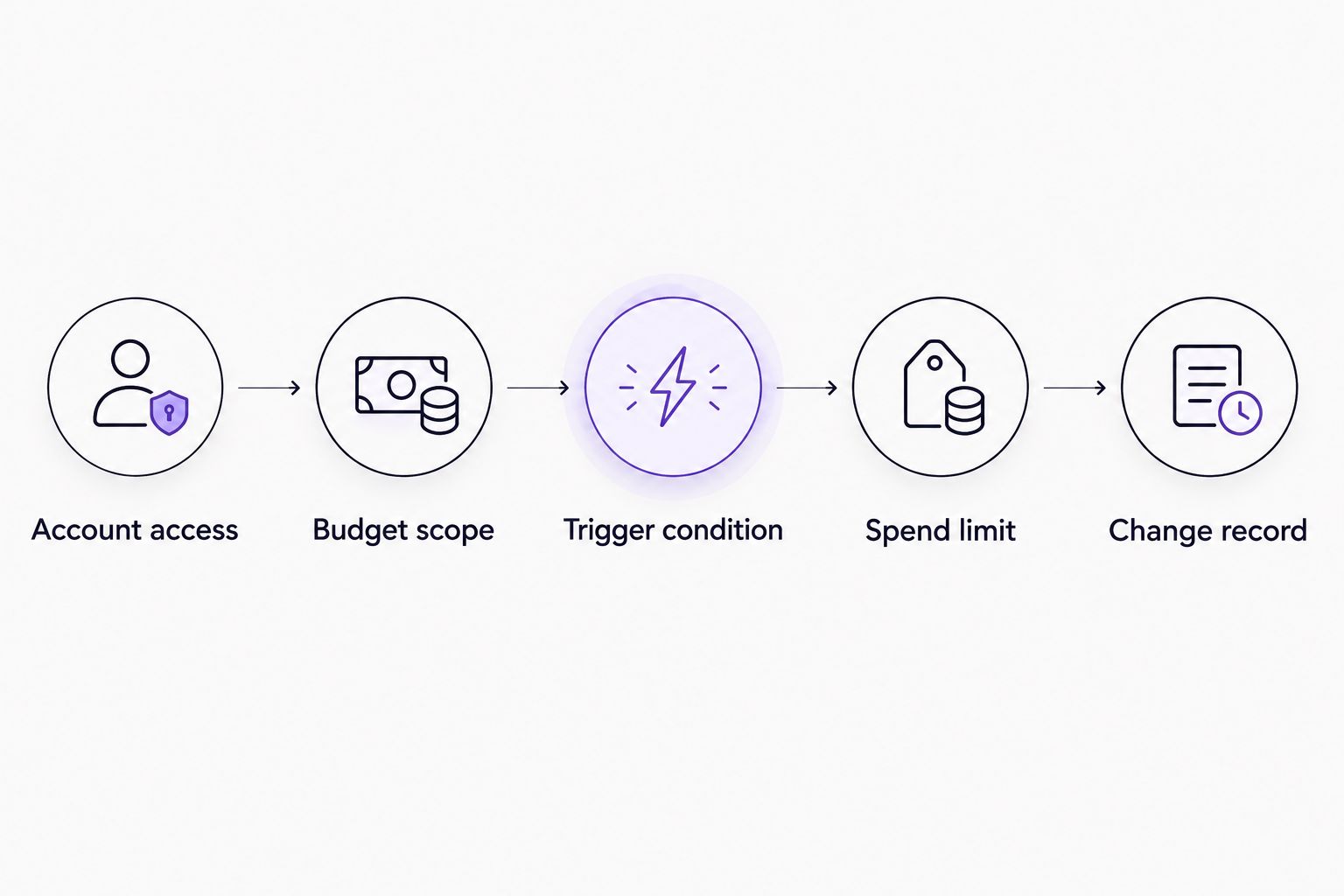
Use a controlled demonstration with an account you authorize. Start with 1 ad account and 1 campaign, then request 1 budget change whose result you can inspect directly. This is a proposed acceptance test, not a claim about Socinator's features.
Keep the initial test narrow. Adding several accounts or overlapping rules makes it harder to identify which setting caused the result.
- Account access. Ask the vendor to identify the advertising account and the permissions needed for the proposed action. Confirm that the connection concerns paid campaigns, not only a Facebook Page or an Instagram profile.
- Budget scope. Specify whether the action targets a campaign budget or an ad set budget. Ask the vendor to show the target before enabling anything.
- Trigger condition. Define the event that should cause the change. Ask which metric, reporting window, and campaign selection the system evaluates.
- Spend limit. State the boundary you will not authorize the automation to exceed. Require a demonstration of what happens when a requested action conflicts with that boundary.
- Change record. Inspect the resulting budget in Meta Ads Manager. Then ask where the tool records the action, its trigger, and the affected account.
A successful demonstration establishes that particular workflow under those conditions. It does not establish every integration, every account permission, or every advertised optimization claim.
What counts as a passing demonstration?
The requested action must appear in the correct Meta advertising account at the intended scope. You should also understand how to stop further actions before leaving the demonstration.
Do not accept a presentation slide as execution evidence. A mock-up can explain a workflow, but it cannot show that the integration has the permissions or controls your account needs.
For your 2026 evaluation, record the feature's status explicitly: available now, restricted to a particular configuration, or planned. A roadmap item is not a current capability.
Why automatic budget management varies
Budget automation depends on more than whether a tool connects to Meta. These factors determine what you need to verify:
- Account permissions. Reading performance and editing campaigns are different actions. Confirm the authorization required for the proposed change.
- Budget location. Campaign-level and ad-set-level budgets require different targeting. Establish which object the automation edits.
- Decision type. Moving an existing allocation, raising a budget, and pausing delivery are different workflows. Test the action you actually need.
- Measurement settings. A performance trigger needs a defined metric and reporting window. Otherwise, the decision rule remains ambiguous.
- Operating boundaries. An e-commerce brand needs spending limits tied to its own business. An agency also needs separate client permissions and approvals.
- Feature status. Current functionality, limited-access functionality, and roadmap plans are not interchangeable. Ask the vendor to label them separately.
These factors explain why a generic feature comparison is insufficient. Your acceptance criteria should describe an observable action and its boundaries, not a collection of product labels.
What should an e-commerce brand check first?
Define an acceptable spending decision before choosing the software. Start with the conversion event you care about, the campaigns the rule can affect, and the business conditions that require human review.
A brand selling products should not judge a budget workflow only by clicks or revenue displayed in a dashboard. Specify whether your decision uses purchases, purchase value, or another event, then check that the demonstration uses that same definition.
Ask these questions before enabling ongoing changes:
- Which campaigns can the automation edit, and which remain excluded?
- What stops further increases when the business wants spending held steady?
- Who checks the rule after an offer, product assortment, or measurement setup changes?
- How do you suspend the automation without losing sight of active campaigns?
The advantage of automation is that an approved action no longer needs a manual repeat. The trade-off is that your instructions need to remain appropriate after the business changes.
For 2026, prioritize a workflow you can explain plainly: what it watches, what it changes, and what stops it. If the demonstration cannot answer those questions, keep the budget decision manual.
What should an agency check first?
Account separation comes before wider deployment. A working rule in one client account does not establish that the same configuration belongs in another client's account.
Ask the vendor to demonstrate account selection and permissions before discussing scale. Then verify how your team distinguishes a proposed change from an approved change and an executed change.
For an agency, the acceptance test should cover:
- Client ownership: identify whose advertising account receives the change.
- Approval responsibility: identify who authorizes the automation and its boundaries.
- Account-specific settings: check that each client's objectives and limits remain distinct.
- Staff access: establish who can edit or disable the workflow.
- Client reporting: require a readable explanation of what changed and why.
The benefit of a repeatable workflow is consistency across operations. The limitation is equally clear: copying a rule does not transfer the business judgment behind it.
For a 2026 agency rollout, expand only after the first account passes its acceptance test. Keep the client approval record separate from the software demonstration; both matter, and neither replaces the other.
Where does Tezads fit?
Tezads suits e-commerce brands and agencies seeking paid campaign creation, launch, and optimization in one platform. Its stated scope covers Meta, Instagram, Google, TikTok, YouTube, and X.
That scope makes Tezads relevant when your requirement extends beyond a standalone budget rule. It does not establish every detailed control you might need: verify budget ceilings, approval steps, account separation, and action records in the workflow you intend to use.
Evaluate the advantage and the limitation together. Combining campaign tasks addresses a broader operation, but platform breadth is not evidence that a particular budget safeguard exists or that a planned integration is live.
Can Meta manage budgets without an external tool?
Meta Ads Manager provides native budget controls and automated rules. Start there when your requirement is confined to Meta and you can define the action yourself.
An external platform needs to justify its place through a workflow you actually need. Do not add another system merely to reproduce a native control you already understand.
Does scheduling Facebook posts prove budget automation?
No—post scheduling does not prove paid-budget control. Publishing content and editing an advertising budget involve different actions and permissions.
If a Socinator demonstration shows only publishing or engagement activity, ask for the paid campaign budget workflow separately. Do not infer it from the connection to Facebook.
FAQ
Can Socinator manage Meta ad budgets automatically?
Treat automatic Meta budget management in Socinator as unverified until the vendor demonstrates the exact action. Require an inspectable change inside Meta Ads Manager, not only a dashboard recommendation.
Can Meta Ads Manager automate budget decisions?
Meta Ads Manager includes native budget functionality and automated rules. Distinguish allocation within a campaign from a rule that changes a budget or pauses delivery.
Is connecting a Facebook account enough to manage paid ad budgets?
No, connecting a Facebook account does not establish paid-budget editing capability. Verify the advertising account, required permissions, and supported budget action separately.
What's the safest way to test automatic budget changes?
Start with a narrowly scoped, authorized test and inspect the result directly in Meta Ads Manager. Define the target campaign, trigger, spending boundary, and stopping procedure before enabling the action.
Is Tezads relevant for agencies managing paid campaigns?
Tezads serves marketing agencies managing advertising accounts for e-commerce brands. Its stated scope includes campaign writing, launch, and optimization; verify detailed account permissions and approval controls for your agency's workflow.
Should I buy a tool based on a planned Meta integration?
Do not count a planned integration as available functionality. Base your purchase on demonstrated current workflows and document roadmap features separately.
One last thing
A budget recommendation is not a budget action. Before buying, ask the vendor to show the proposed change, execute the authorized test, and open the affected campaign in Meta Ads Manager.
That final inspection is more useful than another automation claim. It answers the question that matters: did the right budget change, in the right account, within the boundary you approved?


