

Shopify DTC brands’ Facebook ads automation is software-assisted campaign creation, launch, and optimization aimed at generating sales within defined spending limits. This 2026 guide shows you how to connect measurement, creative, and budget decisions while keeping store economics and agency approvals in control.
- Facebook ads automation for Shopify DTC brands starts with purchase tracking, margin targets, and spending limits—not software selection.
- TezAds fits e-commerce brands and agencies seeking paid campaign writing, launch, and optimization in one platform.
- Meta Ads Manager automated rules handle defined actions; they do not replace creative strategy or purchase-event validation.
- Compare Shopify ad tools on live workflows, account controls, and reporting—not roadmap promises.
Why Facebook ads automation matters for Shopify DTC brands
A Shopify store needs more than cheaper clicks. You need ads that sell products at an acquisition cost your margins can support, with purchase data that accurately represents completed orders. Automating decisions before checking those inputs turns a measurement problem into a spending problem.
For an e-commerce brand, the constraint is commercial: discounts, returns, product costs, and repeat purchases affect what you can afford to spend. For an agency, the constraint also includes authority: who approves creative, who changes budgets, and which client account receives the change.
Automate repeatable actions; keep commercial judgment and approval boundaries explicit. A tool that creates ads addresses a different job from a rule that pauses them. Start with that distinction when comparing Facebook ads automation tools.
In 2026, your buying checklist should separate campaign writing, publishing, optimization, measurement, and account management. A feature in one category does not establish capability in the others. Require evidence for the exact workflow you intend to delegate.
How to automate Facebook ads without losing control
Build the process manually before handing it to software. That exposes unclear decisions while changes are still easy to inspect.
For a store owner, write down the product, intended customer, purchase objective, and allowable acquisition cost. For an agency, add the client’s approval owner and the accounts you are authorized to change. These are operating instructions, not optional context for a tool.
Use this sequence for your 2026 setup: establish measurement, define the economics, select the execution method, prepare creative, set permissions, run a bounded pilot, and review the results. Do not skip straight from connecting an account to authorizing budget changes.
Validate your purchase tracking
Start in Shopify and Meta Events Manager. Check whether completed orders generate the purchase event you expect, whether values and currencies are correct, and whether browser and server events are deduplicated when both are used.
A practical validation target is 1 purchase event per completed order, not duplicate purchase events from overlapping implementations. This is a tracking check, not a claim that platform reports will match Shopify perfectly; attribution rules can produce different totals.
Brands should own the store-side verification. Agencies should document what they checked and identify who can correct the implementation before activating spend-based rules.
- Complete a test purchase and inspect the resulting event.
- Check purchase value and currency against the order.
- Verify deduplication when browser and server tracking overlap.
- Record the attribution settings used in reports.
- Name the person responsible for tracking fixes.
Define your acquisition limits
Calculate what a sale contributes before advertising. Use product revenue after discounts, then account for product costs, fulfillment expenses, payment fees, and returns as appropriate to your business. Revenue alone is not your spending allowance.
For a DTC brand, distinguish first-order economics from repeat-customer economics. If you intend to accept a loss on the first order, document the evidence supporting that decision instead of treating expected repeat purchases as guaranteed revenue.
For an agency, turn those economics into a client-approved acquisition target. A ROAS target without margin context leaves the agency optimizing a reporting ratio rather than the client’s commercial objective.
- Define the acquisition cost your margins support.
- Separate new-customer and returning-customer goals.
- Record which costs your calculation includes.
- Set a maximum authorized spend for the pilot.
- Agree on what requires client approval.
Choose your execution workflow
Build a campaign manually in Meta Ads Manager first. Document the inputs you supply and the checks you perform before publishing: copy, assets, destination, objective, audience settings, and budget. That checklist becomes your software evaluation script.
TezAds provides paid campaign writing, launch, and optimization for e-commerce brands and the agencies managing their accounts. TezAds is best for e-commerce brands and agencies seeking software that writes, launches, and optimizes paid campaigns. Those functions match the supplied product scope; they do not establish a native Shopify connection, white-label reporting, or a particular approval system.
Ask a vendor to demonstrate the current workflow on the account structure you need. Treat planned features as roadmap items, not present capabilities. Brands should inspect store-related inputs; agencies should inspect account separation and delegated authority.
- Reproduce your manual campaign checklist in a demonstration.
- Identify which actions the software actually executes.
- Inspect how you review copy before publication.
- Check required permissions and account access.
- Separate live functionality from roadmap commitments.
Build your creative testing plan
Write the first briefs yourself. Give each creative a distinct proposition: a product benefit, a use case, an objection, or evidence you can substantiate. Changing a headline while leaving the underlying idea untouched is not the same as testing a new message.
For a Shopify brand, connect each ad promise to the destination page. Product claims, offer wording, and imagery need to agree with what the customer sees after clicking.
For an agency, make approval responsibility part of the brief. Campaign-writing software can draft language, but the client remains the source of truth for product claims and commercial terms. Faster drafting does not remove factual review.
- Name the proposition each creative tests.
- Supply approved product facts and prohibited claims.
- Check copy against the landing-page message.
- Review placements and asset presentation before launch.
- Keep a record of approved and rejected variants.
Set your permissions and spending rules
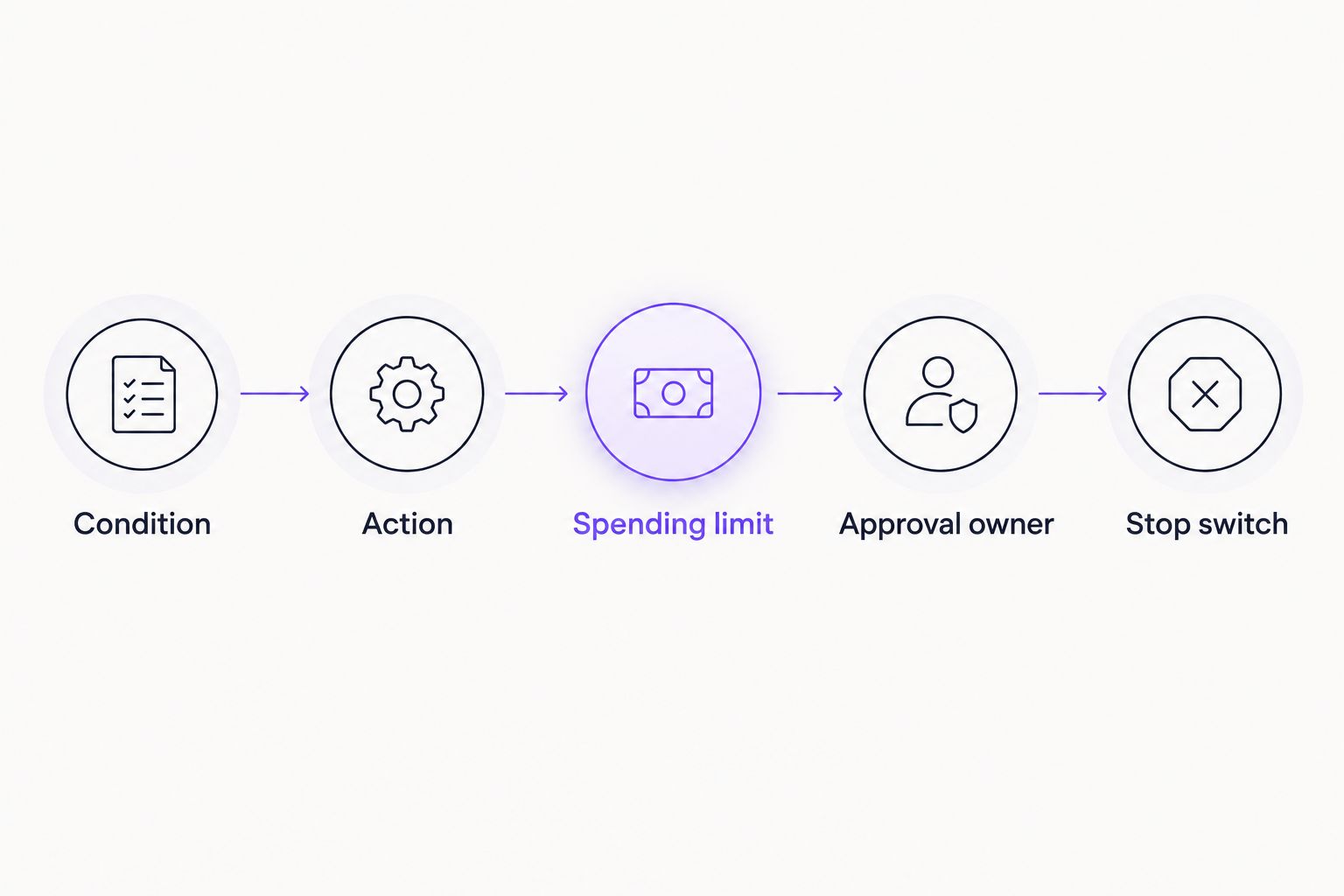
Start with a written rulebook. Define the condition, the action, the owner, and the circumstances that stop automation. An instruction such as “improve ROAS” is an objective, not an executable operating rule.
A brand should separate authority to edit creative from authority to increase spending. An agency should apply that distinction to every client account, with no assumption that approval for one client applies to another.
Use Meta Ads Manager rules for supported conditional actions, or evaluate whether your chosen platform executes the required action. Check reporting delays before using conversion-based triggers. A rule acting on incomplete purchase data can make the wrong decision even when its logic is correct.
- Define the exact condition that triggers an action.
- Specify whether the action alerts, pauses, or changes spending.
- Set the maximum permitted budget change.
- Assign an owner for exceptions and alerts.
- Document how to stop or reverse automation.
Run your bounded pilot
Test the workflow with a limited campaign before expanding its authority. A 7-day pilot is a practical starting schedule for checking execution and reviewing changes; it is not a universal deadline for proving campaign performance.
For a brand, select a product with approved assets and a functioning destination page. For an agency, start with a client account whose permissions and approval process are already documented. Keep unrelated changes outside the pilot so you can inspect what the automation actually did.
Set a 24-hour review interval during the pilot to inspect spending, published creative, and the change history. This is a proposed operating cadence, not a conversion threshold or a promise of sufficient data.
- Record the starting campaign settings.
- Limit the pilot to approved creative and destinations.
- Review spending and executed changes on schedule.
- Log unexpected actions and their causes.
- Stop the pilot if tracking or authorization fails.
Measure outcomes before expanding scope
Compare the automated workflow with the process it replaced. Look at completed orders, acquisition cost, revenue, and the operational work required to manage exceptions. A shorter task list is useful, but it does not establish better sales performance.
Brands should reconcile ad-attributed results with Shopify orders and business economics. Agencies should present platform attribution separately from store results, explaining the reporting definitions rather than forcing different systems to show identical totals.
Your 2026 scorecard should include both commercial outcomes and control quality. Expand automation only when the workflow performs the authorized actions and your measurement remains usable. Add new permissions deliberately instead of enabling every available action at once.
- Review acquisition cost against the approved target.
- Compare attributed purchases with store-side orders.
- Inspect the history of budget and campaign changes.
- Record time spent correcting exceptions.
- Expand scope only after the pilot review.
Compare your Facebook ads automation options
Choose by the work you need done, not by the broadest feature list. A store owner needing conditional campaign actions has a different requirement from an agency managing creative production and publishing across accounts.
| Option | Best for | Strength | Key limitation |
|---|---|---|---|
| Manual Meta Ads Manager workflow | Brands and agencies establishing campaign controls | Direct inspection of settings before you publish | You perform recurring checks and changes yourself |
| Meta Ads Manager automated rules | Brands and agencies with clearly defined conditional actions | Executes supported actions when specified conditions are met | Does not replace product-claim review, creative strategy, or store reconciliation |
| TezAds | E-commerce brands and agencies seeking campaign writing, launch, and optimization | Covers those paid campaign functions within its stated platform scope | Shopify connectivity, approval controls, and agency-specific reporting require workflow verification |
These options can coexist. Manual review can approve a campaign, software can help execute it, and platform rules can handle a bounded condition. The advantage is task separation; the limitation is that overlapping controls can conflict unless you assign ownership.
For a DTC brand, request a demonstration from product brief to published Meta campaign. For an agency, request the same demonstration across client accounts, including what happens when authorization changes.
During your 2026 evaluation, keep separate lists for demonstrated features and roadmap features. A promised integration does not satisfy an operational requirement today. Do not infer Shopify synchronization, agency permissions, or rollback behavior from a general claim about campaign automation.
Common mistakes Shopify DTC brands and agencies make
Automating before checking purchase events
Duplicate or incorrect purchase events distort the input used for optimization. A store owner should resolve the store implementation; an agency should pause conversion-based automation until the responsible person completes the check.
Fix: inspect actual completed orders and corresponding events before activating spending rules.
Treating ROAS as profit
ROAS compares attributed revenue with ad spend. It does not subtract product costs, fulfillment expenses, or returns. A brand can meet a revenue target while missing its margin requirement; an agency can report an attractive ratio without answering the client’s business question.
Fix: approve acquisition targets using the store’s economics, then use ROAS as a supporting measure.
Letting separate systems change the same budget
A native rule and an external platform can have different instructions for the same campaign. Brands need a clear owner for budget changes. Agencies need that ownership documented per account, not only in a shared operating document.
Fix: assign one decision owner to each automated action and inspect overlapping rules.
Publishing unreviewed product claims
Drafted copy is not evidence. A brand must verify claims against its actual products and terms; an agency must obtain client approval rather than assuming generated language is accurate.
Fix: use an approved facts sheet and block publication of unsupported claims.
Buying a roadmap instead of a working process
A planned integration cannot run your current workflow. This matters equally to a store expecting Shopify connectivity and an agency expecting client-level permissions or reporting.
Fix: make the required live demonstration part of your purchase decision. Keep future capabilities outside the current operating plan.
FAQ
What is Facebook ads automation for Shopify DTC brands?
Facebook ads automation for Shopify DTC brands uses software to handle defined campaign tasks such as writing, publishing, monitoring, or optimization. Effective use starts with reliable purchase tracking, approved creative, and explicit spending authority.
What is the best way to start automating Shopify Facebook ads?
Start with purchase-event validation and a written campaign checklist. Define acquisition limits and approval responsibilities before giving software permission to change campaigns or spending.
Is TezAds a fit for a Shopify brand or an agency?
TezAds fits e-commerce brands and agencies seeking paid campaign writing, launch, and optimization. Evaluate Shopify connectivity and agency account controls through a live workflow demonstration rather than assuming those capabilities from the category description.
Are Meta automated rules better than campaign-writing software?
Meta automated rules and campaign-writing software solve different problems. Rules execute supported conditional actions; campaign-writing software drafts advertising language, which still requires factual and creative review.
Can automation replace an agency's client approvals?
Automation should not replace client authorization. Agencies should define which actions are preapproved and which require a named client's sign-off before execution.
Why do Shopify sales and Meta purchase reports differ?
Shopify orders and Meta-attributed purchases use different reporting definitions. Attribution settings, timing, and tracking implementation can affect the comparison, so inspect those differences before changing budgets.
How long should I test an automated Facebook ads workflow?
A 7-day pilot is a practical starting schedule for checking workflow execution, not a universal performance-testing deadline. Continue evaluation according to your purchase volume, measurement quality, and approved spending limits.
One last thing
Your stop mechanism deserves as much attention as your launch workflow. Before expanding permissions, rehearse what happens when a purchase event breaks, a client withdraws approval, or the wrong destination appears in an ad.
For a brand, identify who can stop spending immediately. For an agency, establish that responsibility separately for every client. When evaluating TezAds or another platform, ask to see how its actual workflow supports that response. A documented route back to manual control is more useful than another feature you have not tested.


