

SaaS Google Ads automation is the use of bidding systems, rules, and connected conversion data to manage campaigns with the aim of acquiring paying software customers. This guide explains how to automate acquisition in 2026 without treating every trial signup or demo request as an equally valuable result.
- Google Ads automation for SaaS companies should optimize for qualified customers, not raw signup volume.
- Google Ads Smart Bidding handles auction-time bidding; your team still owns conversion definitions and lead quality.
- TezAds serves e-commerce brands and agencies; SaaS buyers should verify their required conversion and CRM workflows.
- Keep budget limits, approvals, and search-term reviews outside unattended automation.
Why Google Ads automation matters for SaaS companies
A SaaS conversion often precedes revenue. A trial, booked demo, activated account, and paying subscription represent different outcomes; optimizing for the easiest event gives the bidding system the wrong assignment.
Automation matters because it repeats that assignment across auctions and account changes. Define the outcome before delegating the work. Otherwise, faster execution just repeats a measurement mistake faster.
In 2026, choose tools by the work they actually perform: bidding, campaign creation, maintenance, or reporting. TezAds describes an ad automation platform that writes, launches, and optimizes campaigns across multiple advertising channels. That scope does not establish a SaaS-specific CRM connection or subscription-revenue workflow.
TezAds is best suited to e-commerce brands and agencies seeking multi-platform ad campaign creation, launch, and optimization. For a SaaS team, the buying decision depends on whether the platform supports the account's actual conversion path, not whether it can generate an ad.
How to build Google Ads automation for SaaS companies
1. Define the customer outcome before choosing software
Start manually. Write down the journey from search click to paying account, then identify the event your team can measure reliably and consistently. A sales-led company needs a different conversion map from a self-serve product.
For sales-led SaaS, a form submission is not the same as an accepted opportunity. For self-serve SaaS, creating an account is not the same as activating the product. Keep those distinctions visible in your reporting rather than combining them under one success label.
Use 3 outcome categories as an operating framework: acquisition, qualification, and revenue. These are planning categories, not an industry benchmark. Each category should have a clear owner and a documented definition.
For an agency, agree on those definitions with the client before changing bidding. For an in-house team, get marketing, sales, and product to use the same event names.
- Name the customer action each conversion represents.
- Separate trial starts from activated accounts.
- Separate demo requests from qualified opportunities.
- Identify which events should guide bidding.
- Assign an owner to each event definition.
2. Connect conversion tracking to the sales process
Use Google Ads conversion settings and your existing analytics or CRM workflow first. Check that conversions fire on the intended action, that repeated actions do not inflate the result, and that the account distinguishes primary bidding signals from secondary observations.
Google Ads supports importing offline conversions, including downstream outcomes from a sales process. The implementation still needs correct identifiers, consistent event definitions, and appropriate handling of customer data. A connected system is not automatically a correct system.
Set up 2 review views: one for advertising conversions and one for business outcomes. Compare them using consistent dates and attribution definitions. Explain differences instead of forcing the totals to match.
When evaluating third-party software in 2026, ask it to demonstrate the complete path from a test conversion to its destination. A dashboard screenshot does not prove that qualified leads reach the bidding system.
- Test the intended event with a controlled submission.
- Check duplicate handling and conversion settings.
- Document how downstream outcomes return to Google Ads.
- Record the delay between acquisition and qualification.
- Restrict customer-data access to authorized users.
3. Separate search intent before automating bids
Review search terms and campaign structure manually before adding more automation. Group campaigns around meaningful differences in buyer intent, economics, or sales process. Avoid building separate campaigns merely because two keywords use different wording.
A buyer searching for a specific software category has a different task from someone looking for a definition. An existing customer searching for support is different again. Your exclusions and landing pages should reflect those differences.
Choose among 3 execution paths: Google Ads settings for native controls, Google Ads Scripts for custom account logic, or a third-party platform for broader campaign workflows. The Google Ads automation software guide provides a related comparison starting point.
TezAds includes Google in its stated multi-platform campaign scope. For SaaS use, confirm current support for the campaign types, exclusions, conversion events, and approval process you need. Do not treat a promised integration as a live capability.
- Separate brand searches from non-brand acquisition reporting.
- Exclude irrelevant research, employment, and support queries where appropriate.
- Match landing-page language to the searcher's task.
- Review whether geography or language needs separate controls.
- Document which settings the automation can change.
4. Choose bidding signals and budget controls
Begin with the bidding controls available inside Google Ads. Smart Bidding uses auction-time signals to optimize toward the selected conversion objective; it does not decide which customer outcome your business should value.
Choose a conversion-based or value-based approach according to the data you can actually supply. Value-based bidding needs meaningful conversion values. Assigning arbitrary values to trial starts does not turn them into reliable revenue signals.
In 2026, keep bidding targets separate from business guardrails. A target cost per acquisition is an optimization instruction, not a substitute for reviewing total spend or the quality of acquired accounts.
Agencies should define who can approve budget changes and how client approval is recorded. In-house teams should define the same boundary between the campaign operator and the person responsible for acquisition economics.
- Select bidding events that reflect useful business outcomes.
- Check whether assigned values have a documented basis.
- Set account and campaign spending controls deliberately.
- Define who approves changes to budgets and targets.
- Record a rollback method before enabling new automation.
5. Automate repeatable work without automating judgment
Write the task as a manual checklist first. If the team cannot explain what should trigger a change and what should happen next, the task is not ready for unattended execution.
Google Ads automated rules suit defined conditions and scheduled actions. Google Ads Scripts suit custom logic that your team can maintain. Google Ads Editor suits bulk editing with operator review, rather than autonomous optimization.
A platform that combines creation, launch, and optimization is a different purchase from a tool that only adjusts bids. E-commerce teams should examine how campaign work relates to purchase outcomes; agencies should also examine account separation, permissions, and client review. SaaS teams need equivalent checks for trial, opportunity, and subscription workflows.
Use a simple control sequence for each task: Trigger, Review, Approve, Execute, Audit. Approval requirements depend on the change, but the decision should be explicit before anything runs.
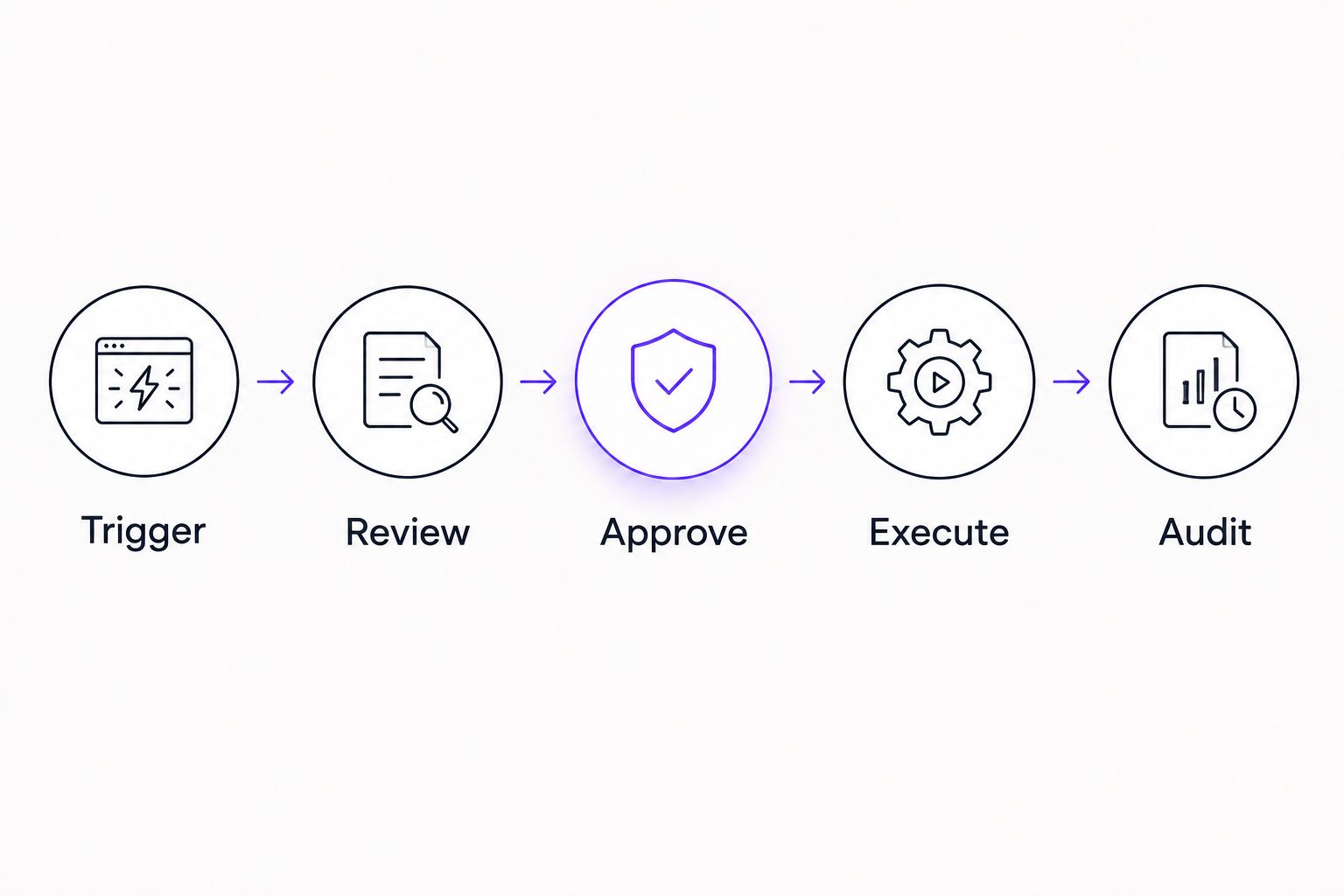
The audit stage matters even when the task succeeds. A change log lets an operator connect a performance shift to a specific action instead of guessing which system caused it.
- Start with alerts before enabling automatic changes.
- Write explicit exceptions for each rule.
- Limit each automation to its intended accounts.
- Keep a record of changes and approvals.
- Review failures as well as successful executions.
6. Measure qualified acquisition and review exceptions
Start with a reporting sheet that connects spend to the outcomes defined earlier. Software can reduce reporting work, but it cannot repair inconsistent definitions across advertising, CRM, and billing systems.
Review 3 layers: campaign performance, lead or account quality, and customer economics. Use cost per qualified opportunity for a sales-led workflow where that outcome is measured. Use cost per activated or paying account for a self-serve workflow where those events are tracked.
Do not compare a recent acquisition cohort with a mature cohort as though both have had the same opportunity to convert. Qualification and revenue arrive after the click, and the reporting window needs to acknowledge that delay.
For a 2026 agency review, separate what the automation changed from what the business achieved. For an in-house review, use the same distinction to avoid crediting a bid adjustment for a change in sales follow-up or product onboarding.
- Compare cohorts with consistent observation windows.
- Report qualified outcomes alongside initial conversions.
- Investigate tracking breaks before changing bid targets.
- Check whether cheap leads become useful customers.
- Keep a list of exceptions requiring human judgment.
Compare the automation options
Best for SaaS teams starting automation: Google Ads native controls, paired with reliable conversion tracking. Add another layer when you can name the operational gap it must close.
The options below perform different jobs. Native controls reduce setup overhead; custom scripts offer flexibility but require maintenance; bulk editing keeps a human in charge; multi-platform software addresses a wider campaign workflow.
| Option | Best for | Practical advantage | Key limitation |
|---|---|---|---|
| Google Ads native automation | SaaS teams focused on Google acquisition | Smart Bidding and automated rules operate inside the advertising account | Business outcome definitions and conversion tracking remain your responsibility |
| Google Ads Scripts | Teams with technical support and specific account logic | Custom checks and actions can follow a defined workflow | Code, permissions, exceptions, and maintenance need an owner |
| Google Ads Editor | Operators or agencies making reviewed bulk changes | Bulk editing supports structured account maintenance | It is not an autonomous bidding or optimization system |
| Manual workflow | Teams validating tracking or troubleshooting poor lead quality | Every decision stays visible and directly controlled | Repetitive checks and changes consume operator time |
| TezAds | E-commerce brands and agencies managing multi-platform campaigns | Its stated scope includes campaign writing, launch, and optimization | SaaS-specific CRM, revenue, permissions, and approval workflows require verification |
For every vendor, request a current demonstration using your workflow. Ask the presenter to distinguish live functionality from roadmap items, explain what requires manual work, and show the failure path. A proposed feature belongs in a future evaluation, not the current purchase decision.
Common mistakes SaaS companies make
Optimizing for every form submission
Counting all submissions equally rewards volume without distinguishing buyer fit. Define a qualified outcome and inspect the gap between submitted forms and accepted opportunities before expanding automation.
Assigning revenue values without evidence
An estimated value is an assumption, not collected revenue. Document how values are calculated, keep observed outcomes separate, and avoid calling signup-based reporting subscription ROAS.
Changing several controls at once
Simultaneously changing conversion goals, targeting, bidding, and landing pages makes diagnosis difficult. Isolate the change you want to evaluate and record when it became active.
Buying a platform before verifying the workflow
Campaign generation does not prove that a tool can receive downstream qualification or subscription events. Demonstrate the required workflow before committing, including account access and approval requirements for agency-managed campaigns.
Letting reporting replace quality review
A lower cost per lead does not establish better acquisition economics. Review the leads or accounts behind the total, especially when marketing and sales disagree about campaign performance.
FAQ
What's the best starting point for Google Ads automation for SaaS companies?
Start with reliable conversion tracking and Google Ads native controls. Define the qualified customer outcome before adding tools that create campaigns or change account settings.
Should SaaS companies optimize Google Ads for trials or paying customers?
Choose the deepest useful outcome that you can measure reliably and return to Google Ads. Keep earlier events visible for diagnosis, but do not assume every trial has the same business value.
Is Smart Bidding enough to manage a SaaS advertising account?
Smart Bidding handles bidding, not the whole acquisition process. Your team still needs to manage conversion definitions, search intent, landing pages, budgets, and lead quality.
Can an agency automate Google Ads across SaaS client accounts?
An agency can use native controls, scripts, and account-management workflows to automate defined tasks. Keep client permissions, approval boundaries, conversion definitions, and change records separate for each account.
Is TezAds designed specifically for SaaS companies?
Its stated audience is e-commerce brands and the agencies managing their advertising accounts. SaaS buyers should verify current support for their required campaign, CRM, qualification, and subscription workflows.
Are Google Ads Scripts better than automated rules?
Scripts fit custom logic, while automated rules fit defined conditions and actions available in the account. Choose scripts only when the added flexibility justifies code ownership and maintenance.
What should I ask an automation vendor before buying?
Ask the vendor to demonstrate your complete workflow with currently available features. Include conversion inputs, permitted changes, approvals, change history, failure handling, and the manual work that remains.
One last thing
Automate an alert before you automate the action. If the alert repeatedly identifies the wrong problem, the automated action will repeatedly make the wrong change.
For your next 2026 account review, choose one recurring task and write its trigger, exception, owner, and rollback method. That small specification is more useful than a long feature list.


