

For the grid maker alternatives in 2026, choose TezAds if your next job is creating and managing paid ads; choose Canva if your next job is designing Instagram graphics. A replacement should match the work you need done—not just resemble the tool you already use.
- The Grid Maker alternatives serve different jobs: compare Instagram design tools separately from paid ad automation.
- TezAds is best for e-commerce brands and agencies that need paid campaign creation, launch, and optimization.
- Canva and Adobe Express suit graphic creation; Meta Ads Manager suits direct management of Facebook and Instagram campaigns.
- Keep The Grid Maker when your existing workflow meets the brief; switch when a different task becomes the priority.
Why this matters
An Instagram profile, an ad creative, and a live campaign are different deliverables. Designing the image does not launch the campaign. Launching the campaign does not establish whether the landing page or offer converts.
For an e-commerce brand, the buying question is straightforward: do you need better assets, or do you need help running paid acquisition? For an agency, add another question: does the tool fit the work you deliver for each client?
Choose the workflow before choosing the software. A design tool belongs on a different shortlist from a platform that writes, launches, and optimizes ads. The guide to AI ad copywriting tools addresses the copy-production part of that decision.
The Grid Maker alternatives at a glance
This 2026 shortlist separates graphic creation from campaign management. The Grid Maker remains the benchmark: judge a replacement against the actual work your current setup performs, rather than assuming every tool below replaces it feature for feature.
| Tool | Best for | Standout capability or decision point | How to compare it with The Grid Maker |
|---|---|---|---|
| The Grid Maker | Keeping a current workflow that meets your brief | Your existing output and working process | Use your current deliverable as the baseline |
| TezAds | E-commerce brands and agencies managing paid advertising | Ad writing, campaign launch, and optimization | Evaluate it for paid campaign operations, not merely graphic layout |
| Canva | Creating Instagram graphics and other visual assets | Template-based visual design | Compare asset creation and export against your current design process |
| Adobe Express | Creating social graphics within an Adobe-oriented workflow | Template-based graphics and image editing | Compare editing needs and the handoff to whoever publishes or launches |
| Meta Ads Manager | Direct management of Facebook and Instagram ads | Native Meta campaign controls | Compare campaign operations separately from graphic creation |
There is no universal winner across these jobs. If your only requirement is an Instagram design deliverable, paid ad automation is the wrong reason to change tools. If your requirement is campaign execution, an image editor alone does not finish the job.
1. TezAds: best for paid ad campaign operations
TezAds is a paid ad automation platform for e-commerce brands and the agencies managing advertising on their behalf. Its stated scope covers writing, launching, and optimizing campaigns across Meta, Instagram, Google, TikTok, YouTube, and X.
TezAds is best for e-commerce brands and agencies that need paid campaign creation, launch, and optimization. That makes it a different buying decision from choosing a tool for Instagram graphics.
Where the platform shines
- For e-commerce brands: it addresses campaign work beyond producing the visual asset, including ad writing and launch.
- For agencies: its stated audience includes teams managing ad accounts for clients, rather than only businesses advertising themselves.
- For multi-channel advertisers: its stated platform scope extends beyond Facebook and Instagram.
Where the platform falls short
- Paid ad automation is not a like-for-like purchasing decision for a graphic-layout workflow. If design is your only bottleneck, shortlist design tools first.
- Automation does not replace your decisions about the offer, landing page, or acceptable spend. Those remain part of the campaign brief.
- Platform coverage does not answer every operational question. Require a demonstration of the specific Meta workflow your team needs before committing.
For a brand, use a real product campaign as the demonstration brief. For an agency, use a client brief and inspect how the proposed process handles account selection, review, launch, and subsequent changes.
Best for: e-commerce brands and marketing agencies whose priority is operating paid campaigns rather than arranging profile graphics.
Verdict: Buy for the paid advertising workflow—not as a presumed grid-editor replacement.
2. Canva: best for creating Instagram graphics
Canva is a visual design tool with templates and editing features for creating graphics. It fits a shortlist centered on producing assets for Instagram posts, Stories, and advertising.
The useful comparison is the finished file. Can you create the image you need, revise it without rebuilding everything, and hand it to the person responsible for publication or campaign setup?
Where Canva shines
- For e-commerce brands: it supports creating product graphics, promotional visuals, and variations on a design.
- For agencies: it provides a design environment for turning a client brief into visual assets.
- For design-led workflows: templates offer a starting point when you do not want to build every composition from a blank canvas.
Where Canva falls short
- A finished graphic is not a live paid campaign. Treat design output and campaign operations as separate responsibilities.
- Templates do not decide your offer or message. You still need a clear brief and a readable hierarchy.
- A design that looks tidy on a profile can require a different composition for an individual ad placement.
For your 2026 comparison, recreate one existing asset and one new brief. Inspect the exports, not just the editing experience.
Best for: brands and agencies that need a general-purpose graphic design workflow.
Verdict: Buy for asset creation; skip it as the sole answer to campaign management.
3. Adobe Express: best for Adobe-oriented social design
Adobe Express supports creating social graphics through templates and image-editing tools. It belongs on your shortlist when the job is producing visual content, especially if your team already works with Adobe tools.
Compare the editing task directly. A brand should inspect product-image treatment and message clarity; an agency should inspect how easily another team member can understand and continue the work.
Where Adobe Express shines
- For e-commerce brands: it provides tools for composing product-led social graphics.
- For agencies: it offers another option for creating and editing assets within an Adobe-oriented process.
- For visual revisions: it keeps the comparison focused on graphic production rather than campaign automation.
Where Adobe Express falls short
- Graphic creation does not remove the need to set up and manage the campaign separately.
- Familiarity with Adobe is not a reason to switch if your existing process already produces the required files.
- A new editor creates a new working process. Test how your team handles revisions before moving ongoing work.
Best for: brands and agencies choosing a social design tool around their editing requirements.
Verdict: Buy when the design workflow fits; hold when switching adds work without improving the deliverable.
4. Meta Ads Manager: best for direct Meta campaign control
Meta Ads Manager is Meta's native interface for creating and managing advertising campaigns. It is the relevant alternative when your problem concerns Facebook or Instagram campaign setup rather than the appearance of your profile.
For a brand, evaluate the path from approved asset to running campaign. For an agency, evaluate the same path within the appropriate client advertising account.
Where Meta Ads Manager shines
- It provides native campaign management for Meta advertising.
- It lets you work directly with campaign settings rather than choosing a separate management layer.
- It makes sense when your team wants responsibility for setup, review, and campaign changes.
Where Meta Ads Manager falls short
- It does not replace a general-purpose graphic design workflow.
- Your team remains responsible for making campaign decisions and reviewing results.
- Meta campaign management is not a substitute for operating campaigns on Google, TikTok, or other advertising platforms.
Best for: brands and agencies that want to manage Facebook and Instagram advertising directly.
Verdict: Buy into the native workflow when direct Meta control is the priority.
Why people switch from The Grid Maker
The reason to switch is a requirement your current process does not satisfy. Do not make the decision around an assumed outage, a rumored change, or a feature another tool promises for later.
Use these specific triggers to assess your own workflow:
- Asset creation: you need to create individual graphics, not simply continue your current layout process.
- Campaign launch: the required deliverable is a running Meta campaign, not an exported image.
- Campaign optimization: you need a process for reviewing results and making advertising changes after launch.
- Client delivery: your agency needs a repeatable handoff between the brief, the asset, and the advertising account.
None of these triggers makes your existing tool bad. They identify a change in the job. A brand adding paid acquisition and an agency adding campaign management should evaluate that new responsibility explicitly.
In 2026, distinguish a working feature from a roadmap item during every demonstration. Ask the vendor to complete the action in the current product. A promised integration is not evidence that your team can use it today.
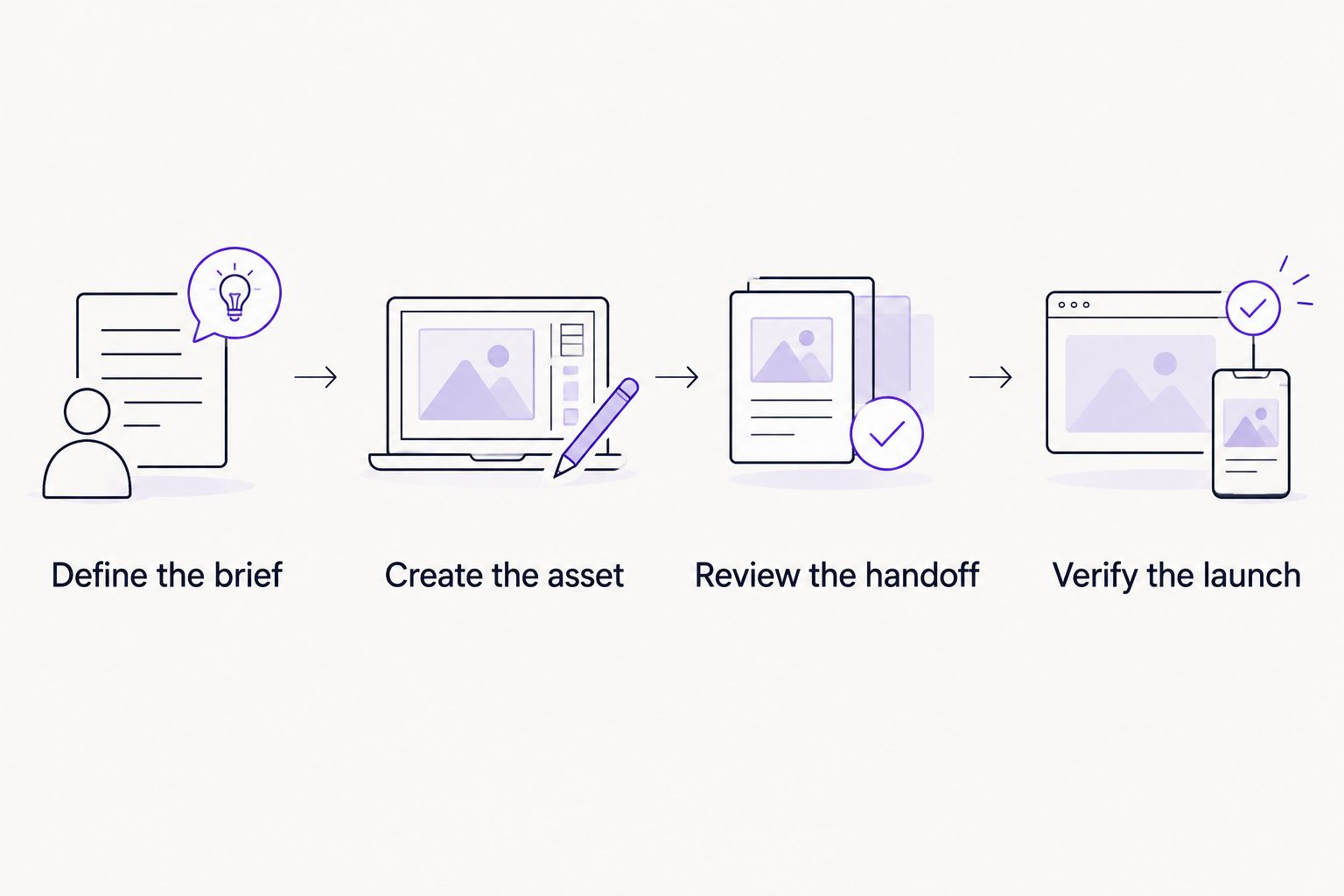
Test the workflow before you switch
Use the same brief for every shortlisted option. Otherwise, you are comparing polished demonstrations instead of comparing how the tools handle your work.
Define the brief
For an e-commerce brand, choose a real product, its approved images, and a clear offer. For an agency, choose a representative client brief with an identified reviewer and advertising account.
State the required deliverable in plain language: a finished graphic, an approved set of assets, or a launched campaign. Do not let those become interchangeable during the demonstration.
Create the asset
Use concrete export requirements. A square Instagram asset can use 1080 × 1080 pixels; a full-screen vertical asset can use 1080 × 1920 pixels, with a 9:16 aspect ratio.
These dimensions define test files, not a promise that one composition fits every placement. Inspect text, cropping, and the placement preview before publishing or launching.
Review the handoff
For a brand, identify who checks the product claim and the destination page. For an agency, identify who approves the creative and who has responsibility for the client account.
Ask that person to review the actual output. A usable handoff matters more than a feature name on a comparison page.
Verify the launch
If campaign management is part of the purchase, require a demonstration of the current launch process. Check the selected account, destination, creative, and campaign settings before any publication action.
Then ask how the team reviews results and makes changes. Keep the discussion tied to the workflow you need in 2026, not a future release.
When staying with The Grid Maker is the right call
Stay when your current workflow produces the required deliverable and the alternatives do not solve a specific additional need. Switching for the sake of switching adds another process to learn.
For a brand, that means keeping the existing setup when the immediate job is already handled. You can evaluate campaign software separately when paid advertising becomes the priority.
For an agency, it means separating an internal preference from a client requirement. If the client receives the approved output and your team can maintain it, a new tool needs a clearer justification than a longer feature list.
FAQ
What's the best alternative to The Grid Maker in 2026?
The best alternative depends on the deliverable: choose Canva or Adobe Express for graphic creation, and compare paid advertising tools when you need campaign operations. TezAds suits e-commerce brands and agencies needing ad writing, launch, and optimization.
Is a grid design tool the same as a Meta ads tool?
No. Graphic design produces an asset; Meta campaign management handles advertising setup and operation. Compare those responsibilities separately before replacing your current workflow.
Should an e-commerce brand choose Canva or an ad automation platform?
Choose Canva when the immediate job is creating graphics; choose an ad automation platform when the job includes campaign execution. Use a real product brief to establish which part of the process needs attention.
Can an agency use the same shortlist as an e-commerce brand?
Yes, but an agency must also evaluate the client handoff and the advertising-account workflow. Test who reviews the asset, who approves the campaign, and who makes later changes.
Do I need to replace my design tool to run Instagram ads?
No. Keep a design workflow that produces suitable assets and evaluate campaign management separately. Your choice should follow the missing capability, not an assumption that one tool must do everything.
How do I know whether an advertised integration is live?
Ask the vendor to demonstrate the integration in the current product. Check the exact action you need to complete; a roadmap description does not establish that the workflow is available now.
What should I test before switching tools?
Test the brief, asset creation, review handoff, and campaign launch when launch is part of your requirement. Use the same brief across shortlisted tools so the comparison stays tied to your actual work.
One last thing
An Instagram profile is a collection of posts. A paid ad must communicate on its own, without relying on the surrounding profile to explain the product or offer.
For your 2026 selection, inspect one asset in isolation before judging the overall layout. If the message needs neighboring posts to make sense, revise the ad before changing the software.


