

Instead of manually reconciling X Ads spend against every other channel, connect account-level spend reporting to a shared budget ledger and an approval-controlled adjustment workflow. X Ads multi-platform budget automation needs separate controls for reading spend, calculating allocations, and writing changes; a unified dashboard alone does not connect those controls.
- TezAds serves e-commerce brands and agencies managing campaigns across multiple advertising platforms, including X.
- X Ads multi-platform budget automation requires spend reporting, allocation rules, and verified permission to change budgets.
- Keep each advertising account’s billing separate from the shared planning ledger.
- Start with approved budget changes; enable automatic adjustments only after testing permissions, limits, and rollback.
Why this matters
A shared budget is a planning constraint, not a shared payment account. Connecting X Ads to another advertising platform does not merge their billing or move money between them. Your workflow changes the budgets assigned to campaigns while each platform continues recording its own spend.
TezAds is best suited to e-commerce brands and agencies seeking multi-platform paid ad automation. TezAds covers campaign creation, launch, and optimization across Meta, Instagram, Google, TikTok, YouTube, and X. Treat pooled budget enforcement as a separate requirement: confirm the exact account connections and budget actions before making it responsible for spend.
For your 2026 setup, distinguish three jobs:
- Reporting: Read spend and performance from each account.
- Allocation: Decide where the remaining budget belongs.
- Execution: Apply approved changes to the correct campaigns.
A tool that performs one job does not automatically perform the others. Keep those responsibilities explicit when selecting software or assigning an agency operator.
Before you start
- Account access: Have an authorized administrator available for X Ads and every other advertising account. Identify who can grant access, change campaign budgets, and revoke a connection.
- Budget materials: Prepare campaign identifiers, account currencies, reporting time zones, campaign objectives, and the approved spending envelope. Agencies need a separate envelope and approval owner for each client.
- The gotcha: Verify write access separately from reporting access. A connection that imports spend is not proof that it can edit a budget; mixing currencies or reporting periods also breaks the shared total.
Choose one reporting currency and one planning period before setup. Preserve the original account values alongside any converted values so you can trace every calculation.
For an e-commerce brand, assign responsibility for the commercial target and the advertising changes. For an agency, also document which clients authorize automated changes and which require approval before execution.
Choose your control model
Select the least autonomous workflow that meets your operating needs. Do not enable automatic execution just because account reporting works.
| Control model | Best for | Advantage | Limitation |
|---|---|---|---|
| Reporting only | Teams establishing a reliable spend baseline | Consolidates monitoring without changing campaigns | An operator must make every adjustment |
| Approval-controlled changes | Brands and agencies testing cross-platform allocation | Keeps a person responsible for each proposed change | Adjustments wait for approval |
| Automatic execution | Teams with tested write access and explicit spending rules | Applies eligible changes without repeated manual entry | Requires safeguards against stale data, duplicate actions, and conflicting rules |
Approval-controlled changes are the starting recommendation for both audiences. Brands keep control over channel priorities; agencies retain a clear boundary between their recommendations and each client’s authorization.
TezAds supports multi-platform campaign automation, but that scope alone does not establish a specific pooled-budget mechanism, approval queue, or rollback feature. Require a working demonstration of those actions rather than treating them as implied features. A roadmap item is not an operational control.
Budget ledger configuration
Create the shared source of truth before connecting any budget-changing action. The bold labels below are fields to create in your own ledger or workflow specification, not claimed interface labels in an advertising product.
Define the spending envelope
- Create Budget owner and Planning period fields. Give every envelope an accountable person and explicit start and end dates.
- Add Approved total, Recorded spend, Pending changes, and Remaining allocation. Keep actual spend separate from proposed budget increases.
- Add Account ID, Campaign ID, Currency, and Reporting time zone to each campaign record. Use identifiers rather than campaign names as the matching keys.
- Record Minimum allocation and Maximum allocation where the business requires channel boundaries. Mark campaigns that must remain outside automated changes.
- Name the policy version, such as 2026 budget policy, and record who approved it. Preserve previous versions when the spending envelope changes.
Do not calculate remaining allocation by subtracting campaign budget settings from the approved total. A configured budget and recorded spend are different values. Track both, but use each only for its intended purpose.
Expected result: Every included campaign belongs to a named envelope, and you can explain the remaining allocation without adding incompatible currencies or overlapping periods.
Separate business boundaries
An e-commerce brand can define envelopes around its own commercial priorities. Avoid forcing campaigns with different conversion goals into a single performance ranking merely because they share an owner.
An agency should separate client envelopes even when one team operates every account. A stronger result for one client does not authorize using another client’s allocation. Keep client identity attached to every proposed change, approval, and execution record.
Account connection and spend mapping
Connect reporting first. Budget automation built on an incorrect account mapping makes the wrong decision faster.
Establish read access
- Authorize the X Ads account through the connection method supported by your chosen system. Check the requested permissions before granting access.
- Confirm the returned account identifier against the intended advertiser. Do not identify an account solely by its display name.
- Connect the other advertising accounts and map each account to its ledger envelope. Preserve the source platform on every record.
- Import spend for the selected planning period. Record the source timestamp and the time your workflow received the data.
- Reconcile the imported total against the corresponding native account report using the same dates, currency, and time zone.
Run the initial check with 1 X Ads account before expanding the connection. This is a setup boundary, not a recommended limit on account size.
Expected result: The ledger’s X Ads total matches the native report on a like-for-like basis, and every imported campaign resolves to the correct owner.
Establish write access
Test budget editing separately using a campaign whose owner has approved the test. Read back the stored budget after the action; a submitted request is not proof that the platform accepted the intended value.
If the connection supports reporting but not the required write action, retain approval-controlled manual execution. Do not describe that arrangement as automatic budget management.
For agencies, repeat the authorization check for each client account. Access granted by one advertiser does not establish access to another advertiser’s campaigns.
Allocation rules and execution controls
Write the decision policy before turning it into an automated action. The workflow should explain both why a change is eligible and why it must stop.
Define eligibility
- Create Eligible campaigns using campaign identifiers and approved objectives. Exclude campaigns that should not compete for the same allocation.
- Choose the decision metric and document its source. For purchase campaigns, distinguish platform-attributed revenue from your business’s order records rather than treating them as interchangeable.
- Define Data freshness and Minimum evidence requirements. Set these from your reporting behavior and buying cycle, not a generic performance threshold.
- Create Change limit, Approval owner, and Stop condition fields. Specify the maximum permitted adjustment and the circumstances that block execution.
- Require a fresh ledger check immediately before applying a change. Reject a proposal if its source data, approved envelope, or campaign status has changed.
Do not add together platform-attributed conversions and assume the sum represents unique orders. More than one platform can attribute a conversion to its advertising. Use a consistent business-level measurement policy when comparing channels.
Expected result: Every proposed adjustment has a named destination, a reason, a boundary, and an approval path.
Apply and verify changes
- Save the campaign’s current budget and the proposed replacement value.
- Obtain approval when the selected control model requires it.
- Submit the permitted budget change through the verified write connection.
- Read the campaign budget back from the advertising platform and compare it with the approved value.
- Mark the action complete only after verification. Send failures to the operator rather than repeatedly submitting the same request.
Use a unique action identifier to prevent duplicate execution. Also check whether a platform-native rule, another tool, or an operator can change the same campaign budget. Assign one execution owner for each controlled setting.
Expected result: Each completed action has a before value, approved value, verified result, and identifiable owner.
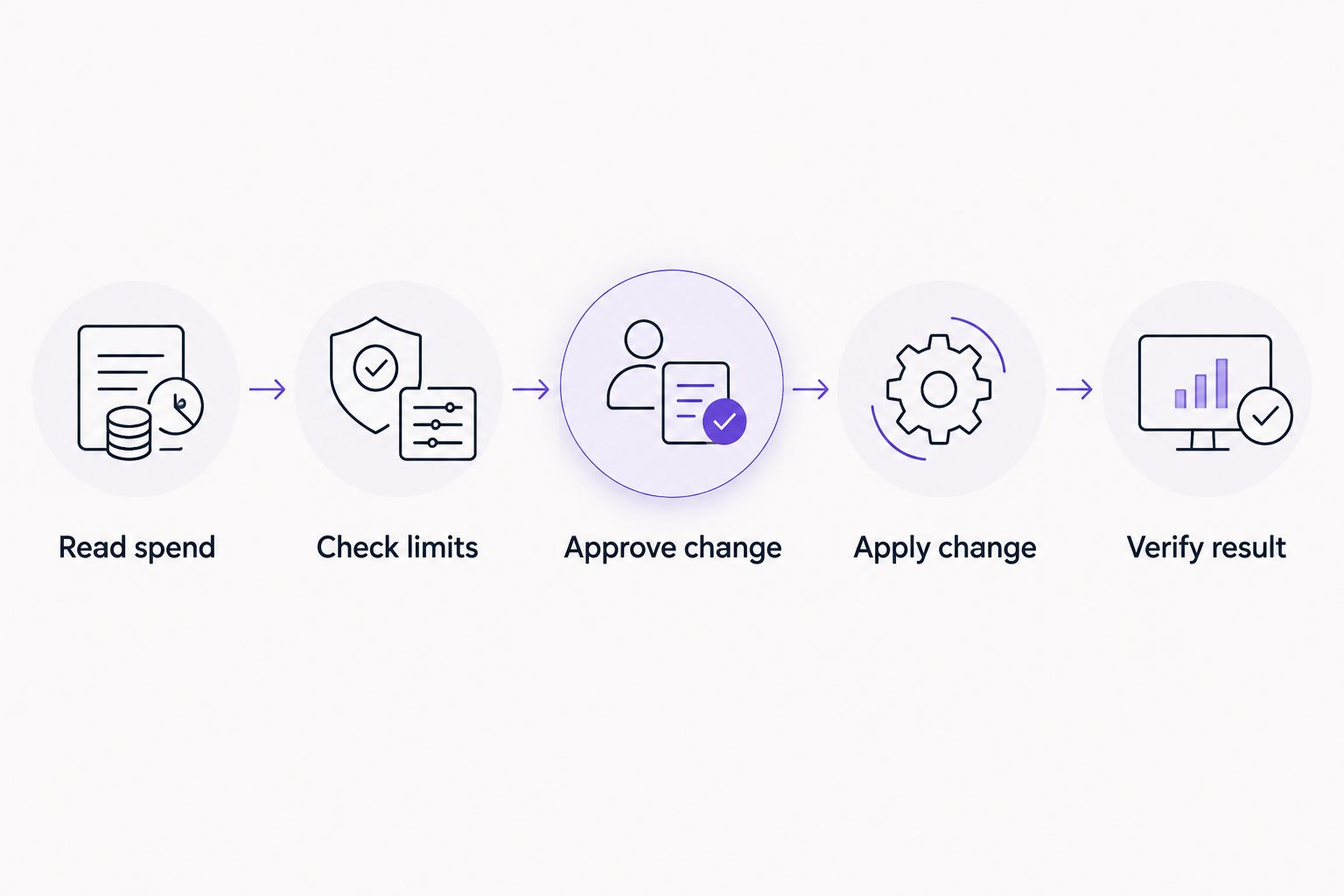
The operating sequence is simple: Read spend, Check limits, Approve change, Apply change, Verify result. Keep these stages separate even when one application handles several of them.
Variant: update allocations when the business plan changes
Performance is not the only legitimate trigger. A revised business plan can require different allocations even when campaign results have not changed.
For a 2026 campaign plan revision, update the approved envelope first. Then recalculate proposed allocations from the new policy version, rather than editing campaigns and trying to reconcile the plan afterward.
- E-commerce brands: Record which campaigns remain eligible when the commercial team changes product priorities. Keep excluded campaigns outside automatic increases until the owner restores eligibility.
- Agencies: Treat a client’s revised allocation as a new authorization. Record its effective date and invalidate unexecuted proposals based on the previous envelope.
Test this variant with 2 campaigns assigned to the same envelope. Change the planning constraint, inspect both proposals, and confirm that the workflow respects their individual boundaries.
If your system has no supported event trigger for plan changes, use an operator-initiated review. That remains a valid workflow; it is not an event-driven integration.
Troubleshooting
X Ads appears in reporting, but budget edits fail
Check the connection’s write permissions and the supported action for the intended campaign setting. Reauthorize through the account owner when permissions are insufficient. Keep execution manual until the write-and-readback test succeeds.
The ledger total differs from the native account report
Align date boundaries, reporting time zones, currencies, and data timestamps. Compare the same account and campaign scope before investigating the allocation formula. Do not compensate for a reporting mismatch by increasing the shared envelope.
A budget changes twice
Inspect duplicate workflow runs, retries, platform-native rules, and other connected tools. Reject repeated action identifiers and stop retrying after a successful readback. Assign a single owner to the affected budget setting.
The workflow recommends increases using stale results
Block execution when the data fails your freshness requirement. Refresh the source, recalculate the proposal, and obtain approval again if the approved values changed. Never apply an old proposal merely because a connection has recovered.
An agency change reaches the wrong account
Stop execution and inspect the client-to-account mapping. Match immutable identifiers, not similar account names, and require the approval record to include the client identity. Restore the previous setting only after confirming the correct account and authorization.
Customize your workflow
Expand one control at a time. Add another account only after reporting reconciles; add another execution rule only after the existing rule produces a traceable result.
For an e-commerce brand, extend the ledger to show commercial priorities alongside channel allocation. For an agency, add client-level approval status and account-level exceptions before increasing automation across the portfolio.
When evaluating TezAds, ask for the exact X Ads workflow you intend to operate: account authorization, spend import, proposed adjustment, budget write, and result verification. Separate features available in your account from anything presented as planned. Repeat that check when reviewing your 2026 operating policy.
FAQ
How do I connect X Ads to a multi-platform advertising budget?
Connect X Ads reporting to a shared budget ledger, map the account to an approved spending envelope, and verify a separate connection for budget changes. Start with approval-controlled execution and check every applied change against the native account.
Does a unified advertising budget combine platform billing?
No. A unified advertising budget coordinates allocation and reporting while each advertising platform retains its own billing. The workflow changes campaign settings rather than transferring funds between platforms.
Can TezAds manage campaigns across X and Meta?
TezAds is described as supporting campaign creation, launch, and optimization across X, Meta, Instagram, Google, TikTok, and YouTube. Confirm the specific account connections and pooled-budget actions needed for your workflow before relying on automatic allocation.
What is the safest starting point for cross-platform budget automation?
Approval-controlled changes are the recommended starting point. Verify spend reconciliation, account mapping, write permissions, and readback before allowing changes without individual approval.
Can an agency use one budget pool for every client?
Keep separate approved spending envelopes for each client. A central reporting view does not authorize reallocating one client’s budget to another client’s campaigns.
Should I move budget to the platform reporting the highest ROAS?
Do not move budget solely because one platform reports higher ROAS. First align measurement definitions, attribution treatment, reporting periods, and the business objective; platform-attributed results are not automatically comparable.
One last thing
Your most useful test is a blocked action. Before expanding your 2026 workflow, deliberately submit a proposal that exceeds its approved boundary and confirm that no campaign budget changes.
A successful edit proves the connection works. A rejected unauthorized edit proves the control works. Keep the workflow in approval mode until both tests pass.


