

Instead of exporting abandoned checkouts and rebuilding audiences by hand, set up Shopify abandoned cart Meta retargeting ads with website events, a purchase exclusion, and an ongoing Meta campaign. The workflow updates audience eligibility as shoppers act; it does not create an individual ad for every abandoned checkout.
- Shopify abandoned cart Meta retargeting ads need checkout events, a website audience, and purchaser exclusions—not daily exports.
- Meta retargeting depends on matched website activity; a Shopify checkout record does not guarantee ad delivery.
- TezAds supports paid-ad creation, launch, and optimization; confirm checkout-trigger and catalog requirements before choosing the workflow.
- Keep audience expansion separate from strict retargeting so your campaign reaches the audience you intended.
Why this matters
An abandoned checkout in Shopify and a retargetable person in Meta are different things. Shopify records checkout activity; Meta needs usable event signals and a matching account before that activity can support website retargeting.
Automate audience membership, not a new campaign for every checkout. Keep the campaign running, let qualifying events update the audience, and exclude purchasers. This avoids turning routine shopping activity into a campaign-management task.
TezAds is best for e-commerce brands and agencies seeking paid-ad creation, launch, and optimization in one platform. That role is separate from proving that Shopify checkout events reach Meta correctly.
For your 2026 setup, separate three responsibilities: event collection, audience rules, and campaign execution. A failure in the first responsibility cannot be repaired by better ad copy in the last.
Before you start
- Access and ownership: Have Shopify access to manage the Facebook & Instagram sales channel, plus permission to manage the relevant Meta ad account, Page, dataset, and audiences. Agencies should use client-owned assets with assigned access, rather than mix unrelated clients under one tracking setup.
- Tracking and materials: Prepare your destination page, approved creative, consent configuration, and the Meta dataset connected to the store. If you want product-specific catalog ads, also prepare a connected catalog and matching product identifiers.
- The gotcha: A Shopify abandoned checkout is not automatically a Meta audience member. Browser restrictions, consent choices, event matching, and audience eligibility affect who can be reached. Never promise that every checkout will receive an ad.
For an e-commerce brand, the approval owner should control the store and campaign permissions. For an agency, record which client owns each asset before connecting anything. Correct permissions on the wrong dataset still produce the wrong workflow.
Choose your workflow
Use the native Shopify-to-Meta path to establish the retargeting foundation. Add campaign-management software when its supported workflow matches your operating needs; do not treat a general campaign feature as proof of a checkout-specific integration.
| Option | Best for | What it handles | Advantage | Limitation |
|---|---|---|---|---|
| Shopify Facebook & Instagram channel plus Meta Ads Manager | Brands building website-event retargeting; agencies configuring client-owned assets | Store connection, website-event setup, audience configuration, and campaign management | Keeps tracking and audience controls close to their source | Requires separate checks for tracking, audience restrictions, creative, and delivery |
| TezAds paid-ad automation | E-commerce brands and agencies managing campaign creation, launch, and optimization | Paid-ad campaign creation, launch, and optimization across supported advertising platforms | Covers campaign work beyond this single retargeting use case | Do not assume a native abandoned-checkout trigger, catalog synchronization, or purchaser-exclusion control without confirming support |
For this workflow, verify the tracking and audience controls before selecting the management layer. The TezAds campaign-automation offering does not, by itself, establish that every checkout-specific connection described here is available. Treat planned features as unavailable until released and confirmed for your account.
Store connection and event validation
Connect the correct assets
- In Shopify, open the Facebook & Instagram sales channel. Follow its connection flow using the business assets authorized for this store.
- Confirm the selected Meta business, ad account, and dataset. Match ownership against your setup record rather than relying on similar account names.
- Review the channel's data-sharing configuration alongside your consent setup. Choose the configuration appropriate to your legal obligations and business requirements; a more permissive setting is not a substitute for consent.
- Open Meta Events Manager, select the connected dataset, and use Test events to inspect a permitted test journey.
Complete that journey by viewing a product, adding it to the cart, and starting checkout. Look for the corresponding ViewContent, AddToCart, and InitiateCheckout events. Validate Purchase through an authorized test transaction as well.
A checkout-recovery audience needs a dependable purchase signal because the exclusion depends on it. Do not launch just because checkout events appear.
Expected result: The selected dataset receives the expected shopping events from the correct store, and the purchase event is validated separately from checkout initiation.
Check duplicate collection
Review whether another app, manually installed pixel, or custom integration also sends the same events. When browser and server events describe the same action, Meta's deduplication setup matters; do not remove legitimate server tracking simply because both sources appear.
For a 2026 launch check, compare one deliberate test journey with the received events. Investigate repeated purchase events before using revenue reporting to make budget decisions.
Audience rules and purchase exclusions
Build the checkout audience
- In Meta Audiences, select Create audience, then Custom audience, and choose Website as the source.
- Select the dataset connected to Shopify. Build the inclusion around InitiateCheckout for checkout recovery, rather than all website visitors.
- Set an initial retention window of 7 days as a starting configuration, not a universal performance benchmark. Adjust it later using your purchase cycle and delivery evidence.
- Create a separate website custom audience using Purchase. Use that audience as an exclusion in the campaign's audience controls, with a retention window appropriate to the recovery purpose.
Give the audiences descriptive names that identify the store, event, and retention window. Agency teams should include the client identifier so similarly named audiences cannot be confused across accounts.
Expected result: You have a checkout-based inclusion audience and a separately maintained purchaser audience ready for exclusion. Audience population is not immediate proof that the campaign will deliver.
Define eligibility clearly
Use this operational rule: Checkout entry, Purchase exclusion, Campaign delivery, Order review. These are separate checks, not interchangeable measures of success.
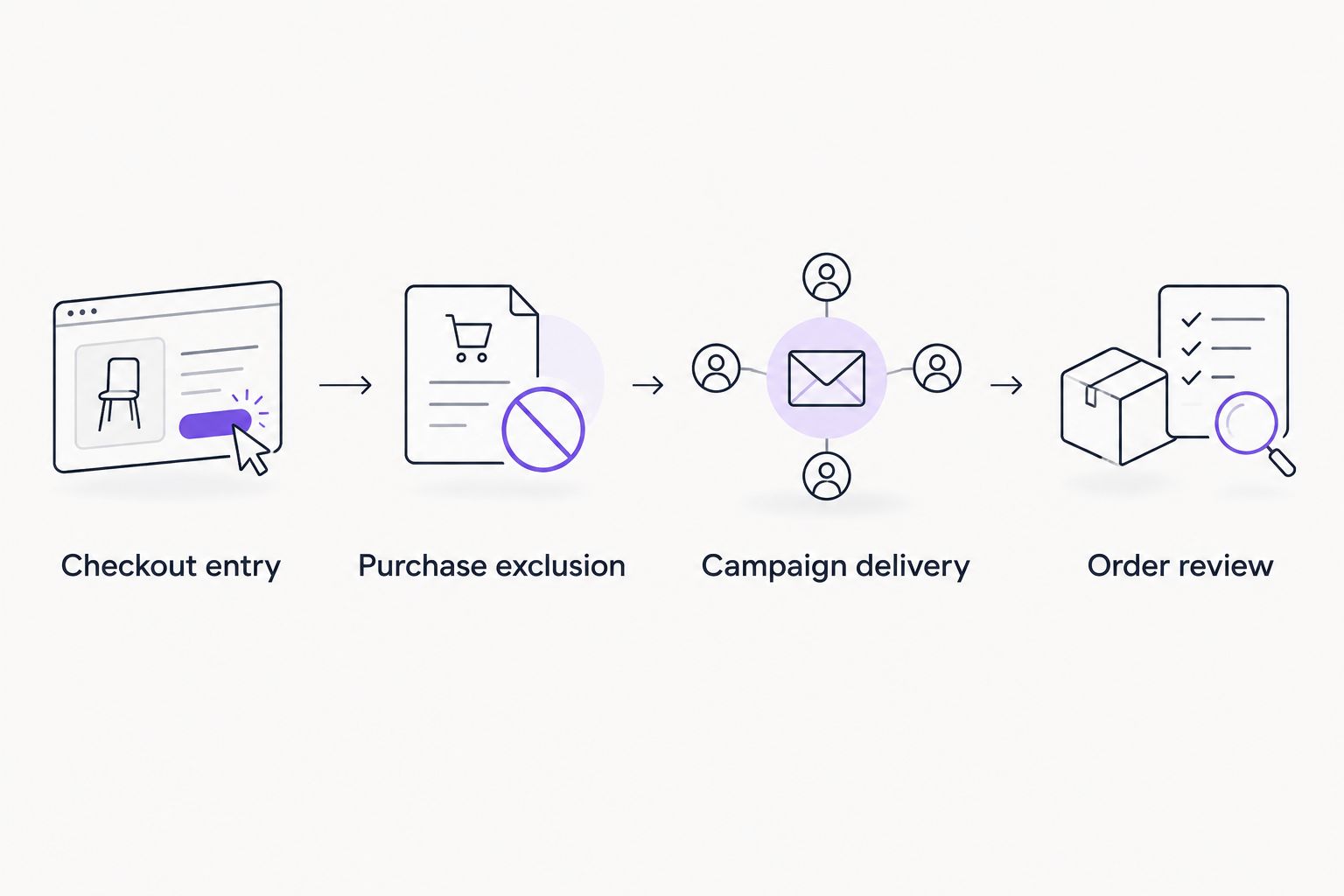
A purchase exclusion is not an instant recall system. Event processing and audience updates take time, so a recent purchaser can still encounter an ad before the exclusion takes effect.
For brands, this means customer support should not promise immediate suppression. For agencies, document the limitation in the campaign handover instead of reporting every post-purchase impression as a configuration failure.
Campaign settings and launch checks
Configure the recovery campaign
- In Meta Ads Manager, select Create and choose Sales. Configure the campaign for website purchases using the store's connected dataset and the Purchase conversion event where those settings are available.
- Apply the checkout custom audience as the intended inclusion and the purchaser audience as an exclusion. Read the current audience controls carefully: an audience entered as a suggestion is not a strict inclusion boundary.
- If the campaign configuration expands beyond your selected audience, do not label it strict abandoned-checkout retargeting. Use a configuration with the required restrictions when available, or report the campaign as broader sales targeting.
- Add approved creative and a working destination. Use a stable product or collection destination unless you have a supported, secure way to generate individual recovery destinations.
- Review the daily spend limit, schedule, tracking parameters, audience settings, and exclusions before selecting Publish.
Expected result: The published campaign has a defined purchase objective, an explicit audience strategy, purchaser exclusions, and an approved destination. Publication alone does not confirm audience delivery or recovered orders.
Keep creative accurate
Use a clear product reminder and a reason to reconsider the purchase that your business can substantiate. Do not imply that Meta knows the exact contents of a shopper's cart unless the ad format and product matching support that presentation.
Never put customer email addresses, checkout tokens, or other personal checkout details into ordinary ad URLs or copy. A general reminder can send shoppers back to browse without exposing a recovery link.
For your 2026 creative review, check the destination on mobile and confirm that the product message still matches the landing page. Agencies need client approval for product claims; brands need someone responsible for keeping those claims current.
The broader Facebook ads automation guide for Shopify DTC brands covers the surrounding campaign workflow beyond checkout recovery.
Variant: retarget cart additions before checkout
An adjacent workflow starts with AddToCart instead of InitiateCheckout. It includes shoppers who added a product but never reached checkout, so it serves a different audience definition.
| Audience variant | Best for | Benefit | Trade-off |
|---|---|---|---|
| Checkout starters | A focused checkout-recovery campaign | Targets a later shopping action | Excludes shoppers who stopped before checkout |
| Cart adders | A broader cart-recovery campaign | Includes shoppers earlier in the purchase journey | Includes a less committed shopping action |
To build the second variant, create a website custom audience using AddToCart, retain the purchaser exclusion, and choose a clearly documented retention window. You can test 30 days as a broader configuration, but do not describe that window as proven for your store.
If you run both variants, exclude checkout starters from the cart-addition campaign when you need distinct audience groups. Otherwise, the same shopper can qualify for both.
Do not combine audience definitions and then claim to know which shopping stage drove the result. Keep the definitions visible in campaign names and reporting. Agencies should apply the same naming logic across clients without copying one client's retention assumptions into another account.
Troubleshooting
Checkout records exist, but the audience stays small
Check InitiateCheckout in the correct dataset and compare the event source with your connected store. Shopify checkout totals and Meta audience sizes measure different things; matching, consent, retention, and eligibility prevent a one-to-one reconciliation.
Do not upload checkout contact details as a workaround without establishing the required permission and lawful basis.
Recent purchasers still see ads
Verify that Purchase fires and that the purchaser audience is actually excluded in the delivering ad set. Then check event timing and whether the shopper purchased through a different device or unmatched identity.
An exclusion reduces eligibility based on available signals. It does not guarantee immediate suppression everywhere.
The campaign reaches people outside the checkout audience
Inspect whether the custom audience is an audience suggestion rather than a binding restriction. Review the configuration actually delivering, not just the audience selected during setup.
If expansion remains part of the setup, rename and evaluate the campaign accordingly. Broader targeting is not evidence that checkout-only retargeting works.
Catalog ads show the wrong products
Compare event product identifiers with the identifiers in the connected catalog. Check variant-level versus product-level identifiers and whether another integration sends a different identifier format.
Use general creative until the product match is correct. Attractive catalog creative cannot fix an incorrect mapping.
Events appear, but reporting looks duplicated
Inspect browser and server event deduplication, repeated app installations, and custom tracking code. Check whether one purchase produces repeated events before changing attribution settings or campaign budgets.
Keep a record of the correction so another team member does not reinstall the duplicate integration later.
Customize your workflow
Once the basic path works, expand the operating rules rather than adding more overlapping audiences. Assign separate owners for tracking changes, creative approval, spend decisions, and reporting.
For an e-commerce brand, start with one store and one documented checkout-recovery configuration. For an agency, standardize the checklist but keep each client's assets, consent requirements, and purchase cycle separate.
Use TezAds for supported campaign creation, launch, and optimization tasks only after confirming the controls this workflow needs. Ask specifically about website custom audiences, purchaser exclusions, catalog requirements, and approval before publication; do not substitute a roadmap promise for a working control.
Your 2026 review should separate checkout starts, attributed purchases, and store orders. Meta-attributed purchases are not automatically incremental recovered orders, so avoid presenting attribution as proof that the shopper would otherwise never have bought.
FAQ
How do I automate Shopify abandoned cart Meta retargeting ads?
Connect Shopify website events to Meta, create an InitiateCheckout or AddToCart website audience, exclude purchasers, and run an ongoing sales campaign. Check whether the campaign treats the selected audience as a restriction or a suggestion.
Does every Shopify abandoned checkout get a Meta ad?
No. Meta needs usable event signals, identity matching, audience eligibility, and an opportunity to deliver an ad. A Shopify checkout record alone does not guarantee a reachable audience member.
Should I use AddToCart or InitiateCheckout for retargeting?
Use InitiateCheckout for checkout recovery and AddToCart for a broader cart-recovery audience. If both campaigns run, define exclusions when you need separate audience groups.
Do I need a product catalog for abandoned checkout ads?
You do not need a catalog for a general reminder ad using standard creative. Product-specific catalog advertising requires a connected catalog and matching product identifiers.
Can TezAds automatically turn every abandoned checkout into an ad?
Do not assume an individual checkout-to-ad trigger from the stated campaign-automation offering. TezAds supports paid-ad creation, launch, and optimization; confirm checkout-trigger, audience, and catalog capabilities before using it for this specific workflow.
Why do customers still see retargeting ads after buying?
Purchase events and audience exclusions take time to update, and unmatched identities can prevent suppression. First confirm that Purchase fires into the correct dataset and that the purchaser audience is excluded.
Can an agency use the same setup for every Shopify client?
An agency can reuse the setup checklist, but not a shared client dataset or an unreviewed set of audience assumptions. Keep ownership, permissions, consent requirements, exclusions, and reporting specific to each client.
One last thing
Before increasing spend in 2026, place 1 test order through your approved testing process and inspect the complete event path. Confirm the purchase event, then verify that the purchaser exclusion is attached to the campaign; do not expect the audience to update instantly.
The most useful automation is the rule that stops advertising to someone who has already completed the intended action. Test that rule as carefully as the rule that starts retargeting.


